How to Make Two Claude Code Sessions Message Each Other
Hand work from one Claude Code session to another and have the second one start on its own, with nothing copied or pasted. One setting decides it, and left on the default it cost me three messages and about ninety minutes without a single error.
>This covers waking a second session. Claude Code Multiplayer goes further: the six-field handoff format, the script that refuses a malformed one, and the gate that throws back a false done before it reaches you.
Claude Code Multiplayer
Build One Shared Workspace for Your Team and Agents in 30 Days
Hello builders,
One Claude Code session can hand a job to another and the second one starts working on it by itself, so the afternoons we spend carrying text between two terminal tabs are over. It cost me about ninety minutes to learn the catch, because a worker left on the default sat there looking healthy while three messages each waited five minutes for an approval nobody was around to give. When Claude Code sessions message each other, one setting decides whether the work arrives, and we’re going to set it and then test it both ways.
There is no daemon to install and no folder to poll. The Claude Code docs give the whole mechanism in two sentences:
The receiving Claude reads the message between tool calls during an active turn, so a running tool is never interrupted. When the receiving session is idle, Claude Code starts a new turn with the message.
Whether that new turn ever starts is decided by a setting called crossSessionInbound, which takes accept, hold or refuse. When we leave it unset, Claude Code decides message by message from the two sessions’ permission modes, and anything it holds for our approval is dropped after five minutes by default. My three messages disappeared exactly that way, on an afternoon when nobody was at the keyboard to approve them.
Start a worker that accepts
We start in a repository we’ve already opened in Claude Code at least once. I tried a brand-new folder first and the background session stopped with Workspace not trusted, so run claude there once and accept the prompt before you go any further. Same-machine messaging needs v2.1.224 or later on macOS, Linux and WSL 2, and everything below ran on v2.1.292.
# 1. The worker gets its own settings file.
echo '{ "crossSessionInbound": "accept" }' > worker-settings.json

# 2. Start it in the background. Plan mode keeps it from editing files.
claude --bg -n handoff-worker \
  --settings ./worker-settings.json \
  --permission-mode plan \
  'You are a worker. Wait quietly. When a message arrives from another
session, reply with one line: the word RECEIVED, a colon, then the
message text, with no spaces.'

# 3. Confirm it is alive. The launch already printed its id, as in
#    "backgrounded · 7e6a50ad · handoff-worker", and it is the "id" field here.
claude agents --json

# 4. Open a second session in another tab of the same repository
#    and type this in plain English:
#      Send a message to the session named handoff-worker: HANDOFF-01

# 5. Read the worker's log.
claude logs <the worker's id> | grep -o 'RECEIVED:[A-Za-z0-9_.-]*'
Step 3 should show our worker with "kind": "background" and "status": "idle". Step 4 is a plain-English request, which Claude carries out with its SendMessage tool, and my sending session answered “Message sent to handoff-worker.” The grep -o in step 5 is doing real work: claude logs replays the worker’s whole terminal on a single line, and a plain grep hands back the entire screen.
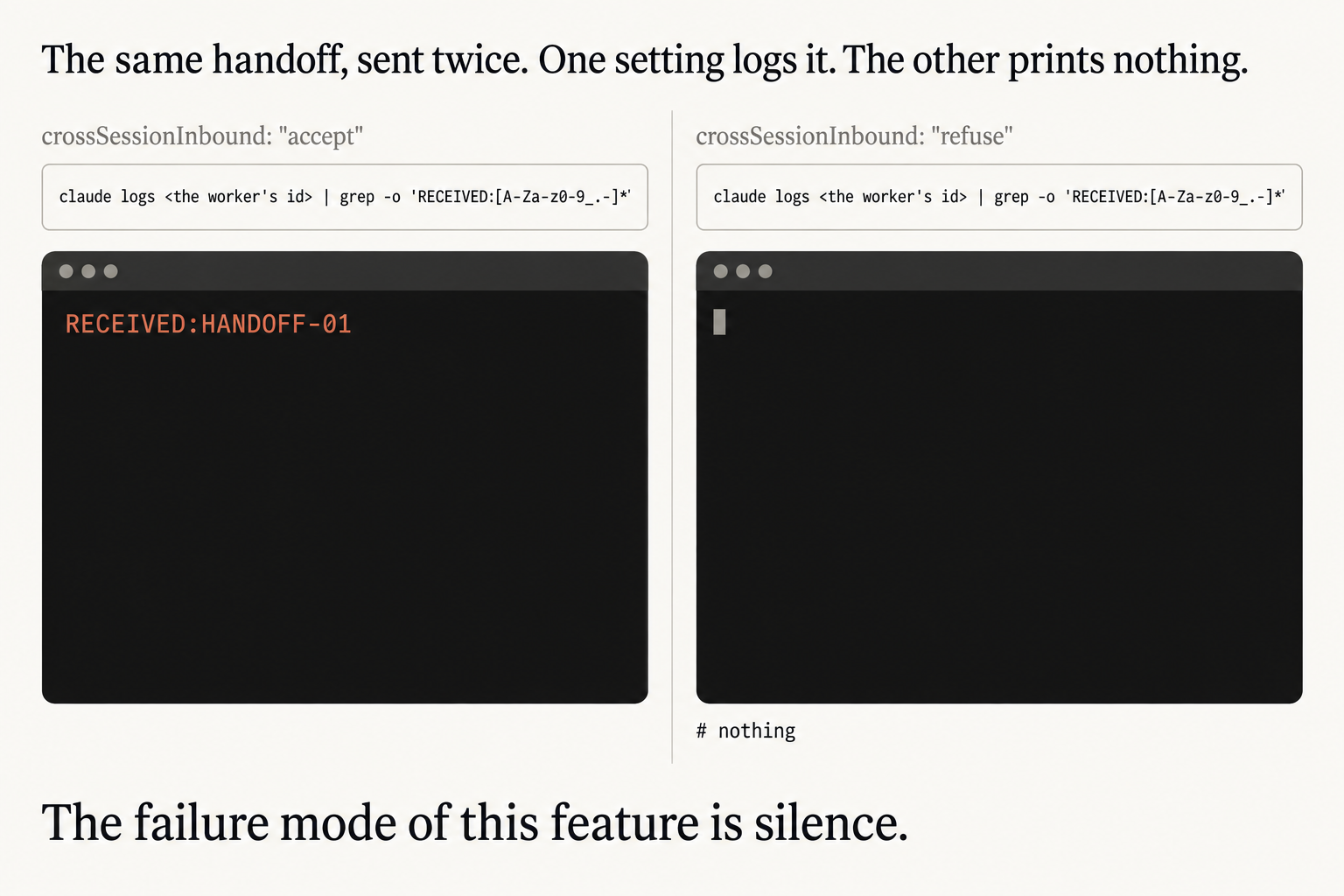
The picture is the run that matters, because it is the same handoff sent twice. On the left the worker’s settings say crossSessionInbound: "accept" and the log command prints RECEIVED:HANDOFF-01. Nobody copied, pasted or prompted anything in between: the worker was idle, a message landed, and Claude Code started a new turn with it.
Now send it to a worker that refuses
We stop the worker, flip the setting, start it again and send the identical HANDOFF-01.
claude stop <the worker's id>
echo '{ "crossSessionInbound": "refuse" }' > worker-settings.json
# start the worker again with the step 2 command; it prints a new id
That is the right-hand panel, where the same command prints # nothing. Here are both of my runs.
$ claude logs 7e6a50ad | grep -o 'RECEIVED:[A-Za-z0-9_.-]*'    # accept
RECEIVED:HANDOFF-01
$ claude logs d07b7aa1 | grep -o 'RECEIVED:[A-Za-z0-9_.-]*'    # refuse
$
What did everything else on the machine say while that message was being dropped? The sending session told me the message was sent. claude agents --json still listed the worker as idle, looking as healthy as it had a minute earlier. The docs describe the same thing from their side, saying a refusing session “shows no visible change” in its own status or in the listings of our other sessions. The line across the bottom of the picture is the one worth remembering whenever a handoff goes quiet: the failure mode of this feature is silence.
One detail in the worker’s instructions is there because I got it wrong first. My original prompt told the worker to reply with the literal text RECEIVED: followed by the message, and the log replays that prompt too, so the grep matched the instructions themselves and the refuse run printed a bare RECEIVED: when it should have printed nothing. Spelling it out as “the word RECEIVED, a colon” keeps the check honest, and I only caught it because I ran the refuse half as well.
I think the unset default is the wrong choice for any worker we plan to leave alone, and the value now gets set on every background worker I start. Use accept for the one that should react the moment work arrives. Use hold for a worker that can wait until we look at it, since an explicit hold never expires and every delivery to an idle session is a new turn that carries its full context. Keep refuse for the session nobody should be able to push text into. The value can also go in your user settings, where it applies to every session you run, so I keep it in the worker’s own file.
Run both halves on your own machine this weekend and keep the two outputs.
Now go build something this weekend!
John Cook