How to Keep Claude Code Working After You Close Your Laptop
Send a job from your phone, close the laptop, and come back to a finished branch by running Claude Code somewhere other than the laptop. Remote Control runs on your machine and GitHub's cloud agent stops at 59 minutes, so here's how to pick the route and a 10-minute test that proves it works.
>This covers where your agent actually runs. Remote Coding Agents goes further: a job file the agent can't wander outside of, a paired trial that picks your runtime on your own numbers, and the gate that turns the returned branch into a pull request you can trust.

Remote Coding Agents: Ship Verified Pull Requests Anywhere
Run Your AI Coding Team From Your Phone and Ship More in 30 Days
Hello builders,
The best thing a coding agent can hand you is a finished branch that got built while your laptop sat closed in a bag. Most setups I see cannot do that, because the agent never left the laptop, and the phone app does a good job of hiding it. If you want to run coding agents remotely, one question decides everything: where does the process actually run? A 10-minute test answers it for whatever setup you have today.
An AWS video about remote agents opened with a line I felt in my chest: “We’re all a little tired of leaving our laptops half open when a coding agent runs.” Same. I do not think a better phone app fixes it, though. What fixes it is knowing which kind of route you are on before you tap send.
The phone is a steering wheel
Control location and execution location are two separate decisions. The phone is where you tap. The runtime is where the process, the files and the credentials live. Every route in the grid below passes the phone test, and only three of the four pass the test you actually care about.
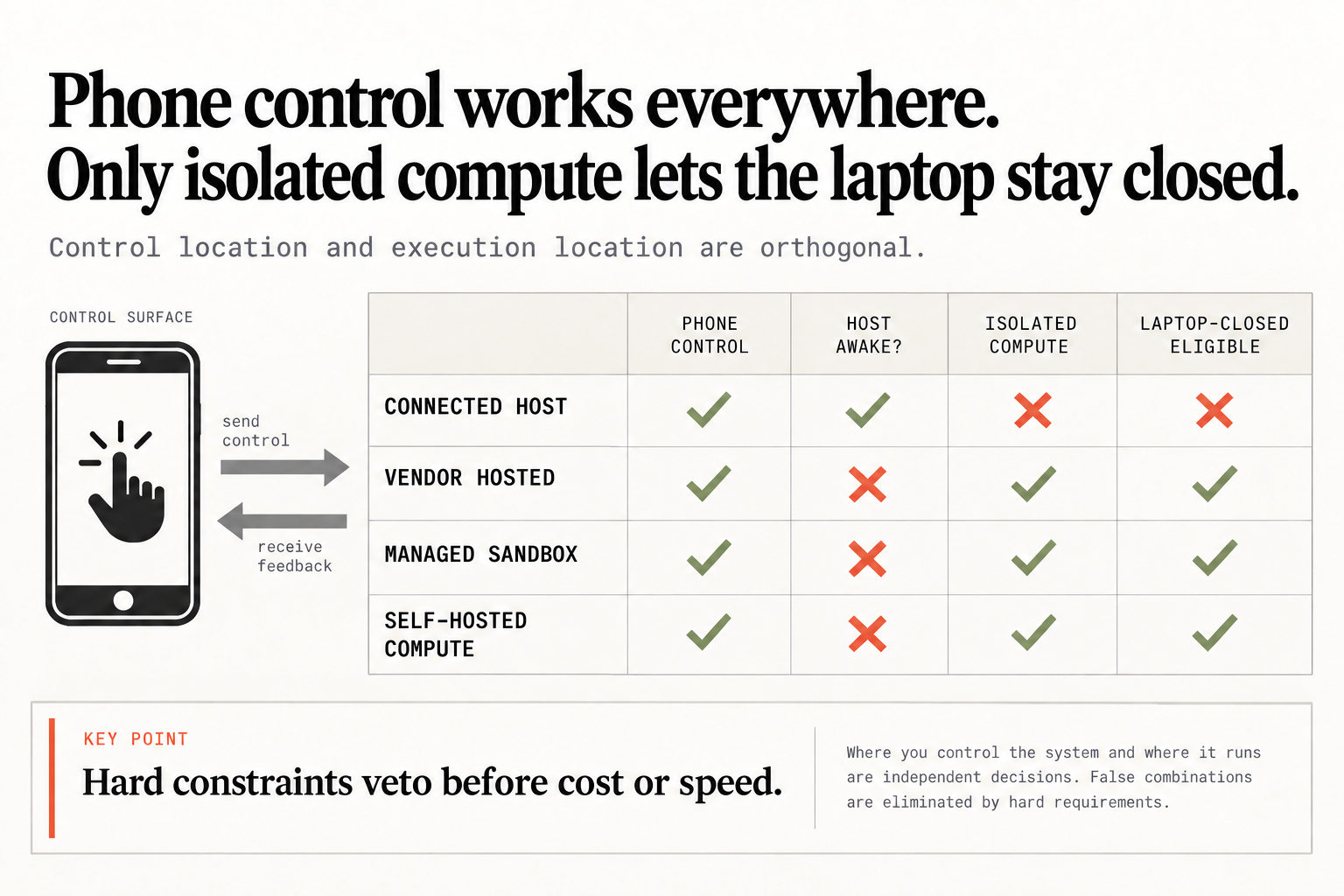
Read it across, row by row:
- Connected host (Claude Code Remote Control, Codex connected machines): phone control, host must stay awake, no isolated compute, not laptop-closed eligible
- Vendor hosted (GitHub’s Copilot cloud agent, Codex cloud): phone control, no awake host, isolated compute, laptop-closed eligible
- Managed sandbox (AgentCore and its cousins): the same three greens
- Self-hosted compute (your own server or VM): the same three greens
Claude Code is honest about which row Remote Control sits in. From the Remote Control docs:
Unlike cloud sessions, which run on cloud infrastructure, Remote Control sessions run directly on your machine and interact with your local filesystem. The web and mobile interfaces are a window into that local session, so your computer has to stay on and the claude process has to keep running.
A window is exactly the right word for it. The same page says that when the laptop sleeps, Claude Code “reconnects automatically when your machine comes back online”, so the job does not die when the lid closes. It waits for you. It is a genuinely nice property, and it is not the one you were hoping for.
So can Claude Code keep working after you close your laptop? Through Remote Control, no. Through a cloud session, yes, because that route “executes on cloud infrastructure, Anthropic-managed by default.” It’s one product with two places to run, which is why I never let a tool guess the execution class from a product name. So the how is short: start the job as a cloud session, or on Codex cloud or GitHub’s cloud agent, check the route’s time limit against the job, and run the lid test below before you trust it with real work.
Hard limits veto first
The hosted routes have a wall of their own. GitHub puts it bluntly:
Each Copilot cloud agent session has a maximum execution time of 59 minutes. This is a hard limit that cannot be extended or bypassed.
What happens to a two-hour migration on that route? It stops at minute 59, while a focused docs fix finishes with time to spare. It’s also where most comparisons go wrong, because people score routes on price and speed, average the columns together, and a cheap route with the wrong lifecycle wins the spreadsheet. We don’t do that. Hard constraints veto before cost or speed: if the job has to keep going with the lid shut, a connected host is out, and if the job runs longer than the route allows, that route is out too. Price and speed only get to rank whatever is still standing after that.
A two-hour job that dies at minute 59 isn’t a model failure, by the way. We picked the wrong runtime before we ever tapped send.
The 10-minute lid test
Don’t trust the product name, and don’t trust the green dot on your phone. Where did the job actually run? Ask the worker. Send your route a throwaway job with one instruction and no repo changes: sleep 90; echo "worker=$(hostname) done_at=$(date +%s)". Run date +%s on the laptop right before the lid goes down, close it for ten minutes, then open it and run date +%s again. Now we have four values, and this script turns them into a verdict:
#!/usr/bin/env bash
# lid-test.sh <lid_down> <lid_up> <worker_host> <done_at>
# run on the laptop after you open the lid; times are `date +%s` values
down=$1 up=$2 worker=$3 done_at=$4
if [ "$worker" = "$(hostname)" ]; then
  echo "FAIL: the job ran on this laptop. Connected host: it needs the lid open."
elif [ "$done_at" -gt "$down" ] && [ "$done_at" -lt "$up" ]; then
  echo "PASS: $worker finished $(( (up - done_at) / 60 )) min before you opened the lid."
else
  echo "FAIL: it didn't finish while the lid was shut. Check the route's time limits."
fi
Call it with the four numbers in that order, for example ./lid-test.sh 1790000000 1790000600 <worker> <done_at> using the values from your run. On a connected host the script fails on the first branch every time, and that’s the correct answer. Keep that host awake, leave the desk, and call what you ran a walk-away test. Both are useful as long as you label them honestly, and I’d rather know which one I passed than find out from a half-finished branch.
My take: Remote Control is a great remote control. It isn’t remote compute, and no setting turns one into the other. Pick the route by the constraint you can’t give up, run the lid test on it once, and write the answer next to the job so nobody has to guess later.
Now go build something this weekend!
John Cook