How to Pick the OpenClaw Templates That Make You Money
Ten OpenClaw templates for real estate, ecommerce, content and freelancing, and how to pick the 2 or 3 that find you more deals and keep more sales. Includes the deal analyzer that ranks every new listing by your own cap rate, built on a rent file so the numbers are real.
>This covers picking your niche templates. OpenClaw: Ship 30 AI Agents in 30 Days prints all ten with their full commands, plus five income templates and the 30-day plan to ship them.
OpenClaw: Ship 30 AI Agents in 30 Days
The No-Code AI Workflow Playbook
Hello builders,
The OpenClaw templates that make you money are the ones that run the same check on every listing, every product and every article, every day, so the deal you’d have missed on page three still gets looked at. Picture an investor who checks new listings by hand before work: she gets through ten and guesses at the rest, and a scheduled job makes sure listing thirty gets the same look as listing one. Below are ten OpenClaw templates for four lines of work, how to pick your 2 or 3, and the one I’d show any investor first.
Each template is one openclaw automations create command with a plain-English prompt inside it. Some run on a schedule. The rest you create switched off and run by hand when you have something for them, because a listing description or a proposal doesn’t belong on a clock.
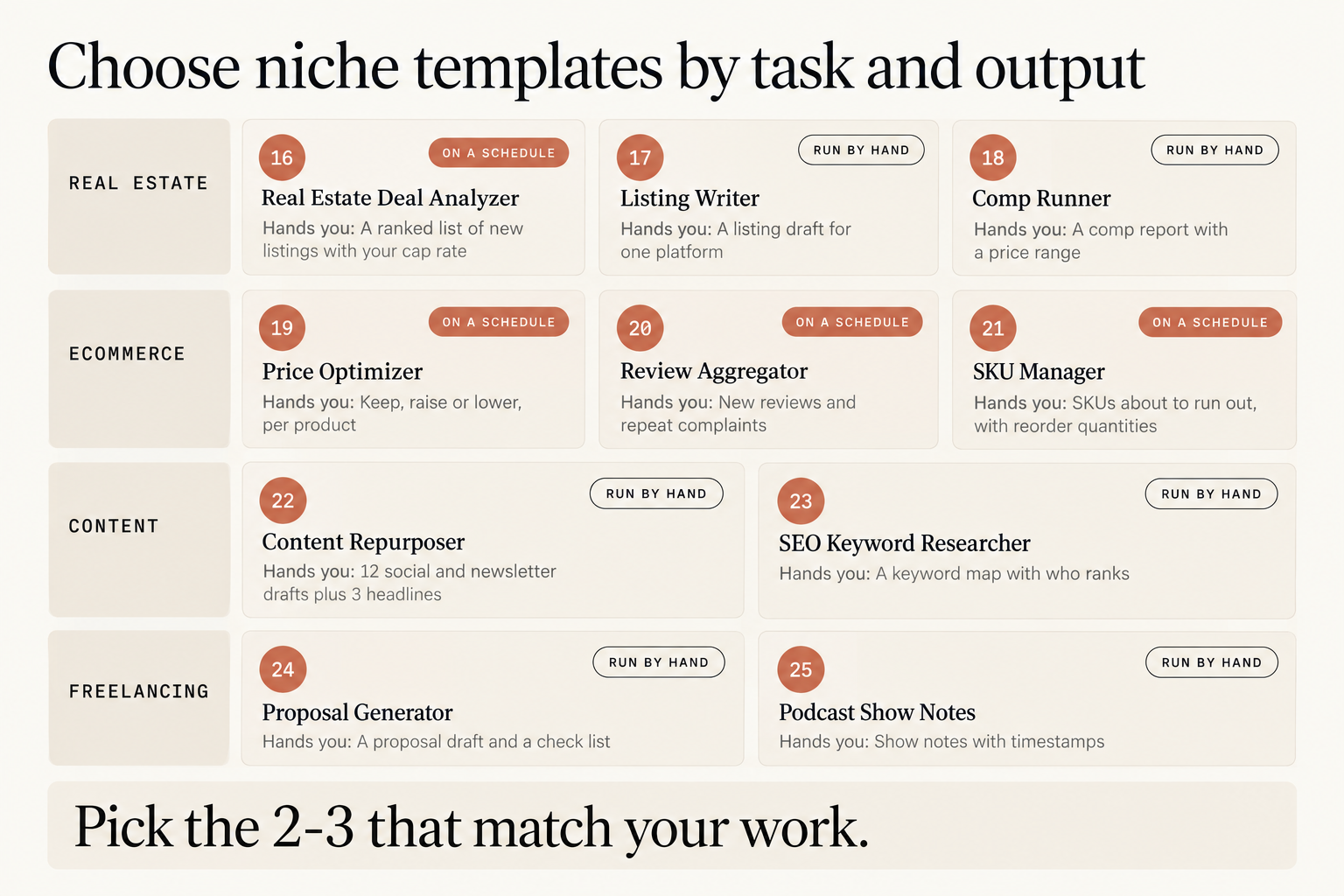
Here’s what each one hands you:
- Real estate: 16, Real Estate Deal Analyzer (on a schedule): a ranked list of new listings with your cap rate. 17, Listing Writer (run by hand): a listing draft for one platform. 18, Comp Runner (run by hand): a comp report with a price range.
- Ecommerce: 19, Price Optimizer (on a schedule): keep, raise or lower, per product. 20, Review Aggregator (on a schedule): new reviews and repeat complaints. 21, SKU Manager (on a schedule): SKUs about to run out, with reorder quantities.
- Content: 22, Content Repurposer (run by hand): 12 social and newsletter drafts plus 3 headlines. 23, SEO Keyword Researcher (run by hand): a keyword map with who ranks.
- Freelancing: 24, Proposal Generator (run by hand): a proposal draft and a check list. 25, Podcast Show Notes (run by hand): show notes with timestamps.
Pick the 2 or 3 that match your work, and skip the rest. A job nobody reads is a job you pay for and ignore. The pairs I’d start with: 16 and 18 for real estate, since the analyzer finds candidates and the comp runner checks the ones you like; 19 and 21 for a store, since both read a Google Sheet you already have the data for; 22 and 24 if you write or freelance, because neither needs anything connected and you can run either one tonight.
The deal analyzer, done right
Template 16 runs every morning, looks up homes newly listed in your zip codes, pulls up to 3 sold comparables within half a mile for each, and ranks them. Cap rate is a year of rent minus expenses, divided by the price, so it tells you what the property earns on what you’d pay. The part most setups get wrong is rent. If rent is worked out as a fixed share of the asking price, every property gets the same cap rate, every listing clears your bar and the filter filters nothing. So we give the job rents we can defend, from our own leases or similar units we looked up. We make the folder with mkdir -p ~/openclaw-inbox and save this as deal-criteria.md inside it. These numbers are made up to show the layout.
The file:
Zip codes: 30310, 30314, 30318
Property types: single family, duplex
Maximum price: 350000
Monthly rent I can charge, by bedrooms:
2 bedrooms: 1450
3 bedrooms: 1750
4 bedrooms: 2100
Expense share of rent (taxes, insurance, repairs, vacancy, management): 40 percent
Minimum cap rate: 8 percent
Flag when below comps by: 15 percent
Then the arithmetic the job runs on every listing, worked once: a 3-bedroom listed at $240,000 rents for $1,750, so $1,750 × 12 = $21,000 a year. Take off 40% for expenses and $12,600 is left. $12,600 ÷ $240,000 = 5.25%, which does not clear the 8% bar, so the cap-rate check gives it no flag. The job prints every number it used, so we can check it on a calculator. Its full create command, and the other nine, are free in the book’s companion repo, one file each, ready to paste once the skill below is set up.
The listings and sold prices come from one skill, @zillapi/zillow-full, and it sends your lookups to a paid data service under your own key. Here is what its ClawHub page says:
- Version v1.0.2, security audit: Pass
- “Nine tools over the Zillapi REST API,” each costing 1 credit, except
search_listingsat “1 per result” - “Set
ZILLAPI_KEYto your Zillapi API key” and “Free key at https://zillapi.com/signup: 100 credits, no card required.” - “Failed calls are not charged.”
- “Zillapi is an independent service and is not affiliated with, endorsed by, or sponsored by Zillow Group, Inc.”
The key goes where the skill’s own SKILL.md says, and then openclaw skills check --agent main should list the skill as ready. So we test with one zip code, run the job once by hand with openclaw automations run <jobId> --wait, read the result and check the credits, then widen the file. We install it the safe way, verify first and install second: openclaw skills verify @zillapi/zillow-full --agent main, then openclaw skills install @zillapi/zillow-full --agent main. The person who published it wrote on r/openclaw that their “wholesale deals went from 2/mo → 11/mo.” That’s one person’s account of their own business, and I’d treat it as a reason to test it on your own zip codes.
Thin comps are the thing I’d watch. With fewer than three sold comps, “below market” means very little, which is why the prompt prints how many it found. We read that number before we read the flag. Stale rents do the same damage the other way: a rent typed a year ago gives you a confident, wrong cap rate, so update the file when your market moves.
Now go build something this weekend!
John Cook