How to Get Paid Faster With OpenClaw Invoice Reminders
Have every overdue invoice's reminder written and waiting at 9 AM each weekday, from a friendly nudge to a formal follow-up, so the money comes in sooner. One Google Sheet, one pasted OpenClaw command, and a four-invoice test that should total 7,200 unpaid before a real client sees anything.
>This covers invoice reminders. OpenClaw: Ship 30 AI Agents in 30 Days adds the weekly client report that reads the same sheet, plus 28 more copy-paste templates and a 30-day plan to ship them.
OpenClaw: Ship 30 AI Agents in 30 Days
The No-Code AI Workflow Playbook
Hello builders,
You get paid sooner when every overdue invoice gets the right reminder on the right day, and OpenClaw can have all of those reminders written and waiting for you by 9 every weekday morning. Picture a one-man consultant, made up so we can run the math: 11 hours a week of admin at a $150 billing rate comes to $85,800 a year of billable time, and chasing invoices 7, 14 and 30 days late is a big slice of it. Here is OpenClaw invoice automation in its plainest form: one Google Sheet, one scheduled job, and you still press send.
The job reads your sheet, works out how late each unpaid invoice is, and writes the reminder that fits. Up to 6 days past due gets a short, friendly payment-due note. From 7 to 13 days it writes a gentle reminder. From 14 to 29 it writes a formal follow-up that restates the amount, the due date and the payment terms. At 30 days it writes nothing and marks the row CALL THIS CLIENT. It sends nothing, ever.
Build the sheet first
We make a Google Sheet named Invoice Tracker with eight columns: Invoice ID, Client, Client Email, Amount, Date Sent, Due Date, Status (Sent, Overdue or Paid) and Last Action Date. Type the two dates as real dates in one format, such as YYYY-MM-DD, in every row, because a job can only count days from a date it can read.
OpenClaw reaches the sheet through gog, a small program for Gmail, Calendar, Drive and Sheets. Setting it up starts on the Google side: in the words of the gogcli README, “Create a Desktop OAuth client in a Google Cloud project, download its JSON file, and authorize only the services you need.” Once it is connected, the gogcli examples show the same kind of read you can run yourself to check gog sees your sheet. The spreadsheet id is the long string in the sheet’s web address, and column H covers all eight columns.
The docs example:
gog sheets get <spreadsheetId> 'Sheet1!A1:D20' --jsonThe job runs that kind of read for you. Its prompt also asks for read only, and gog’s --readonly flag, per its automation docs, rejects “mutating API requests before network dispatch.”
Then we paste the job. We change nothing yet except the time zone:
openclaw automations create "0 9 * * 1-5" "Use the gog skill to read the Google Sheet named Invoice Tracker. Read only. Do not send any email and do not change the sheet.
Look at every row where Status is not Paid. Work out how many days past the Due Date each one is, counting from today.
Skip any row whose Last Action Date is less than 7 days ago.
For the rest, pick one action:
- Due today or up to 6 days past due: write a short, friendly payment-due note.
- 7 to 13 days past due: write a gentle reminder.
- 14 to 29 days past due: write a formal follow-up that restates the amount, the due date and the payment terms.
- 30 or more days past due: write no email. Mark it CALL THIS CLIENT.
Give me one entry per invoice: Invoice ID, client, amount, days past due, the action, and the full text of the email if there is one. Finish with one line that totals the unpaid amount.
If the sheet is empty or you cannot read it, say so and stop. Do not make up invoices." \
  --name "Invoice Processor" --agent main --tz "America/Los_Angeles" --session isolated \
  --no-deliver --disabled --declaration-key book.invoice-processor --timeout-seconds 300
0 9 * * 1-5 is 9:00, Monday to Friday. --disabled --no-deliver creates it switched off and silent, and --declaration-key means a second paste updates the same job. I pasted this exact command twice into OpenClaw 2026.9.8 and got "created": true the first time and "created": false, "updated": true with the same id the second.
Test it on fake clients
Before any real client is in that sheet, we fill it with four fake invoices. Count the dates back from the day you test, set Status to Sent, put your own address in Client Email and anything in Date Sent.
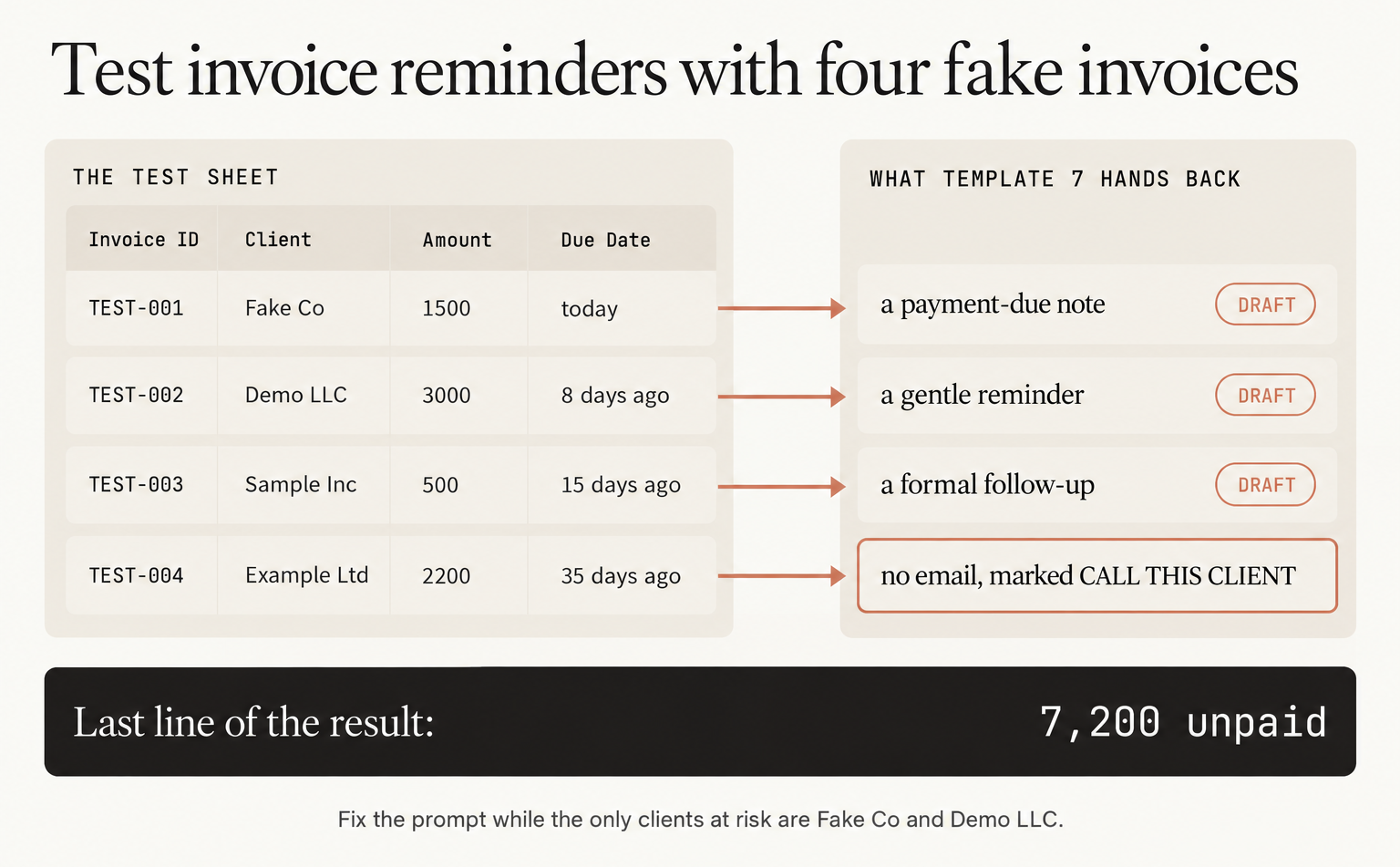
We run it by hand with openclaw automations list --all to get the id, then openclaw automations run <jobId> --wait. We’re looking for "status": "ok" and "completionStatus": "succeeded", and a failed run also prints "ok": true, so skip that line. The result should hand you a payment-due note for TEST-001, a gentle reminder for TEST-002, a formal follow-up for TEST-003, no email for TEST-004 with CALL THIS CLIENT beside it, and a last line that totals 7,200 unpaid. We read the result with openclaw automations runs <jobId> --limit 5, since the job is silent. Then type today’s date into Last Action Date for TEST-002 and run it again, and TEST-002 should be gone from the list. If any of that is off, fix the prompt now, while the only clients at risk are Fake Co and Demo LLC. When it holds, swap in your real invoices and run openclaw automations enable <jobId>.
From then on the morning routine takes minutes. We read the result, send the reminders we agree with, and type today’s date into Last Action Date for those rows. That column is the job’s only memory, and it’s how it knows not to nag the same client tomorrow. Weekends don’t break anything either, because the rules are ranges: an invoice that turns 7 days late on a Saturday still gets caught on Monday.
The job stops writing at 30 days because by then it’s a relationship question. Is the client short on cash, disputing the work, or just disorganised? No prompt knows that, and I don’t want a collections-style email reaching someone who’d have paid next week after one phone call. So the job writes the routine reminders, and the late ones come to you as a call to make.
Now go build something this weekend!
John Cook