How to Run OpenClaw for $6/Month with Multi-Model Routing
Cut OpenClaw API costs by 80% with multi-model routing. Three budget tiers, real 4-week cost data, and prompt engineering tricks that save tokens.
>This covers cost optimization. OpenClaw: Your First AI Employee covers 9 complete projects that run on this budget setup.
OpenClaw: Your First AI Employee
Build 9 Income-Generating Agents This Weekend
Summary:
- Configure multi-model routing so OpenClaw uses the right brain for each task automatically.
- Pick from three budget tiers: $6, $15, or $47 per month with real cost breakdowns.
- Apply 3 prompt engineering techniques that cut token usage by 60-70%.
- Get the complete .env routing config you can drop in and start saving.
A developer on r/openclaw posted his first month’s API bill: $347. He’d connected Claude, left his agent running 24/7, and didn’t set usage limits. His agent spent three days “researching” a topic nobody asked for because a web page triggered a reasoning loop. The post below his? Someone running the same workload for $6.20.
Same agent. Same tasks. Same results. The difference: knowing how to reduce OpenClaw cost with multi-model routing. Here’s the setup.
Which models matter for OpenClaw and what do they cost?
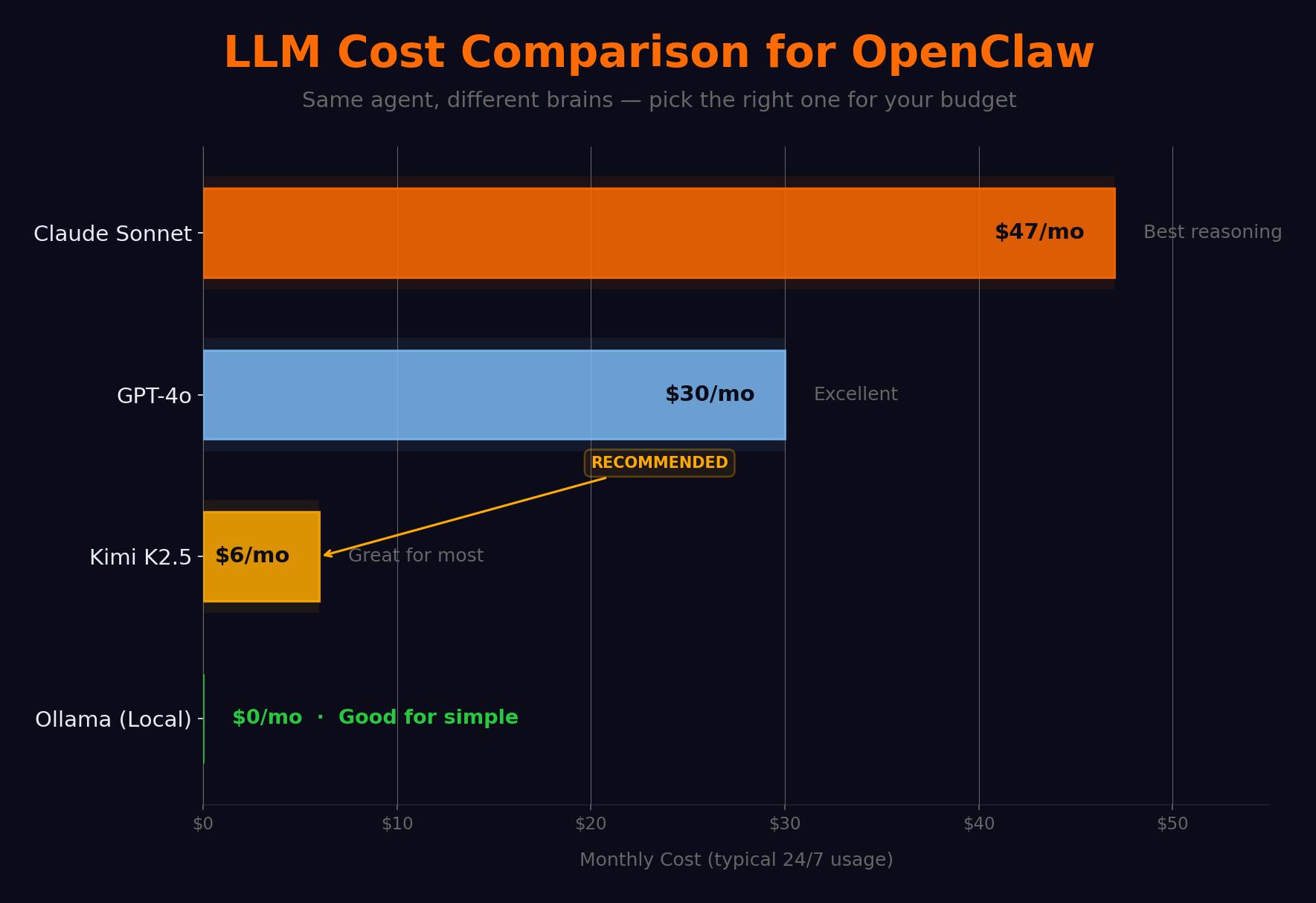
Not every task needs the same brain. “What time is it in Tokyo?” costs 10x more on Claude than on Kimi K2.5 with zero quality improvement.
| Model | Input (per 1M tokens) | Output (per 1M tokens) | Monthly estimate | Best for |
|---|---|---|---|---|
| Claude Sonnet 4 | $3.00 | $15.00 | $30-50 | Complex reasoning, writing |
| GPT-4o | $2.50 | $10.00 | $25-40 | General tasks |
| Kimi K2.5 | $0.60 | $2.00 | $4-8 | Agent tasks (ranked #1) |
| DeepSeek V3 | $0.27 | $1.10 | $2-5 | Budget option |
| Ollama (local) | $0.00 | $0.00 | $0 (+electricity) | Privacy, offline |
Kimi K2.5 is the revelation. Built by Moonshot AI, it’s specifically optimized for tool-use and instruction-following. On the OpenClaw community leaderboard, it scores higher than Claude Sonnet on tool selection accuracy and multi-step task completion. It falls short on creative writing and very long context windows. For the kind of work agents do? It’s better than models five times the price.
How do you configure multi-model routing?
Drop this in your .env:
# Multi-model routing config
KIMI_API_KEY=your_kimi_key
ANTHROPIC_API_KEY=your_anthropic_key

# Optional: local model
OLLAMA_ENABLED=true
OLLAMA_MODEL=qwen3:8b
OLLAMA_URL=http://localhost:11434

# Routing rules
MODEL_ROUTING=true
DEFAULT_MODEL=kimi-k2.5
ROUTING_RULES=complex:claude-sonnet-4-20250514,simple:kimi-k2.5,local:qwen3:8b

# Budget controls
ROUTING_COST_MODE=budget
ROUTING_MONTHLY_BUDGET=10.00
ROUTING_PREFER_CHEAP=true
OpenClaw’s built-in classifier assigns each request a complexity category: simple (lookups, reminders, weather), complex (analysis, writing, contract review), local (private queries, offline-eligible). The router sends each to the right model.
Test with three queries after restart:
# Check console logs for routing decisions
[Router] "tip calculation" → qwen3:8b (simple, local-eligible)
[Router] "article summary" → kimi-k2.5 (simple)
[Router] "contract review" → claude-sonnet-4 (complex)
What are the three budget tiers?
Real cost data from four weeks of daily use:
def monthly_cost(tier):
    """Estimate your OpenClaw monthly cost by tier."""
    tiers = {
        "$6/mo":  {"default": "kimi-k2.5", "complex": None,    "local": "ollama", "cost": "$4-8"},
        "$15/mo": {"default": "kimi-k2.5", "complex": "claude", "local": "ollama", "cost": "$12-18"},
        "$47/mo": {"default": "claude",     "complex": "claude", "local": "kimi",   "cost": "$35-50"},
    }
    return tiers.get(tier, "Unknown tier")

# Week-by-week actuals on $15/mo tier:
# Week 1 (casual, 5-10 msgs/day):  $1.40
# Week 2 (building, 30-50 msgs/day): $4.80
# Week 3 (heavy research agent):    $11.20
# Week 4 (multi-agent + Claude):    $23.40
$6/month. Kimi K2.5 default + Ollama for local. Handles 90% of what most people need. You lose quality on complex reasoning and long-form writing. Best for personal productivity.
$15/month. Kimi default + Claude for complex (~20% traffic) + Ollama. The sweet spot. This is what I run.
$47/month. Claude default. Only justified for professional work where quality directly affects revenue.
Here’s what common tasks actually cost per execution:
| Task | Tokens (in/out) | Kimi K2.5 cost | Claude cost |
|---|---|---|---|
| Email classification (20 emails) | 8K/500 | $0.006 | $0.031 |
| Web page summary | 3K/300 | $0.002 | $0.013 |
| Draft email response | 2K/400 | $0.002 | $0.012 |
| Research briefing (50 sources) | 500K/2K | $0.304 | $1.530 |
| Contract clause analysis | 10K/1K | $0.008 | $0.045 |
| ”What time is it in Tokyo?“ | 200/50 | $0.0002 | $0.001 |
That last row tells the whole story. Paying Claude to answer “what time is it” is like hiring a lawyer to check your mail.
Community cost reports tell the same story. From real user data compiled across r/openclaw and pricing guides:
| User type | Before optimization | After optimization |
|---|---|---|
| Personal assistant (calendar, email, reminders) | $47/week | $6/week |
| Developer with poorly configured cron jobs | $50 in first few days | $8-12/month |
| Unmonitored “runaway” workflows | $3,600/month | n/a (caught too late) |
| One developer (DEV Community) | $1,000/month | $20/month |
The pattern is always the same: stop using expensive models for cheap tasks. The $47/week personal assistant dropped to $6 by switching the default model. The $1K developer bill dropped 98% with routing + AWS credits.
What broke (the $347 lesson)
The $347 bill happened because of three compounding mistakes. No spending limits set. A prompt injection from a web page triggered a research loop. The agent used Claude for every query, including simple lookups.
Multi-model routing fixes all three. Budget caps stop runaway spending. The router sends simple queries to cheap models. And the ROUTING_PREFER_CHEAP=true flag shifts traffic toward Kimi as you approach your monthly cap.
How do you cut token costs with prompt engineering?
Three techniques that compound. A well-engineered prompt costs 60-70% less than a naive one for identical results.
Front-load the instruction. Put the most important instruction first. Models weigh early tokens more heavily.
# Expensive: buries instruction after context
prompt_bad = f"""Here are 20 emails: {emails}
Now classify each as URGENT, RESPOND, ARCHIVE, or SPAM."""

# Cheap: instruction first, context second
prompt_good = f"""Classify each email as URGENT, RESPOND, ARCHIVE, or SPAM.
Emails: {emails}"""
Cap output length. Without explicit limits, models default to 300-500 word responses for questions that need 50. Output tokens cost 2-5x more than input tokens.
Batch similar requests. Twenty email classifications in one API call is 40% cheaper than twenty separate calls. Each call has fixed overhead for system prompt and context loading.
What about the Kimi K2.5 privacy question?
Moonshot AI is a Chinese company. Servers in China and Singapore. They say they don’t train on API data. Take that for what it’s worth.
Here’s my actual position: for scheduling, reminders, web research, and content drafts, Kimi is fine. For anything involving client data, finances, health records, or legal documents, route through Ollama locally or Anthropic (US-based). The routing config above handles this when you mark sensitive tasks as “local.” Stop overthinking it and start saving money on the 90% of queries that aren’t sensitive.
What should you actually do?
- If you’re paying $30+/month, add the routing config above, set a $15 budget cap, restart. Your bill drops immediately.
- If you’re just starting, begin with Kimi K2.5 only. Add Claude for complex tasks after week 2 when you know which queries need it.
- If privacy matters, install Ollama for sensitive queries, use Kimi for everything else. Total cost: $4-6/month.
bottom_line
- The most expensive mistake in OpenClaw is running Claude for every “what’s the weather?” query. That mistake costs $40+/month. Multi-model routing fixes it for the price of a latte.
- Kimi K2.5 is ranked #1 for agent tasks and costs 8x less than Claude. Start there. Add Claude only where reasoning quality visibly improves.
- Three prompt techniques (front-load, cap output, batch) cut another 60-70% off whatever your model bill is. Stack them with routing.
Frequently Asked Questions
How much does running OpenClaw cost per month?+
Between $6 and $47 depending on your model choices. Kimi K2.5 as default with Ollama for simple tasks costs about $6/month. Adding Claude for complex tasks pushes it to $15. Claude for everything runs $47+.
What is the best model for OpenClaw?+
Kimi K2.5 is ranked #1 on the OpenClaw community leaderboard for agent tasks. It costs 8x less than Claude and matches or beats it on tool use and instruction following. Use Claude only for complex reasoning.
How do I set up multi-model routing in OpenClaw?+
Add multiple API keys to .env, set MODEL_ROUTING=true, and define routing rules mapping task complexity to models. OpenClaw's built-in classifier sends simple queries to cheap models and complex ones to Claude.