How to Build Your First OpenClaw Skill in 15 Minutes
Step-by-step OpenClaw custom skill tutorial. Build a working notes-reader skill with YAML configs, SOUL.md personality, and debugging fixes.
>This covers building one skill. OpenClaw: Your First AI Employee walks you through 9 complete projects from email agents to freelance automation.
OpenClaw: Your First AI Employee
Build 9 Income-Generating Agents This Weekend
Summary:
- Build a working OpenClaw custom skill from zero using the trigger-context-action-output framework.
- Set up SOUL.md to make your agent stop sounding generic.
- Debug the 4 most common skill failures without reading 800 pages of docs.
- Get 5 skill ideas you can build in your first week.
An OpenClaw custom skill tutorial shouldn’t take 800 pages of documentation to understand. The gap between “I have an agent” and “I have an agent that’s useful” is exactly one custom skill. Here’s how to cross it.
Your terminal shows a JSON error. "trigger" field is required. You forgot to define when the skill activates. This is the most common mistake, and you’re about 90 seconds from having something working.
What are OpenClaw skills and how do they work?
OpenClaw skills are tools that let your agent take action: run commands, browse websites, read files, send messages. Without skills, your agent is a brain with no hands.
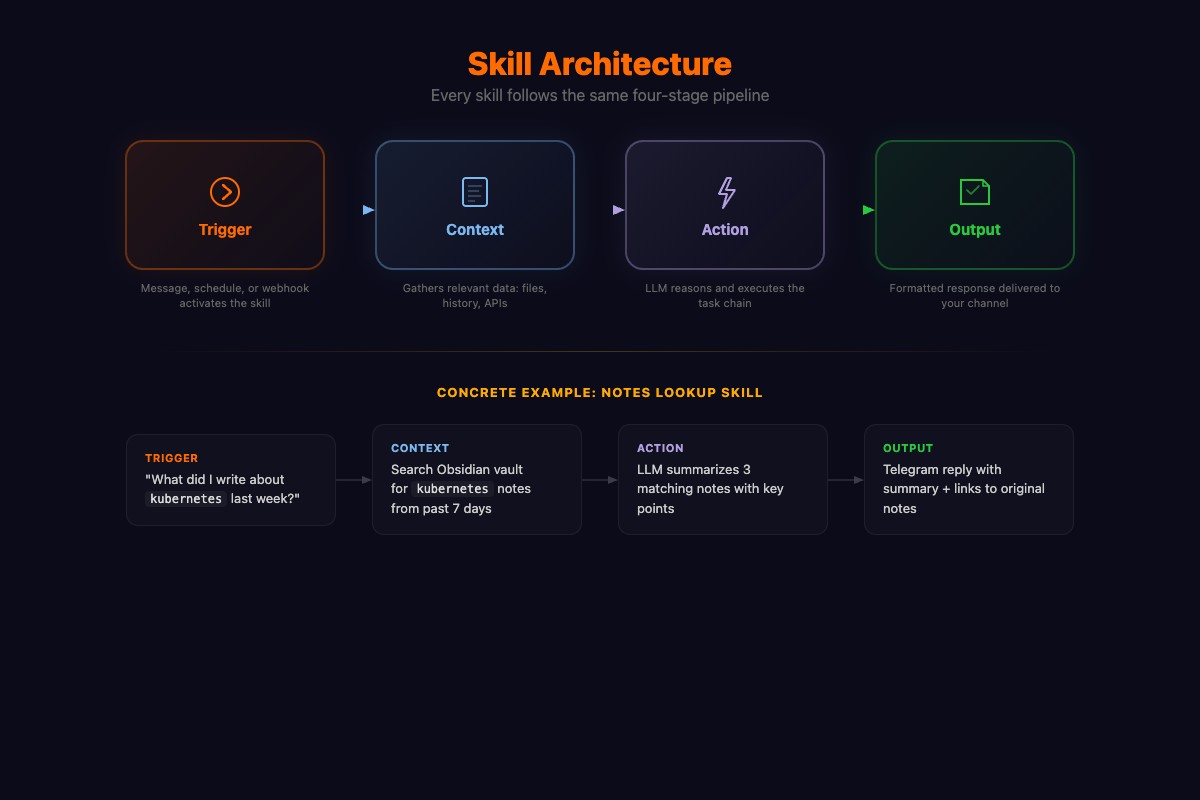
Every skill has four parts. This structure never changes, whether you’re building a notes reader or a trading bot:
# The anatomy of every OpenClaw skill
trigger:    # WHEN does this skill activate?
context:    # WHAT data does the skill need?
action:     # WHAT does the skill do?
output:     # HOW does it present results?
OpenClaw ships with built-in skills. Here’s when to use them vs building custom:
| Built-in Skill | What it does | When to build custom instead |
|---|---|---|
| Shell | Run terminal commands | When you need an allowlist (Ch3 security) |
| Browser | Open pages, extract content | When you need domain-specific scraping |
| Files | Read/write files | When you need structured note search (this tutorial) |
| Memory | Store info across chats | When you need tagged, queryable knowledge |
| Calendar | Google/Outlook events | When you need meeting prep or auto-scheduling |
| Web Search | Google/DuckDuckGo results | When you need source monitoring (Ch7 research) |
OpenClaw’s public registry (ClawHub) hosts 13,729 community-built skills across categories like search/research, coding agents, web/frontend, and productivity automation. One warning from the chapter that bears repeating: independent researchers found roughly 1 in 5 ClawHub plugins were malicious before a major cleanup in early 2026. Vet before you install (see our security hardening article). The skills that matter most are still the ones you build yourself.
How do you build a notes-reader skill step by step?
Six steps. The skill reads your local notes and answers questions about them.
Step 1. Create the skill directory:
mkdir -p skills/notes-readerStep 2. Create skills/notes-reader/config.yaml:
name: notes-reader
description: Reads and searches local notes for the user
trigger:
  patterns:
    - "what did I write about"
    - "find in my notes"
    - "search my notes"
    - "check my notes"
  always_available: true
context:
  sources:
    - type: directory
      path: "~/Documents/Obsidian"
      extensions: [".md", ".txt"]
      max_files: 50
      max_size_kb: 500
action:
  type: llm_query
  prompt: |
    The user is asking about their notes. Here are the relevant notes:

    {{context}}

    Answer based on these notes. If they don't contain relevant
    information, say so. Quote specific passages when possible.
output:
  format: text
  max_length: 2000
Step 3. Change ~/Documents/Obsidian to your actual notes path. Works with Obsidian, plain .txt, exported Notion markdown, anything.
Step 4. Register in skills/skills.json:
{
  "notes-reader": {
    "path": "./skills/notes-reader",
    "enabled": true
  }
}
Step 5. Restart OpenClaw. Console shows [OpenClaw] Skill loaded: notes-reader ✓.
Step 6. Send your agent: “What did I write about marketing last week?” If the answer references content from your notes, it works.
How do you set up SOUL.md for your agent?
SOUL.md is a plain-English file that replaces your agent’s generic personality. Without it, your agent sounds like every other OpenClaw installation.
Create characters/SOUL.md:
# Agent Personality

You are a direct, efficient assistant. No filler phrases.
When asked a question, answer it. When given a task, do it.

## Rules
- Never start a response with "Sure!" or "Of course!"
- If you don't know something, say "I don't know"
- Max 3 options when presenting choices
- Match my communication style: short gets short

## Preferences
- I use Obsidian for notes (vault at ~/Documents/Obsidian)
- I prefer bullet points over paragraphs
- Time zone: US Eastern
- "Later" means "add to task list," not "remind in an hour"
Start with 10-15 lines. Add more as you discover annoying defaults. I’ve seen people write 50-line SOUL files. The right length is whatever captures the behaviors that matter to you.
What broke (the 4 most common skill failures)
“Skill loaded but never triggers.” Your patterns don’t match. If your trigger is “what did I write about” and you type “find my notes about marketing,” it won’t fire. Fix: add more patterns or set always_available: true.
“Triggers but returns empty results.” Wrong path or wrong extensions. Your notes are .markdown but you specified .md. Run ls ~/Documents/Obsidian/*.md to verify files exist where you pointed.
“Returns generic answers, not from notes.” Context isn’t reaching the model. Your max_size_kb limit is too low. If notes total 5MB and limit is 500KB, the agent gets a random subset. Bump to 2000.
“YAML parsing error on restart.” Indentation. YAML needs exactly two more spaces per nesting level. Tabs cause silent failures. Paste into yaml-online-parser.appspot.com to find the exact line.
Add LOG_LEVEL=debug temporarily to .env and you’ll see exactly what the skill receives, sends, and gets back.
What are 5 skills you can build this week?
Once you’ve built one skill, you’ve built them all. Same trigger-context-action-output pattern.
Daily Standup Compiler. Reads Slack standup channel, groups by person, summarizes blockers. 20 minutes to build. Saves 15 minutes of Slack scrolling per day.
Invoice Generator. Client name + hours + rate in, PDF invoice out. The book’s Chapter 9 builds a full version with auto-tracking and payment reminders that catches forgotten billable hours.
Bookmark Summarizer. Honestly, this one surprised me. Point it at your browser bookmarks file. Ask “what articles did I save about machine learning?” and it visits each URL, generates summaries, sorts by date. Turns your bookmark graveyard into a searchable knowledge base.
Meeting Notes Formatter. Paste raw notes, get structured output: attendees, decisions, action items with assignments, open questions. The formatting alone is worth the 15 minutes of setup.
Recipe Scaler. This sounds trivial but people use it constantly. Recipe URL + serving count in, scaled ingredients with unit conversions out.
What should you actually do?
- If you have Obsidian/text notes → build the notes-reader skill exactly as shown. Test with a topic you know is in your notes.
- If you don’t take digital notes → swap the notes-reader for a bookmark summarizer. Same config structure, different
pathandextensions. - If you want your agent to stop sounding robotic → write a SOUL.md before building any skill. 10 lines. 5 minutes. Transforms every interaction.
bottom_line
- One custom skill is the difference between a chatbot and a personal assistant. The notes-reader takes 15 minutes and makes your agent smarter than every default installation.
- SOUL.md is the most underrated OpenClaw feature. 10 lines of plain English eliminates the generic AI assistant personality.
- If your skill isn’t working, it’s almost always trigger patterns, file paths, YAML indentation, or context size limits. Check those four things before anything else.
Frequently Asked Questions
How do I build a custom skill in OpenClaw?+
Create a YAML config file with four sections: trigger (when to activate), context (what data to use), action (what to do), and output (how to respond). Register it in skills.json and restart OpenClaw.
What is SOUL.md in OpenClaw?+
SOUL.md is a plain-English file that defines your agent's personality, rules, and preferences. Drop it in your characters/ directory to replace the generic defaults with behavior tailored to how you actually work.
Why is my OpenClaw skill not triggering?+
Your trigger patterns don't match what you're typing. OpenClaw does partial matching, but the patterns need to be close. Add more trigger patterns or set always_available: true so the AI decides when to use the skill.