How to Build an OpenClaw Email Agent That Saves 9 Hours
Build an OpenClaw email automation agent with auto-triage, smart drafts, and morning briefings. Copy-paste YAML configs. Real numbers: 94 to 12 min/day.
>This covers email automation. OpenClaw: Your First AI Employee builds 8 more projects including research agents, content engines, and freelance admin.
OpenClaw: Your First AI Employee
Build 9 Income-Generating Agents This Weekend
Summary:
- Build a complete OpenClaw email automation agent: auto-classify, smart drafts, morning briefing.
- Copy-paste the classifier YAML, email rules file, and writing style guide.
- Train the system from 60% accuracy to 95%+ in three weeks.
- Get real numbers: 94 minutes of daily email drops to 12. Cost: $2.80/month.
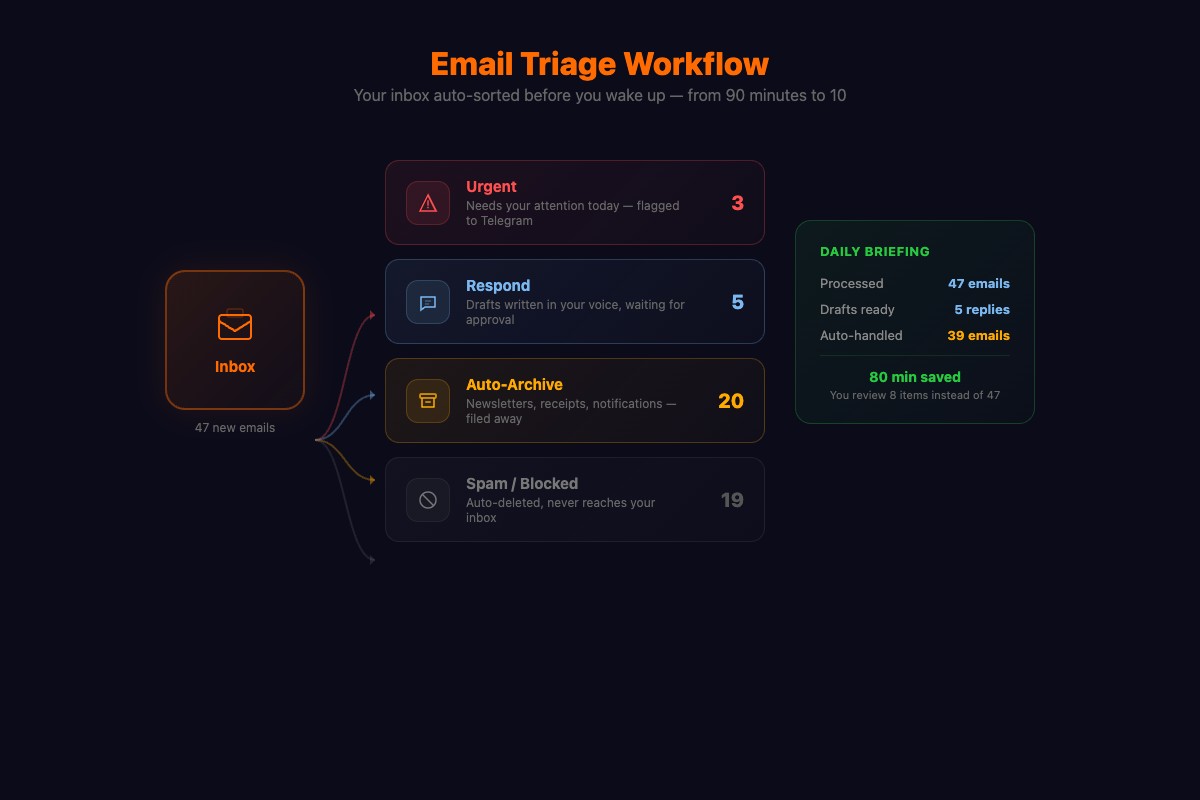
Your phone buzzes at 7:14 AM. Not an email notification. A Telegram message from your OpenClaw email automation agent: “3 urgent emails need responses. 5 drafts waiting. 22 auto-archived. 1 flagged: your accountant needs W-2 info by Friday.”
You approve two drafts with a thumbs-up. Edit one word in the third. Reply “send all.” By 7:22 AM, your inbox is handled. Total time: eight minutes.
How does the OpenClaw email triage system work?
Three components: a classifier that sorts incoming mail, a drafter that writes responses in your voice, and a briefing generator that summarizes everything to Telegram.
How do you connect your email?
Gmail setup takes 10 minutes. Go to console.cloud.google.com, create a project, enable the Gmail API, generate OAuth credentials, save the JSON file.
# Add to .env
EMAIL_PROVIDER=gmail
EMAIL_CREDENTIALS_FILE=./gmail-credentials.json
EMAIL_SCOPES=read,draft,send
For Outlook: Azure portal, register an application, grant Mail.Read and Mail.Send. For anything else (Protonmail, Fastmail):
EMAIL_PROVIDER=imap
EMAIL_IMAP_HOST=imap.yourprovider.com
EMAIL_IMAP_PORT=993
EMAIL_SMTP_HOST=smtp.yourprovider.com
EMAIL_SMTP_PORT=587
EMAIL_USER=you@yourdomain.com
EMAIL_PASSWORD=your_app_password  # Use app-specific, not main password
How do you build the classifier skill?
Create skills/email-triage/config.yaml:
name: email-triage
description: Classifies and triages incoming email
trigger:
  schedule:
    cron: "*/15 * * * *"
  on_new_email: true
context:
  sources:
    - type: email
      folder: inbox
      unread_only: true
      max_messages: 20
    - type: file
      path: "./data/email-rules.md"
action:
  type: llm_query
  model_override: kimi-k2.5
  prompt: |
    Classify each email into: URGENT, RESPOND, ARCHIVE, or SPAM.

    URGENT: Requires response within 24 hours. Client deadlines,
    direct questions, financial matters.
    RESPOND: Needs response but not urgent. Meeting requests, follow-ups.
    ARCHIVE: No response needed. Newsletters, receipts, notifications.
    SPAM: Unsolicited sales, cold outreach.

    For each: category, one-sentence summary, suggested action.

    My rules: {{email-rules}}
    Emails: {{emails}}
output:
  format: structured
  store_results: true
Now create data/email-rules.md. This is what makes the classifier smart:
# Email Rules

## Always Urgent
- Emails from: boss@company.com, keyClient@their.com
- Subject contains: "deadline", "ASAP", "urgent", "payment"
- Replies to emails I sent asking for something

## Always Archive
- Newsletters (unless from specific senders below)
- Receipts from Amazon, Uber, DoorDash
- GitHub notifications (I check GitHub directly)

## Response Style
- Professional but warm with clients
- Direct and brief with teammates
- Match the sender's formality level

## Never Auto-Send
- Emails to clients worth over $5,000/year
- Emails containing financial information
- First email to any new contact

## Manual Only (Do Not Process)
- Emails from: lawyer@firm.com, doctor@practice.com
- Subject contains: "NDA", "confidential", "settlement"
Spend 20 minutes customizing these rules. It saves hours of fixing misclassifications later.
How do you add the smart drafter?
The drafter reads the email thread, checks your calendar, and writes a response in your voice. Add this action block after the classifier:
  - name: draft
    type: llm_query
    model_override: kimi-k2.5
    condition: "classification in ['URGENT', 'RESPOND']"
    context:
      sources:
        - type: email_thread
          thread_id: "{{current_email.thread_id}}"
          max_messages: 10
        - type: calendar
          next_days: 7
        - type: file
          path: "./data/writing-style.md"
    prompt: |
      Draft a reply to this email. Use the conversation history.
      Match my writing style (see style guide).
      If scheduling, check my calendar and suggest available times.
      If referencing an agreement, note what needs verification.

      Style guide: {{writing-style}}
      Thread: {{thread}}
      My calendar (next 7 days): {{calendar}}
The drafter uses your calendar to auto-suggest meeting times and pulls thread history so it doesn’t repeat context. An OpenClaw + Google Workspace tutorial on Medium covers the full Gmail API integration if you want deeper calendar access.
How do you add the morning briefing?
Add a briefing action to your skill:
actions:
  - name: briefing
    type: llm_query
    schedule:
      cron: "0 7 * * *"
    context:
      sources:
        - type: email_results
          since: "24h"
    prompt: |
      Generate my morning email briefing:
      1. Count of urgent emails with one-line summaries
      2. Count of drafts waiting for approval
      3. Count of auto-archived emails
      4. Flags or warnings (bounced, unusual patterns)

      Keep it scannable. I read this on my phone making coffee.
    output:
      channel: telegram
      format: text
What broke (and how to fix it)
The $10,000 client that ended up in spam. Subject line looked like a newsletter. I caught it during my daily archive review in week 1. Added the client to the “always urgent” list. Hasn’t happened since. But if I’d been trusting the system blindly from day one? That email sits in archive for three days and the client goes elsewhere.
The boss email that sounded too casual. Agent drafted a response to my boss like it was texting a friend. Fix: data/writing-style.md needs per-person rules, not just global tone settings:
# My Writing Style
- Short paragraphs (2-3 sentences max)
- "Hey [name]" to open, nothing formal
- No exclamation marks in professional email
- Confirm action items: "I'll have X to you by Y"
- Emails to my boss: always include a status update
Stale context. Agent referenced a cancelled project because the cancellation happened in Slack, not email. Fix: tell your agent directly when major changes happen.
How do you train the system over three weeks?
Week 1: Review everything. Check every classification. When the agent miscategorizes, note the pattern. Add rules. Expect 60-70% accuracy.
Week 2: Trust but verify. Let auto-archive run. Check the archive folder once daily. Catch false positives. Accuracy climbs to 85-90%.
Week 3: Autopilot. Error rate under 5%. Check archives twice a week. The rules file is a living document that gets better over time.
What are the real numbers?
After three weeks of running:
def email_roi(daily_emails=67, old_minutes=94, new_minutes=12):
    """Calculate your email automation ROI."""
    weekly_saved = (old_minutes - new_minutes) * 5 / 60  # hours
    monthly_cost = 2.80  # Kimi K2.5, $0.60/M input tokens
    return {
        "hours_saved_per_week": round(weekly_saved, 1),
        "monthly_api_cost": f"${monthly_cost}",
        "drafts_approved_no_edit": "78%",
        "drafts_minor_edits": "15%",
        "drafts_rejected": "7%",
        "false_archive_per_week": 3,
    }

# >>> email_roi()
# {'hours_saved_per_week': 6.8, 'monthly_api_cost': '$2.80', ...}| Metric | Before | After |
|---|---|---|
| Daily email time | 94 min | 12 min |
| Emails requiring manual action | 67 | 8 |
| Draft approval rate (no edits) | n/a | 78% |
| False archive catches per week | n/a | 3 (declining) |
| Monthly API cost | $0 | $2.80 |
| Weekly time saved | 0 | 9.5 hours |
These numbers track with what the broader community reports. From real user data across OpenClaw automation guides: users with 100+ daily emails report saving 1-3 hours per day once configured. One user handles 80+ emails daily in about 15 minutes now. Processing newsletters alone returns roughly 1.5 hours per day.
The average professional spends 28% of their workweek on email. This automates 85% of that 28%.
What should you actually do?
- If email is your biggest time sink → build the classifier first. Skip the drafter for now. Classification alone saves 40% of email time.
- If you handle sensitive email → set manual-only rules for specific senders and keywords. The agent skips them entirely.
- If you have multiple email accounts → set up separate skills for each. The classifier runs independently per inbox.
bottom_line
- The classifier + rules file is the core. Get that right and everything else follows. Spend 20 minutes on your rules, not 2.
- 78% of drafts get approved without edits. The agent matches your voice when you give it specific style rules instead of generic instructions.
- $2.80/month on Kimi K2.5 to handle 67 emails per day. The same workload on Claude costs $14+. Use multi-model routing if you want Claude quality for urgent emails only.
Frequently Asked Questions
Can OpenClaw manage my email automatically?+
Yes. OpenClaw connects to Gmail, Outlook, or any IMAP provider. It classifies incoming email, drafts responses in your voice, and sends a morning briefing to Telegram. You approve drafts with a thumbs-up emoji.
How much does an OpenClaw email agent cost to run?+
About $2.80 per month using Kimi K2.5 for classification and drafting. Running every 15 minutes, processing 67 emails per day. Claude would cost $14+ for the same workload.
Is it safe to let OpenClaw read my email?+
Your email content travels to the AI model's servers for classification. For sensitive emails (legal, medical, financial), set manual-only rules so the agent skips them entirely. Route the rest through Kimi K2.5 or a local Ollama model for privacy.