How to Run OpenClaw and Claude Code as a Two-Agent Team
Set up a practical two-agent workflow where OpenClaw handles operations and Claude Code handles development. Handoff pattern, morning routine, and real limits.
>This covers the two-agent handoff. OpenClaw: The Money-Making Guide goes deeper on building 7 projects across both agents and scaling into a business.
OpenClaw: The Money-Making Guide to AI Agents
Build 7 AI Agents That Earn $3K-$10K/Month
Summary:
- Set up a two-agent workflow: OpenClaw for operations, Claude Code for development.
- The handoff directory pattern that connects both agents through shared files.
- A morning orchestration routine that delivers 4 briefings by 7:15am.
- Five real limitations and how to work around each one.
OpenClaw runs 24/7 on your server handling email, research, content, and monitoring. Claude Code runs in your terminal building features, fixing bugs, and managing git.
They do different jobs. OpenClaw is your operations specialist. Claude Code is your senior developer. Neither replaces the other. The power is in the handoff.
This is not a tutorial on swarm architectures or abstract orchestration patterns. This is how to run two specific tools as a coordinated team with you as the manager.
What does each agent actually do well?
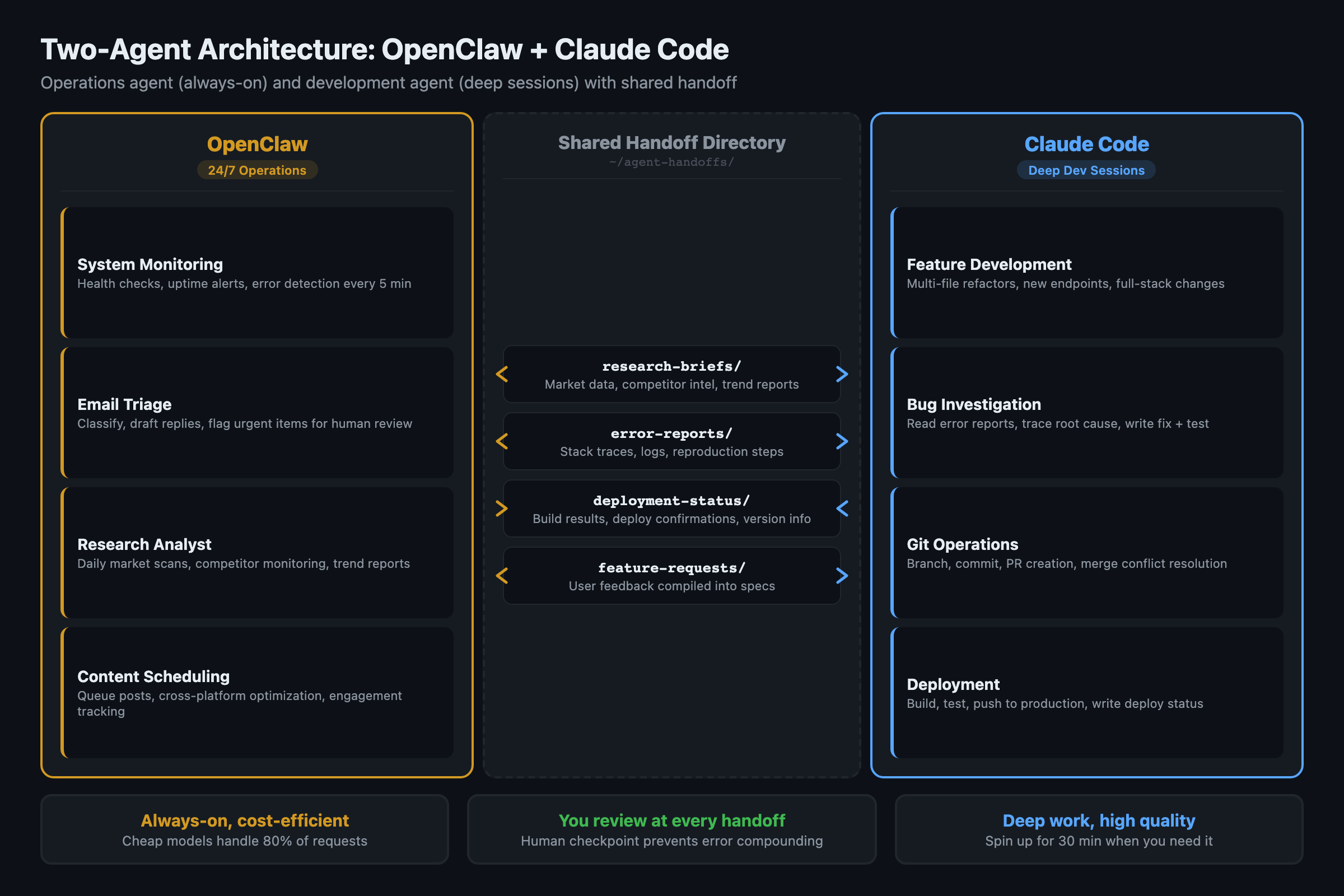
OpenClaw is optimized for persistent, lightweight automation:
- Always-on background tasks (runs as a service with PM2, 42,500+ GitHub stars, 2.4M+ weekly npm downloads, the standard process manager for keeping Node.js services alive in production)
- Multi-platform messaging (Telegram, Discord, WhatsApp, email)
- Scheduled tasks via cron (morning briefings, hourly scans)
- Web browsing and real-time data access
- Custom skills ecosystem on ClawHub
- Cost-efficient at high volume (cheap models handle 80% of requests)
Claude Code is a different animal. It reads entire codebases, writes and refactors across multiple files, runs terminal commands, writes tests, and manages git. Think of it as a senior developer you spin up for 30 minutes when you need deep technical work. It does not run as a background service. You open it, give it a task, and close it when done.
The overlap is smaller than you think. Both can browse the web and process text. But OpenClaw cannot write production code, and Claude Code shuts down when you close your terminal.
How do you connect them?
No official API connects OpenClaw and Claude Code. The bridge is a shared directory with structured handoff files:
# Create the handoff directory structure
mkdir -p ~/agent-handoffs/{openclaw-to-code,code-to-openclaw,shared}
mkdir -p ~/agent-handoffs/openclaw-to-code/{research-briefs,error-reports,feature-requests}
mkdir -p ~/agent-handoffs/code-to-openclaw/{deployment-status,monitoring-requests}

# Shared context both agents reference
cat > ~/agent-handoffs/shared/project-context.md << 'EOF'
# Current Project Context
## Active Projects
- Acme Corp API: Sprint 2, shipping Friday
- Internal dashboard: blocked on auth module

## Tech Stack
- Node.js 22, PostgreSQL 16, Redis 7
- Deployed on Railway, monitored by OpenClaw

## Priorities This Week
1. Fix auth module (Claude Code)
2. Monitor competitor API changes (OpenClaw)
3. Ship Sprint 2 deliverables (both)
EOF
When OpenClaw compiles a research brief, it saves to openclaw-to-code/research-briefs/. When you start a Claude Code session, you point it at the relevant file. When Claude Code finishes a feature, it writes a monitoring request to code-to-openclaw/monitoring-requests/.
Handoff quality checklist
Before accepting a handoff file, verify:
- Status field is “complete” (not “in_progress” or empty)
- Output file exists at the referenced path
- File was modified within the last hour (not stale from yesterday)
- No error messages in the output
- Word count / data count meets minimum threshold
Takes 10 seconds. Catches the failures that cascade into wasted Claude Code runs.
The handoff skill in OpenClaw:
import json
from pathlib import Path
from datetime import datetime

HANDOFF_DIR = Path.home() / "agent-handoffs"

async def create_handoff(handoff_type, data, summary):
    """Create a structured handoff file for Claude Code."""
    handoff = {
        "id": f"{handoff_type}-{datetime.now().strftime('%Y%m%d-%H%M')}",
        "type": handoff_type,
        "created": datetime.now().isoformat(),
        "status": "pending",
        "summary": summary,
        "data": data
    }

    path = HANDOFF_DIR / "openclaw-to-code" / f"{handoff_type}s" / f"{handoff['id']}.json"
    path.write_text(json.dumps(handoff, indent=2))

    # Notify via Telegram
    await send_alert(
        channel="telegram",
        title=f"New handoff: {handoff_type}",
        body=f"{summary}\n\nFile ready at: {path}"
    )
    return handoff

# Example: Research Analyst finds a competitor API change
await create_handoff(
    handoff_type="research-brief",
    data={"competitor": "RivalCo", "change": "New v3 API released",
          "docs_url": "https://rival.co/docs/v3",
          "impact": "Breaking changes to auth flow we depend on"},
    summary="RivalCo released API v3 with breaking auth changes. "
            "Need Claude Code to update our integration."
)
How does the morning orchestration routine work?
Set up four briefings that fire in sequence every morning:
| Time | Agent | Briefing | Content |
|---|---|---|---|
| 6:30 | OpenClaw | Research intelligence | Industry news, competitor moves, tool updates |
| 6:45 | OpenClaw | Inbox summary | Email triage + draft responses ready for review |
| 7:00 | OpenClaw | Content queue | Today’s posts ready for approval |
| 7:15 | OpenClaw | Market signals | Overnight price movements and trading signals |
You spend 20 minutes reviewing all four. Then you decide what needs Claude Code’s attention and create handoffs for the technical work. By 7:30am you are fully informed, email is handled, content is queued, and your development priorities are set.
{
  "morning_schedule": [
    {"time": "06:30", "skill": "research-briefing", "channel": "telegram"},
    {"time": "06:45", "skill": "email-briefing", "channel": "telegram"},
    {"time": "07:00", "skill": "content-review", "channel": "telegram"},
    {"time": "07:15", "skill": "trading-signals", "channel": "telegram"}
  ]
}
The routine runs independently of Claude Code. Claude Code is not a persistent service. You open it when you have development work queued from the morning review.
What are the real limitations?
Five limitations matter. Skipping them leads to expensive mistakes.
1. Agents do not understand your business. They process patterns and follow instructions. They do not know why your client hates blue buttons or why the Q3 deadline matters more than Q2. Every piece of important context needs to be in project-context.md. Update it weekly.
2. Errors compound across agents. Your Research Analyst misreads a satirical tweet as a product launch. Your Content Engine generates a thread about the “launch.” Your audience sees you spreading misinformation. The fix: human checkpoints between agents. Never let one agent’s output flow directly into another agent’s action.
3. Context windows are finite. OpenClaw forgets details from 3 days ago. Claude Code forgets everything between sessions. The fix: write important decisions to the handoff directory as files, not messages. Files persist. Messages disappear.
4. Ambiguity kills output quality. “Make it better” produces garbage. “Reduce the /api/users endpoint response time from 340ms to under 100ms” produces results. Before delegating, ask: would a literal-minded contractor understand exactly what to do?
5. Coordination overhead is real. Managing two agents takes more time than one. The handoff files, the review checkpoints, the context maintenance. For simple workflows, one agent is faster. Only use multi-agent coordination where the quality improvement justifies the overhead.
What broke when I set this up?
Problem 1: Handoff files piled up. After two weeks, the handoff directory had 40+ unprocessed files. Some were stale, some were duplicates of issues already fixed.
The fix: add a status field and a cleanup cron. OpenClaw marks handoffs as pending, in_progress, or done. A weekly script archives anything marked done and flags anything pending for more than 5 days.
Failure mode examples: (1) OpenClaw produces a research brief with outdated data. Claude Code builds a feature based on wrong assumptions. You ship broken code. Fix: add a freshness check to the brief (timestamps on every data point). (2) Handoff files pile up. Claude Code reads a stale one. Generates duplicate work. Fix: add a cleanup cron that archives files older than 5 days.
Problem 2: Claude Code could not find the context file. I kept forgetting to point Claude Code at project-context.md when starting a session.
The fix: add it to a CLAUDE.md file in the project root. Claude Code reads CLAUDE.md automatically at session start. One line:
# CLAUDE.md (project root)
Before starting any task, read ~/agent-handoffs/shared/project-context.md
for current priorities, active handoffs, and tech stack details.
Claude Code picks this up on every session start. No more forgetting.
What should you actually do?
- If you already use both OpenClaw and Claude Code separately: create the handoff directory this week. Start with one handoff type (error reports). See if the structured file format speeds up your workflow before adding research briefs and feature requests.
- If you use OpenClaw but not Claude Code: the morning orchestration routine works standalone. Set up the 4 briefings and run them for a week. The development handoffs can come later.
- If you use Claude Code but not OpenClaw: start with OpenClaw’s research monitoring. Having intelligence delivered to your phone every morning changes how you prioritize your Claude Code sessions.
Starter layout: The book includes a complete two-agent-starter/ directory: handoff schemas, orchestration script, cleanup cron, and CLAUDE.md pre-configured for the handoff workflow. Drop it into any project and customize.
bottom_line
- Two agents are not twice as good as one. They are better at different things. OpenClaw runs 24/7 operations. Claude Code does deep technical work. The handoff pattern connects them through files, not API calls.
- Human checkpoints between agents are not optional. Agent-to-agent pipelines without review produce compounding errors. A 10-second review at each handoff prevents 90% of problems.
- Start with one handoff type and the morning routine. Expand the system only after you have 2 weeks of data showing it speeds you up rather than slowing you down.
Frequently Asked Questions
Can OpenClaw and Claude Code talk to each other directly?+
No. There is no official API connecting them. The bridge is a shared directory structure where one agent writes files and the other reads them. You review at each handoff point. Fully automated agent-to-agent pipelines are not reliable enough for production use yet.
When should you use two agents instead of one?+
When your workflow crosses the operational/technical boundary. OpenClaw runs 24/7 monitoring, email, and research. Claude Code handles code changes, debugging, and PR creation. If your task is purely operational or purely technical, one agent is faster than two.
What is the biggest risk of multi-agent workflows?+
Error compounding. When one agent makes a small mistake and another builds on it, errors multiply. A Research Analyst misreads sarcasm as news, the Content Engine publishes it as fact. Human checkpoints between agents prevent 90% of compounding errors.