LangChain vs CrewAI vs AutoGen: One Clear Winner
Honest comparison of LangChain, CrewAI, AutoGen, and n8n from someone who built with all four. Includes a 5-question decision framework to stop second-guessing.
>This covers picking your stack. Build AI Agents walks you through building, deploying, and selling agents with whichever framework you choose.
Build AI Agents
Ship Your First Agent This Weekend and Start Landing $3,000/Month Clients
Summary:
- Four serious options exist: LangChain, CrewAI, AutoGen, and n8n (no-code).
- Each feels different in practice. Feature lists don’t capture the debugging experience at 11 PM.
- A 5-question decision framework picks your stack in under 5 minutes.
- Switching costs are lower than you think. The sunk cost fear is worse than the actual migration.
I wasted three weeks on framework roulette. Monday: LangChain docs. Wednesday: someone on Reddit said CrewAI was better. Thursday: started the CrewAI quickstart. Friday: a tweet went viral about AutoGen. Saturday: stared at three open tabs and built nothing.
The tools weren’t the problem. The decision was. Every day comparing frameworks was a day not building. The first agent I shipped could have been built in any of them.
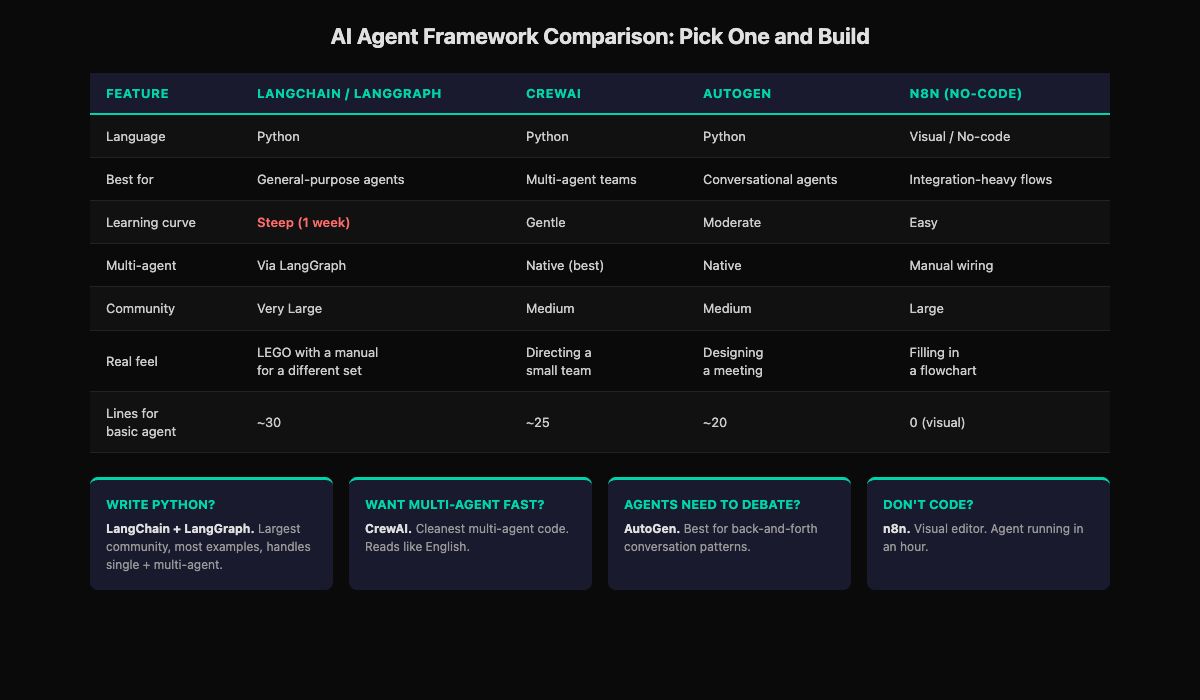
What does each framework actually feel like?
Feature comparison tables are everywhere. What they don’t tell you is what it’s like to debug at 11 PM when your agent returns garbage. Here’s the honest version.
LangChain / LangGraph feels like assembling LEGO with a manual written for a different set. The pieces work. The docs are improving. But you spend time translating between tutorials and your specific use case. Steep learning curve for the first week. After that, it clicks. Largest community means the most Stack Overflow answers when you’re stuck.
CrewAI feels like directing a small team. You describe who each person is, what their job is, and how handoffs work. The framework fills in the mechanics. Code reads almost like English. When an agent goes off-script, debugging is harder because the orchestration layer does a lot behind the scenes.
AutoGen feels like designing a meeting. You decide who’s in the room, what they’re allowed to say, and when the meeting ends. Good meetings produce great results. Bad meetings run in circles. Same with AutoGen.
n8n feels like filling in a flowchart. Each box does one thing. Wire them together. Test. Watch the data flow in real time. When it works, it’s satisfying in a way code sometimes isn’t because you see the whole system at once.
How does the same task look in each framework?
Build the simplest possible agent: take a question, search the web, return a summary.
# LangChain/LangGraph: ~30 lines, most is setup
from langgraph.prebuilt import create_react_agent
from langchain_openai import ChatOpenAI
from langchain.tools.tavily_search import TavilySearchResults

agent = create_react_agent(
    ChatOpenAI(model="gpt-4o", temperature=0.1),
    tools=[TavilySearchResults(max_results=5)],
    prompt="You are a research assistant..."
)
result = agent.invoke({"messages": [{"role": "user",
    "content": "Research AI agent trends"}]})
# CrewAI: ~25 lines, reads like English
from crewai import Agent, Task, Crew
researcher = Agent(
role="Research Analyst",
goal="Find accurate information",
backstory="You are a meticulous researcher.",
llm=ChatOpenAI(model="gpt-4o", temperature=0.0)
)
task = Task(description="Research AI agent trends",
agent=researcher)
crew = Crew(agents=[researcher], tasks=[task])
result = crew.kickoff()# AutoGen: ~20 lines, conversational model
from autogen import UserProxyAgent, AssistantAgent
assistant = AssistantAgent("researcher",
llm_config={"model": "gpt-4o"})
user = UserProxyAgent("user",
human_input_mode="NEVER")
user.initiate_chat(assistant,
message="Research AI agent trends")n8n is the fourth option but there’s no code to show. You drag an AI Agent node onto a visual canvas, add a Tavily tool, connect a trigger, and click “Test.” Same agent, zero lines of code, 15 minutes.
All four produce the same result. The “best” one is whichever makes you say “OK, I see how this works” fastest.
How do you pick in 5 minutes?
Answer these five questions. Write down your answers. Done.
STACK DECISION CARD
═══════════════════════════════════════

Q1: Do you write Python?
    YES → Go to Q2
    NO  → n8n (skip to Q5)

Q2: First project single-agent or multi-agent?
    SINGLE → LangChain. Go to Q3.
    MULTI  → CrewAI or AutoGen. Go to Q4.

Q3: How much control over the agent loop?
    MAXIMUM → LangGraph
    REASONABLE → LangChain AgentExecutor
    JUST WORK → create_react_agent

Q4: How do agents communicate?
    TASK HANDOFF (A finishes, passes to B) → CrewAI
    CONVERSATION (back-and-forth debate) → AutoGen
    NOT SURE → CrewAI (simpler default)

Q5: Self-hosted or SaaS? (no-code only)
    SELF-HOSTED → n8n
    SAAS → Make.com

Framework: _______________
Date decided: _______________
DO NOT REVISIT UNTIL AFTER YOUR THIRD BUILD.
Fill it in. The last line matters most. You will feel the urge to second-guess after a Twitter thread or Reddit comparison post. The framework you chose handles everything you need for your first 3-4 projects.
What about the LLM choice?
The framework is the structure. The LLM is the brain. The LLM choice is simpler.
| Model | Price (per 1M input tokens) | Best for | When to use |
|---|---|---|---|
| GPT-4o | $2.50 | General agent reasoning | Default choice, start here |
| GPT-4o-mini | $0.15 | Classification, routing | Cost-sensitive production tasks |
| Claude Sonnet | $3.00 | Long docs, precise instructions | Complex multi-page prompts |
| Claude Haiku | $0.25 | High-volume simple tasks | 10x cheaper, good enough for many agents |
From OpenAI’s pricing page and Anthropic’s pricing page: GPT-4o and Claude Sonnet are comparable in capability and cost. Pick either. You can swap models later without changing your framework or architecture. The model is the most swappable part of the stack.
Where does each framework actually break?
Feature comparisons don’t show you this. Here’s where I hit walls.
LangChain: the abstraction layers. I needed a simple tool that returned a dict. LangChain wanted it wrapped in a Tool object with a ToolNode and an OutputParser. Three layers of abstraction for what should’ve been return {"price": 29.99}. Took me 40 minutes to realize I was overcomplicating it. The power is real, but the first week costs you time in abstraction translation.
CrewAI: opaque orchestration. My 3-agent crew produced garbage on a specific input. The researcher was fine, the writer was fine, but the reviewer was getting truncated context. I couldn’t see the inter-agent messages without adding verbose logging everywhere. CrewAI handles the wiring, which is great until you need to see inside the wiring.
AutoGen: conversation loops. Two agents got stuck in a polite disagreement loop. Agent A suggested an approach. Agent B said “that’s reasonable but consider this alternative.” Agent A said “good point, but my original approach also handles…” Twelve rounds later, no output. The conversation model works when it converges. When it doesn’t, you burn tokens on an AI debate club.
n8n: the complexity ceiling. Simple agent loops work great. The moment I needed conditional branching based on the agent’s reasoning (not just the tool output), the visual canvas became spaghetti. 47 nodes with crossing lines, and figuring out which path the workflow took required clicking through each node’s output individually.
Every framework has a wall. The question is which wall you’ll hit first given what you’re building.
What do people get wrong about this decision?
They think switching is expensive. I migrated a production content pipeline from LangChain to LangGraph in one afternoon. 80% was copy-paste (tool functions, prompts, API calls). 20% was rewiring the state graph. A freelancer I know rebuilt a CrewAI project in n8n for a client who wanted a no-code version they could maintain. The sunk cost is lower than it feels.
They research infrastructure before building anything. Vector databases, monitoring tools, Kubernetes. Stop. You need none of that for your first agent. LangChain + GPT-4o + Tavily. That’s it. Everything else waits until you’ve shipped something.
They optimize for “the best” instead of “good enough.” There is no best framework. Each has the wall described above. “Best” depends entirely on what you’re building and who you are.
What should you actually do?
- If you write Python and want one recommendation → LangChain with LangGraph. Steepest curve, most versatile.
- If you don’t write code → n8n. Free local version. Agent running in an hour.
- If you know you want multi-agent from day one → CrewAI. Cleanest experience.
- If your agents need to debate and iterate → AutoGen. Conversation-native.
- If you’ve been comparing for more than a week → pick the one you’ve read the most about. You already know it best.
bottom_line
- The best framework is the one you actually use. Pick one, build something, stop comparing. Three weeks of framework research produces zero agents.
- Switching costs are low. If your choice doesn’t fit after 2-3 projects, you migrate in an afternoon. The concepts transfer directly.
- The LLM matters less than the framework, and the framework matters less than the architecture. Start with GPT-4o, pick any framework, and focus on building something a client would pay for.
Frequently Asked Questions
Which AI agent framework is best for beginners?+
CrewAI if you write Python (gentlest learning curve, code reads like English). n8n if you don't write code (visual editor, agent running in an hour).
Can I switch frameworks later without starting over?+
Yes. The core concepts transfer directly. Tool logic, prompts, and LLM calls stay the same. Only the framework-specific wiring changes. Most switches take an afternoon.
Do I need to learn all four frameworks?+
No. Pick one, build with it through your first 3-4 projects, then evaluate whether to switch. Most people don't switch. The framework they picked is fine.