Build Your First AI Agent in 60 Minutes
Build a working AI research agent in 60 minutes with LangChain and LangGraph. Complete copy-paste Python code plus a no-code n8n path. $0.02 per run.
>This covers building a basic research agent. Build AI Agents goes deeper on deployment, memory, multi-agent pipelines, and selling agent services.
Build AI Agents
Ship Your First Agent This Weekend and Start Landing $3,000/Month Clients
Summary:
- Build a working research agent that searches the web and writes structured reports.
- Uses LangChain + LangGraph with about 35 lines of Python.
- Each run costs $0.02 and produces multi-page sourced reports.
- Copy-paste code for both Python and n8n (no-code) paths included.
Eighteen thousand people bookmarked a single tweet about building AI agents. Most of them never built anything. The gap between “I should learn this” and “I built this” is smaller than you think. About 35 lines of Python and 60 minutes.
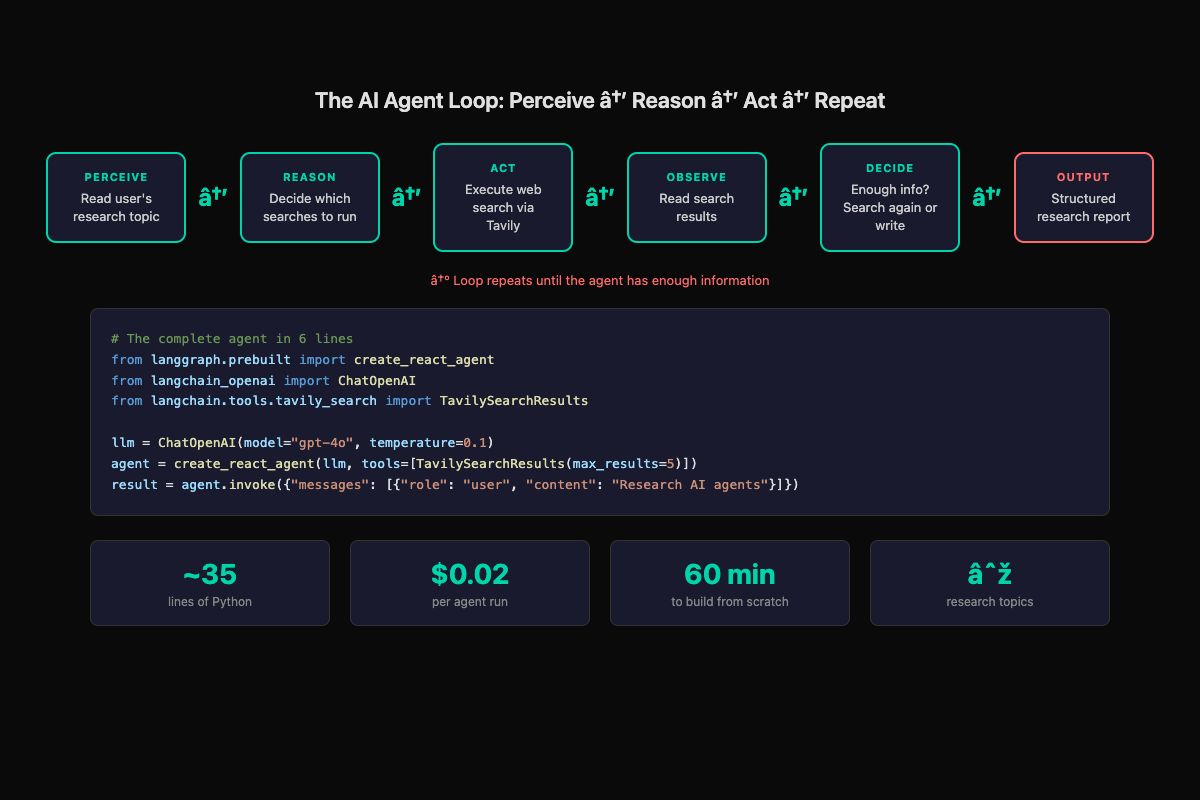
This tutorial gets you a working research agent. You give it a topic, it searches the web, reads results, decides if it needs more information, and produces a structured report. That’s a real agent running the perception-reasoning-action loop, not a chatbot answering one question.
What do you need before starting?
Two API keys and a Python installation. That’s it.
# 1. Get an OpenAI API key at platform.openai.com
#    Add a payment method, set $5 spending limit

# 2. Get a Tavily API key at tavily.com
#    Free tier: 1,000 searches/month

# 3. Create your project
mkdir research-agent && cd research-agent
python -m venv venv
source venv/bin/activate
pip install langchain langchain-openai langgraph tavily-python python-dotenv
Create a .env file with your keys:
OPENAI_API_KEY=sk-your-key-here
TAVILY_API_KEY=tvly-your-key-here
Never put API keys directly in code. The .env file stays on your machine. Add it to .gitignore immediately.
How do you build the agent?
The whole agent fits in one file. Create agent.py:
import os
from dotenv import load_dotenv
from langchain_openai import ChatOpenAI
from langchain.tools.tavily_search import TavilySearchResults
from langgraph.prebuilt import create_react_agent

load_dotenv()

# Search tool - gives the agent web access
search_tool = TavilySearchResults(max_results=5)

# LLM with low temperature for factual output
llm = ChatOpenAI(model="gpt-4o", temperature=0.1)

# The agent - a ReAct loop that reasons and uses tools
agent = create_react_agent(
    llm,
    tools=[search_tool],
    prompt="You are a thorough research assistant. "
           "When given a topic, search for relevant "
           "information, then produce a well-organized "
           "summary report with key findings, sources, "
           "and actionable insights."
)

def research(topic):
    """Run the research agent on a given topic."""
    result = agent.invoke({
        "messages": [
            {"role": "user",
             "content": f"Research this topic thoroughly "
                        f"and produce a detailed report: "
                        f"{topic}"}
        ]
    })
    final_message = result["messages"][-1].content
    filename = topic.lower().replace(" ", "_")[:30] + "_report.md"
    with open(filename, "w") as f:
        f.write(f"# Research Report: {topic}\n\n")
        f.write(final_message)
    print(f"Report saved to {filename}")
    return final_message

if __name__ == "__main__":
    topic = input("What would you like to research? ")
    research(topic)
Run it:
python agent.py
# Type: "AI agent business opportunities"
# Wait 15-30 seconds
# Open the saved .md file
That’s a working agent. Not a toy. You wrote the researcher, not the research. Here’s what the output actually looks like:
# Research Report: AI agent business opportunities

## Executive Summary
The AI agent market is experiencing rapid growth with businesses
paying $500-3,000/month for custom agent workflows. Key sectors
include customer support, lead qualification, and scheduling.

## Key Findings
- Agent builders report $2,000-6,000/month recurring revenue
  from 2-3 clients (Source: Twitter/X builder community)
- 60% of support inquiries can be automated with current tools
- Average response time drops from 3+ hours to under 2 minutes
...
The agent decided which searches to run, executed them, read the results, decided it needed more angles, searched again, and synthesized everything into that structure. You defined the goal and the tools. The agent handled the rest. That’s the difference between writing an agent and writing a script.
What broke when I first built this?
Three things, in order of how annoying they were.
The .env file wasn’t loading. I had load_dotenv() after the LangChain imports instead of before. The OpenAI client initialized with no key and threw a cryptic error. Fix: call load_dotenv() before any imports that need API keys.
The agent searched once and stopped. Default behavior with a vague prompt. The agent ran one search, got surface-level results, and wrote a thin summary. Fix: add explicit instructions. “Perform at least 3 searches from different angles before writing the report” turns a lazy agent into a thorough one.
The output was a wall of text. No sections, no structure, no sources list. Fix: add output formatting to the system prompt. “Format the report with: 1) Executive Summary (3 sentences), 2) Key Findings (bullet points), 3) Sources (numbered list), 4) Recommended Next Steps.”
How do you make the output better?
Five quick improvements, each taking under five minutes:
# Improvement 1: Better system prompt with structure
prompt = """You are a thorough research assistant.

When given a topic:
1. Search for an overview first
2. Search for recent developments
3. Search for expert opinions
4. Perform at least 3 searches before writing

Format your report:
- Executive Summary (3 sentences max)
- Key Findings (bullets with sources)
- Recent Developments
- Recommended Next Steps
- Sources (numbered URLs)

If you can't find enough info, say so clearly.
Do not invent information."""

# Improvement 2: Add a self-critique loop
def research_with_review(topic):
    report = research(topic)
    review = agent.invoke({
        "messages": [{
            "role": "user",
            "content": f"Review this report. Are there "
                       f"gaps? If yes, search once more "
                       f"and update:\n\n{report}"
        }]
    })
    return review["messages"][-1].content
Improvement 3: Lower the temperature to 0.0 for maximum consistency. Research agents need factual accuracy, not creativity.
Improvement 4: Add multiple tools. Import WikipediaQueryRun from langchain.tools for factual background alongside web search. More tools means the agent picks the best source for each aspect.
Improvement 5: Add a confidence note. Append to the system prompt: “End with a Confidence & Limitations section noting which claims are well-supported by multiple sources.” Makes the report honest and more useful.
How do you build this without code?
n8n gives you the same agent with a visual workflow editor. No Python required.
# Start n8n locally
npx n8n
# Opens visual editor in your browser
Build the workflow in 4 steps:
- Add a Manual Trigger node (start button)
- Add an AI Agent node. Set model to GPT-4o. Paste the system prompt from above.
- Add a Tavily tool to the AI Agent node. Enter your API key.
- Connect them: Trigger → AI Agent
Click “Test Workflow,” type your topic, watch the agent work. Click the AI Agent node after execution and expand “Intermediate Steps” to see every search query, every result, every reasoning step. The visual transparency is genuinely useful for understanding what agents actually do.
The output is identical to the Python version. Different interface, same perception-reasoning-action loop underneath.
What are the real costs?
def estimate_agent_cost(runs_per_day, model="gpt-4o"):
    """Calculate monthly API costs for your agent."""
    cost_per_run = {
        "gpt-4o": 0.02,
        "gpt-4o-mini": 0.002,
        "claude-sonnet": 0.03,
        "claude-haiku": 0.003
    }
    daily = runs_per_day * cost_per_run[model]
    monthly = daily * 30
    print(f"Model: {model}")
    print(f"Cost per run: ${cost_per_run[model]}")
    print(f"Daily ({runs_per_day} runs): ${daily:.2f}")
    print(f"Monthly: ${monthly:.2f}")
    return monthly

# Example: 50 research runs per day
estimate_agent_cost(50, "gpt-4o")
# Model: gpt-4o
# Cost per run: $0.02
# Daily (50 runs): $1.00
# Monthly: $30.00

# Same workload, cheaper model
estimate_agent_cost(50, "gpt-4o-mini")
# Monthly: $3.00
A research agent processing 50 requests daily on GPT-4o costs $30/month. On GPT-4o-mini, $3/month. Both produce useful output. Start with GPT-4o to get quality right, then test cheaper models.
How big is the demand for this skill?
On r/AI_Agents, the largest AI agent builder community on Reddit, the top beginner post “How do I get started with building AI Agents?” pulled 61 upvotes and 60 comments. The top reply: “There are so many frameworks, tools, and approaches that it’s a bit overwhelming.” That overwhelm is what this tutorial solves.
From the Tavily API docs, the search tool used in this tutorial:
# Test Tavily right now - free tier, no credit card
from tavily import TavilyClient
client = TavilyClient(api_key="tvly-your-key")
results = client.search("AI agent frameworks 2026")
for r in results["results"][:3]:
    print(f"- {r['title']}: {r['url']}")
Tavily’s free tier gives you 1,000 searches per month. At 3-5 searches per agent run, that’s 200+ research reports before you spend a cent on search.
What should you actually do?
- If you write Python → follow the LangChain path above, run 5 different topics, note where output quality drops
- If you don’t write code → install n8n, build the visual workflow, test with 3 topics
- If you want to sell this → the research agent is your demo piece. “I built a research agent” is a credible capability statement when talking to potential clients
- If the agent loops or produces garbage → lower the temperature to 0.0, add specific search instructions to the prompt, set
max_results=3on Tavily
bottom_line
- A working AI agent is 35 lines of Python and $0.02 per run. The gap between “bookmarked a tutorial” and “built the thing” is one afternoon.
- The framework matters less than you think. LangChain, n8n, whatever. Pick one, build the research agent, see it produce output. That’s when the concepts stop being abstract.
- This research agent is the foundation for everything else: deployment (add FastAPI), memory (add Chroma), multi-agent pipelines (add specialized agents), and paid client work (show the demo, send the proposal).
Frequently Asked Questions
How much does it cost to run an AI agent?+
A typical research agent run costs about $0.02 with GPT-4o. Running 100 times a day costs roughly $60/month. Set a daily spending cap on your API account.
Can I build an AI agent without writing code?+
Yes. n8n gives you visual workflow automation with AI agent nodes built in. Same research agent, drag-and-drop interface, 15-20 minutes to set up.
What is the difference between an AI agent and a chatbot?+
A chatbot answers questions. An agent completes tasks. You tell a chatbot 'what are your hours?' and it answers. You tell an agent 'book me a dentist appointment Tuesday morning' and it checks the calendar, books the slot, and texts you a confirmation.