The Four-Part Prompt That Gets Claude to Write Clean Pine
How to prompt claude for pine script: the Goal, Constraint, Verification, Output structure that ships an RSI indicator in 3 prompts instead of a $40 loop.
>Build TradingView Signals with Claude Code runs this framework through 12 indicators and pairs it with the RAG setup and token budget that make every session cost cents.
Build TradingView Signals with Claude Code
Ship Pine v6 Indicators, Alerts, Backtests & Webhooks This Weekend
Summary:
- Teaches the four-part prompt structure that drops the Pine debug loop from ten tries to three.
- Every prompt has a Goal, a Constraint, a Verification, and an Output. Each kills one failure mode.
- Worked example: a full RSI confluence indicator built in three prompts for about four cents.
- Deliverable: the copy-paste three-prompt sequence plus the “stop sucking up” system preamble.
The question how to prompt claude for pine script has one real answer, and it is not “be specific.” It is a four-part structure you use on every prompt: a Goal, a Constraint, a Verification, and an Output. Each part removes one specific cause of the review-debug-paste-repeat loop that turned a one-line request into a $40.78 session.
Anthropic’s own Claude Code guidance points at the same lever:
“The more precise your instructions, the fewer corrections you’ll need.”
(Claude Code best practices.) “Precise” is the goal; the four parts are how you get there on a Pine task specifically.
Why most Pine prompts fail
“Make me an RSI indicator” is a vibe, not a specification. Claude has to guess a dozen design decisions you did not name: which timeframe, which period, where triangles plot, whether it repaints, whether alerts fire on close, the colors, the trend filter. Every guess is a coin flip. After a dozen unspoken decisions you are far from the indicator you wanted, so you push back, Claude rewrites, and the loop is on. That is the $40.78 receipt: 27 prompts, 611 lines changed, 47 minutes, indicator closed without saving. Unconstrained prompts produce new guesses, which touch new code, which is new surface area to be wrong.
The four parts close every gap. Goal removes the guessing. Constraint stops the collateral rewrites. Verification gives Claude a self-check. Output strips the noise. Here is the template:
GOAL: <one paragraph naming the construct, inputs, visual, bar timing, filter>
CONSTRAINT: <what Claude must not change or add>
VERIFICATION: <the compile, visual, and timing expectations Claude self-checks>
OUTPUT: One Pine v6 code block, nothing else. No preamble. No closing offer.
The three-prompt build (the worked example)
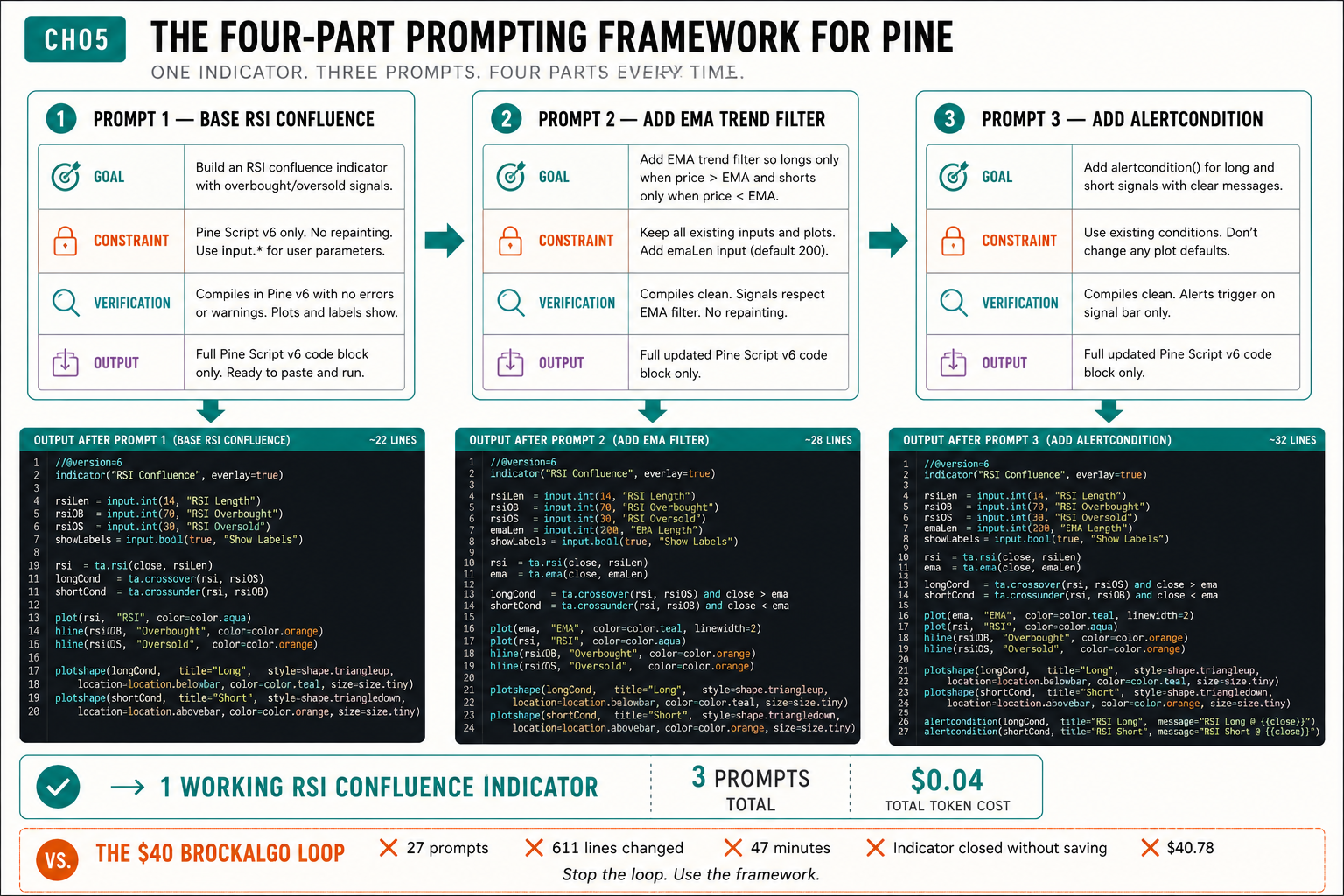
The image is the receipt: one working RSI Confluence indicator, three prompts, ~18 then ~26 then ~32 lines of output, $0.04 total. Here is the sequence.
Prompt 1: Base RSI Confluence (~18 lines).
GOAL: Build a Pine v6 indicator titled "RSI Confluence", overlay=true so it
draws on the price pane. Compute RSI(14) internally. When RSI crosses above 30
from below, draw a small teal up-triangle below the candle on the close of the
confirming bar. When RSI crosses below 70 from above, draw a small orange
down-triangle above the candle.
CONSTRAINT: No other indicators. No strategy{} block. No alerts in this prompt.
Do not set overlay=false.
VERIFICATION: Compiles with //@version=6. Triangles gate on
barstate.isconfirmed. No repeated triangles within the same candle.
OUTPUT: One Pine v6 code block, nothing else.
Prompt 2: Add EMA Trend Filter (~26 lines).
GOAL: Add a 50-period EMA on the price pane in teal. Up-triangle only when
price is above the EMA; down-triangle only when below.
CONSTRAINT: Do not change the RSI calculation or the 30/70 thresholds. Keep
existing variable names. Do not modify the shorttitle.
VERIFICATION: EMA(50) plots in teal. Triangles still gate on
barstate.isconfirmed and now respect the EMA filter.
OUTPUT: One Pine v6 code block of the full updated script. No commentary.
Prompt 3: Add Alertcondition (~32 lines).
GOAL: Add two alertcondition lines at global scope, column zero, one for the
long signal and one for the short, gated on barstate.isconfirmed.
CONSTRAINT: Do not move alertcondition inside any conditional block. Do not
change other logic. Keep variable names goLong and goShort.
VERIFICATION: alertcondition lines at global scope. Compiles under
//@version=6. No alertcondition wrapped in an if-block.
OUTPUT: One Pine v6 code block. No commentary.
Three prompts. One working indicator. About four cents in tokens against the $40.78 BrockAlgo loop. Same Claude, same chart. The difference is that there was nothing left for Claude to guess.
The “stop sucking up” preamble
There is one clause that is not part of the four parts but pairs with them. It is the verbatim fix for the most-cited complaint on the thread, from a chartist named FraGough: “Secret is to be very specific in your request, even then it can take ten tries. Also had to ask it to stop sucking up to me and making irrelevant suggestions.” Put this in your CLAUDE.md or a --system-prompt:
Skip preamble and validation. Do not tell me my idea is great. Do not
summarize what I just asked. Do not say "you're absolutely right" when
correcting your own code. Return the code, ask one clarifying question, or
name the constraint violation. No filler.
It does two things. It cuts the 50-100 tokens of mirror-back plus 50-100 tokens of self-summary per response. And it changes Claude’s stance from validating your choices to challenging the broken ones. You only get useful pushback once you strip the obligation to agree with everything you say.
What broke without the framework
The session that became the running case study used none of this. The prompt was “build me an RSI confluence indicator with TP1, breakeven stop, and alert.” Claude wrote 90 lines. Triangles plotted every candle. Paste the error. Claude rewrote 60 of 90 lines and broke the breakeven. Paste again. By prompt eleven the whole file was being fed back every turn and the replies touched code nobody asked about. 47 minutes, $40.78, nothing saved. The four-part framework is the structural fix for exactly that: a fully specified prompt has no room for the rewrite spiral.
How to apply it
- Write the Goal in 60 seconds. If you cannot, you do not yet know what you are building, and Claude will not figure it out for you.
- Add a Constraint naming what stays fixed: variable names, defaults, no new features.
- Add a Verification: compile expectation, visual expectation, bar-timing expectation.
- Add the Output clause: one Pine block, no preamble.
- Put the “stop sucking up” preamble in CLAUDE.md so it applies every session.
- If three prompts do not ship it, do not paste the broken script back with “fix this.” Open a fresh session, paste the current working script, ask one specific question.
What should you actually do?
- If you prompt in one vague line → split it into Goal / Constraint / Verification / Output. This alone ends most of the loop.
- If Claude rewrites code you did not ask about → your Constraint clause is missing or too soft. Name the variables and the no-new-features rule explicitly.
- If responses are wrapped in three paragraphs of filler → add the Output clause and the “stop sucking up” preamble.
- If a build has gone sideways for five prompts → restart fresh with a paste, do not keep pasting into a poisoned session.
bottom_line
- A goal sentence is a deliverable, not a vibe. If it takes longer than 60 seconds to write, the spec is the problem, not Claude.
- Three prompts beat thirty. The framework is not a productivity hack; it is the structural fix for the specific failure modes that produce the $40 receipt.
- The “stop sucking up” preamble pays twice: fewer tokens and a Claude that catches your bad design decisions instead of applauding them.
Frequently Asked Questions
How do I prompt Claude to write Pine Script that actually compiles?+
Use four parts every prompt: Goal (what to build), Constraint (what not to touch), Verification (what good looks like), Output (the format you want back). Each part removes one cause of the review-debug-paste-repeat loop.
How many prompts should a working indicator take?+
About three. A base build, one feature addition, one alert pass. The four-part framework lands a working indicator in three prompts or fewer roughly 80% of the time; the rest is a one-line gotchas-card lookup.
How do I stop Claude from rewriting code I did not ask it to touch?+
The Constraint clause. Name what Claude is not allowed to change: variable names, input defaults, persistence keywords, features. Add the 'stop sucking up' system preamble so it returns code, not validation.