Claude Code Pine Script Setup: Give It the Manual First
The claude code pine script setup that stops the paste-back loop: a ./docs Pine v6 library, a 3-block CLAUDE.md, path-scoped rules, and a test prompt.
>This is the highest-impact chapter of Build TradingView Signals with Claude Code. The book carries the same scaffold through 12 indicators, the breakeven-SL fix, and the alert-to-Claude loop.
Build TradingView Signals with Claude Code
Ship Pine v6 Indicators, Alerts, Backtests & Webhooks This Weekend
Summary:
- The RAG scaffold that makes Claude read the Pine v6 manual before it writes: a
./docslibrary, a CLAUDE.md, path-scoped rules.- The verbatim Twisttalk pattern, built step by step.
- Result: indicators that compile first try and sessions that cost cents, not $40.
- Deliverable: a reusable folder scaffold for every Pine project.
The claude code pine script setup is one folder, one CLAUDE.md, and one path-scoped rules file, and it is the single change that ends the paste-back loop. You opened Claude Code, asked for an RSI confluence indicator, and got 60 lines that compiled but plotted on the wrong candle. You pasted the error back. Claude said “you’re absolutely right” and rewrote three functions you never touched. Seven pastes later your token meter showed $40 and the script still repainted.
That loop has one root cause, and a chartist named kurtisbu12 said it on r/TradingView: “Pinescript is a niche language. And since most AI is trained off of public things, there’s not much pinescript for it to learn from.” Claude knows the shape of Pine. It guesses on everything that matters, and it guesses with full confidence, which is worse. The fix is to hand it the manual before it writes.
What is the Claude Code Pine Script setup?
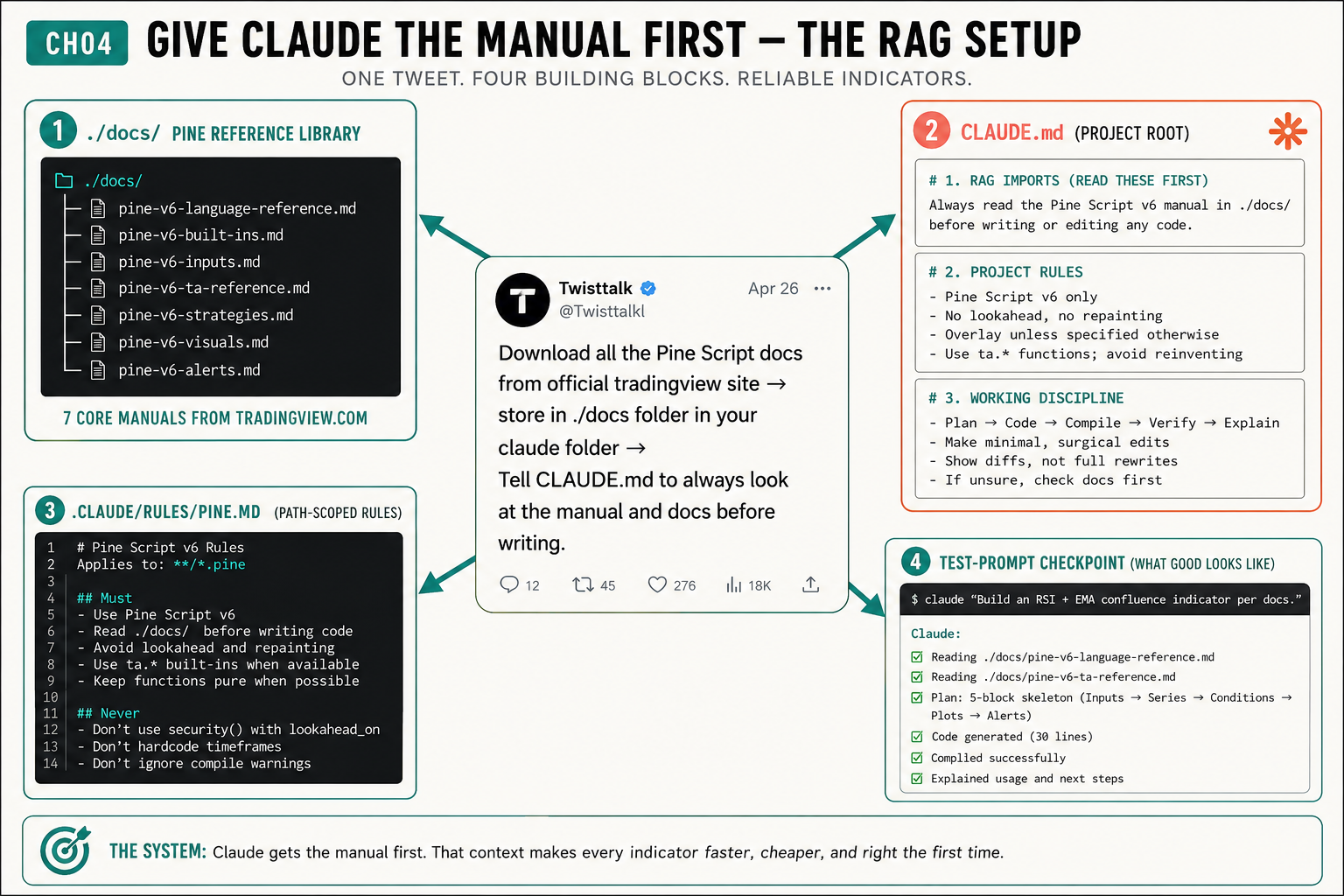
The setup is a retrieval scaffold built from four blocks. It is the verbatim instruction a chartist who posts as Twisttalk dropped on X: “Download all the Pine Script docs from official tradingview site → store in ./docs folder in your claude folder → Tell CLAUDE.md to always look at the manual and docs before writing.” That one tweet is the whole architecture. The four blocks:
- A
./docs/Pine v6 reference library: seven core.mdmanuals saved from tradingview.com. - A
CLAUDE.mdin the project root with three numbered blocks. - A
.claude/rules/pine.mdthat scopes Pine rules to.pinefiles. - A test prompt that proves the setup is live.
It works because Claude Code loads referenced files into context at launch. From the official Claude Code docs:
“CLAUDE.md files can import additional files using
@path/to/importsyntax. Imported files are expanded and loaded into context at launch alongside the CLAUDE.md that references them.”
That single @ line is the mechanism behind the Twisttalk tweet. Claude stops constructing Pine from training fragments and starts reading the v6 reference you saved. (Claude Code docs.)
Build the ./docs Pine v6 library
Make a project folder and a docs directory inside it:
mkdir -p ~/projects/pine-claude/docs
cd ~/projects/pine-claude
Pull the Pine v6 reference and the core user-manual pages into seven markdown files. The cleanest path is a markdown extractor; save the official reference page and the language, built-ins, inputs, ta-reference, strategies, visuals, and alerts sections:
docs/pine-v6-language-reference.md
docs/pine-v6-built-ins.md
docs/pine-v6-inputs.md
docs/pine-v6-ta-reference.md
docs/pine-v6-strategies.md
docs/pine-v6-visuals.md
docs/pine-v6-alerts.md
Seven core manuals from tradingview.com. This is the library Claude reads instead of guessing. Pine v6 is where every new TradingView feature ships: bool strictness, lazy and/or, dynamic for-loop boundaries, when= removed from strategy orders. None of that is in the v5 code Claude was mostly trained on. The docs folder closes that gap.
Write the three-block CLAUDE.md
Save this in the project root as ./CLAUDE.md. It has exactly three numbered blocks, mirrored from the setup’s design:
# 1. RAG IMPORTS (READ THESE FIRST)
Always read the Pine Script v6 manual in ./docs/ before writing or editing any code.

@docs/pine-v6-language-reference.md
@docs/pine-v6-ta-reference.md
@docs/pine-v6-strategies.md

# 2. PROJECT RULES
- Pine Script v6 only
- No lookahead, no repainting
- Overlay unless specified otherwise
- Use ta.* built-ins; avoid reinventing

# 3. WORKING DISCIPLINE
- Plan -> Code -> Compile -> Verify -> Explain
- Make minimal, surgical edits; show diffs, not full rewrites
- If unsure, check docs first. No "you're absolutely right" preambles.
Block 1 is the RAG import: the @docs/ lines that pull the manual into context. Block 2 is your Pine constitution. Block 3 is the discipline that stops the rewrite spiral, drawn verbatim from the two most-cited Reddit complaints: “do not change anything else” and “stop sucking up.”
Claude Code reads four memory scopes in load order, broadest to most specific: Managed (org policy), User (~/.claude/CLAUDE.md, your cross-project preferences), Project (./CLAUDE.md, this file), and Local (./CLAUDE.local.md, gitignored). They concatenate; they do not override each other. For Pine work you only need Project, optionally User. The “three levels: project, user, plugin” framing you see on YouTube is wrong. There is no plugin scope.
Scope the rules to Pine files
Once the project grows past a few indicators, you do not want Pine rules loaded when Claude edits a README. Create .claude/rules/pine.md:
---
paths:
  - "**/*.pine"
---
# Pine Script v6 Rules (path-scoped)
- Use Pine Script v6; read ./docs/ before writing code
- Avoid lookahead and repainting
- Use ta.* built-ins where available
- Never use security() with lookahead_on without a [1] offset
- Don't hardcode timeframes; don't ignore compile warnings
Now the Pine rules only enter context when Claude touches a .pine file. On a large project with backtests and notes folders, the token savings compound.
What broke without it
Here is the failure this scaffold prevents, from the session that became the book’s running case study. One-line prompt: “build me an RSI confluence indicator with TP1, breakeven stop, and alert.” Claude wrote 90 lines in 12 seconds. It compiled. The triangles plotted every candle because the signal was not gated on barstate.isconfirmed. Pasted the error back. Claude rewrote 60 of 90 lines. The breakeven stop fired before TP1. Pasted again. Claude rewrote 70 lines. By prompt eleven the whole 90-line file was being fed back every turn. Session: 47 minutes, $40.78, indicator closed without saving.
The next session had the ./docs folder, the CLAUDE.md, and a four-part prompt. Same indicator. Three prompts. It came together by the second and behaved correctly by the third. Any compiler nit was a one-line lookup, not a paste spiral. Receipt: $1.83. Same chart, same reader, same Claude. The only difference was the manual.
Run the test prompt checkpoint
Do not trust the setup until you prove it. Open Claude Code in the project folder and paste the checkpoint prompt from the setup:
claude "Build an RSI + EMA confluence indicator per docs"A wired-up setup answers like the checkpoint shows: Reading ./docs/pine-v6-language-reference.md → Reading ./docs/pine-v6-ta-reference.md → Plan: 5-block skeleton (Inputs → Series → Conditions → Plots → Alerts) → Code generated (30 lines) → Compiled successfully → Explained usage. If Claude generates Pine without naming a doc it read, the imports are not loading. Run ls docs/, confirm the @docs/ lines are in CLAUDE.md, and restart the session. Imports load at session start, and a stale session will not pick up new ones.
What should you actually do?
- If you have never set this up → build the
./docslibrary and the three-block CLAUDE.md before you write another prompt. It is the highest-impact 30 minutes in your Pine workflow. - If you have a CLAUDE.md but no
./docsimports → add the@docs/block. Rules without the manual still leave Claude guessing v6 syntax. - If your project has grown past a few indicators → move the Pine rules into
.claude/rules/pine.mdso they only load on.pinefiles. - If the test prompt fails → check the three files exist and have content, then restart Claude Code. Do not keep prompting a stale session.
bottom_line
- The setup is the skill. A chartist who “knows zero coding” ships reliable Pine because the environment reads the manual, not because they learned the language.
- Bundle what is thin, trust base knowledge for what is not. Pine training data is sparse; that is the entire reason this scaffold exists. You do not need a Python doc bundle. You need the Pine one.
- Copy this folder into every new Pine project on day one. The scaffold compounds: every indicator you build after this rides on it.
Frequently Asked Questions
Why does Claude write broken Pine Script without this setup?+
Pine is a niche language with thin public training data. Claude knows the shape of Pine but guesses on v6-versus-v5 differences, request.security lookahead, and breakeven logic. Feeding it the v6 manual at session start turns it from a guesser into a reader.
How many CLAUDE.md files do I need for Pine work?+
One project CLAUDE.md in the project root with three blocks: RAG imports, project rules, working discipline. Optionally one ~/.claude/CLAUDE.md for preferences that apply to every project. The .claude/rules/pine.md path-scoped file is the third piece.
How do I know the setup is actually working?+
Run the test prompt: ask Claude the v6 ternary line-continuation rule. A wired-up setup names the deeper-indent rule and recommends switch. If it says the absolute 'ternaries cannot span lines,' the imports are not loading.