How to Set Up Hermes Agent Skills That Compound Over Time
>This covers the skill system. Zero-Human Companies goes deeper on composing Hermes with Paperclip into a full autonomous business.
Zero-Human Companies
Build an Autonomous AI Business with Hermes Agent + Paperclip
Summary:
- Hermes Agent has three skill sources: builtin, hub-installed, and agent-generated.
- All skills write to
~/.hermes/skills/as inspectable SKILL.md files.- The agent creates its own skills after complex tasks via
skill_manage.- You get the full
hermes skillscommand surface and a management workflow.
Most AI agents start from zero every session. You paste context, explain preferences, re-teach the same workflow. Hermes Agent is a self-improving AI agent that works differently. It saves workflows as files on disk. Next time the task matches, it loads the file and already knows what to do. Run a competitive analysis three times. By the fourth, the agent already knows the format, the data sources, and your preferences.
The repo sits at 83.6k GitHub stars with the tagline “The agent that grows with you.” The growth is the skill library. Not the model. The model stays the same. The skills compound.
What are the three skill sources?
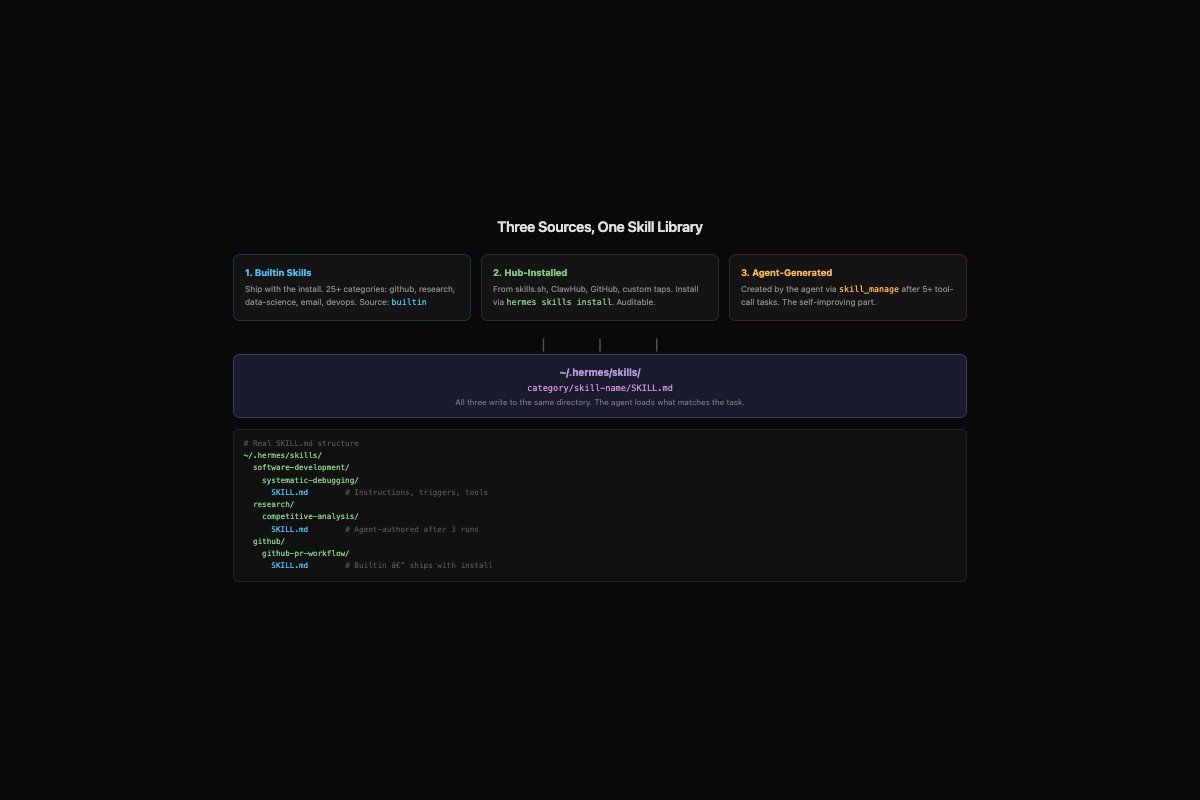
Skills are SKILL.md files stored in ~/.hermes/skills/, organized by category. The agent loads matching skills at the start of every task based on the task description. Three mechanisms feed the library.
Builtin skills ship with the install. Run hermes skills list on a fresh install and you see 25+ categories: github, research, data-science, email, devops, creative, social-media. Each category has multiple skills. The github-pr-workflow skill knows how to draft PRs. The jupyter-live-kernel skill runs code in a live Jupyter kernel.
Hub-installed skills come from external registries. Install via hermes skills install from skills.sh, ClawHub, GitHub repos, or custom taps. Works like Homebrew: add a tap, browse, install. Each skill has a trust level and can be audited.
Agent-generated skills are created by the agent itself via the skill_manage tool. This is the self-improving part. The agent creates skills when it completes complex tasks (5+ tool calls), recovers from errors, or finds patterns worth reusing.
All three write to the same directory. The agent doesn’t distinguish between them when loading.
How do you check what skills you have?
Run this after install:
hermes skills listOutput on a real install:
                            Installed Skills
┏━━━━━━━━━━━━━━━━━━━━━━━━━━━━┳━━━━━━━━━━━━━━━━━━━━━━┳━━━━━━━━━┳━━━━━━━━━┓
┃ Name                       ┃ Category             ┃ Source  ┃ Trust   ┃
┡━━━━━━━━━━━━━━━━━━━━━━━━━━━━╇━━━━━━━━━━━━━━━━━━━━━━╇━━━━━━━━━╇━━━━━━━━━┩
│ github-pr-workflow         │ github               │ builtin │ builtin │
│ systematic-debugging       │ software-development │ builtin │ builtin │
│ jupyter-live-kernel        │ data-science         │ builtin │ builtin │
│ himalaya                   │ email                │ builtin │ builtin │
│ claude-code                │ autonomous-ai-agents │ builtin │ builtin │
│ ...                        │                      │         │         │
The Source column tells you where it came from. builtin shipped with the install. Hub-installed skills show the registry name. Agent-generated skills show self.
What does a SKILL.md file actually look like?
Open any skill on disk. Real path: ~/.hermes/skills/software-development/systematic-debugging/SKILL.md
---
name: systematic-debugging
category: software-development
trigger: "debug|error|bug|fix|broken|failing"
tools: [terminal, file]
---

# Systematic Debugging

When asked to debug an issue:

1. Reproduce the error first. Run the failing command and capture output.
2. Read the error message carefully. Most errors tell you exactly what's wrong.
3. Check recent changes. Run `git diff` to see what changed.
4. Fix one thing at a time. Verify the fix before moving on.
5. If the fix works, run the full test suite to check for regressions.

## Do NOT
- Guess at fixes without reproducing first
- Change multiple things simultaneously
- Ignore test failures after a "fix"
That’s the full format. YAML frontmatter with name, category, trigger pattern, and required tools. Markdown body with the instructions. The trigger field is a regex. If your task description matches it, the agent loads the skill.
You can edit any skill file directly. Delete bad ones. Share them across machines by copying the directory.
How do you install skills from the hub?
The full command surface has 13 operations:
hermes skills browse              # paginated browse of all registries
hermes skills search "research"   # search by keyword
hermes skills inspect research-comparison-table  # preview before install
hermes skills install research-comparison-table   # install it
hermes skills audit               # security re-scan of installed skills
hermes skills check               # check for updates
hermes skills update              # apply updates
hermes skills tap add my-org/my-tap  # add a custom source
hermes skills uninstall old-skill    # remove a skill
# Copy-paste: install three skills useful for research agencies
hermes skills install research-comparison-table
hermes skills install citation-verification
hermes skills install competitive-analysisAfter install, these sit in ~/.hermes/skills/ alongside builtins. The agent loads them when the task description matches their trigger patterns.
What broke when I first set up skills?
Two things. First, a hub skill I installed had a trigger pattern too broad: trigger: ".*". It loaded on every task and wasted tokens on irrelevant context. Fix: inspect the trigger field before installing. If the trigger is a wildcard, the skill loads everywhere. Run hermes skills inspect <name> and check the trigger before you commit.
Second, agent-generated skills sometimes encode a workflow that worked once but isn’t general. The agent solved a specific problem with a specific sequence of commands, saved it as a skill, and then applied that same sequence to a different problem where it made things worse. Fix: review agent-generated skills within the first week. Open ~/.hermes/skills/ and read the ones with source: self. Delete the ones that are too specific. Keep the ones that encode genuinely reusable patterns.
How do you keep the skill library fast?
Past 50 skills, the agent slows down at matching. Too many candidates to evaluate per task. Prune monthly:
# List non-builtin skills (the ones you can remove)
hermes skills list | grep -v builtin

# Audit all hub-installed skills for security
hermes skills audit

# Export your skill config for backup
hermes skills snapshot export > my-skills-snapshot.json

# Import on another machine
hermes skills snapshot import < my-skills-snapshot.json
The snapshot command is how you replicate a skill library across machines. Export on your laptop, import on your VPS. Same skills, same agent behavior.
For pruning: if you haven’t used a skill in 30 days, archive it. The function below checks skill freshness:
import os
import time

def find_stale_skills(skills_dir="~/.hermes/skills", days_threshold=30):
    """Find skills not modified in N days. Review candidates for archival."""
    skills_dir = os.path.expanduser(skills_dir)
    cutoff = time.time() - (days_threshold * 86400)
    stale = []
    for root, dirs, files in os.walk(skills_dir):
        for f in files:
            if f == "SKILL.md":
                path = os.path.join(root, f)
                if os.path.getmtime(path) < cutoff:
                    skill_name = os.path.basename(os.path.dirname(path))
                    age_days = int((time.time() - os.path.getmtime(path)) / 86400)
                    stale.append({"skill": skill_name, "age_days": age_days, "path": path})
    return sorted(stale, key=lambda x: x["age_days"], reverse=True)

# Usage: plug in your threshold
for s in find_stale_skills(days_threshold=30):
    print(f"  {s['age_days']}d stale: {s['skill']}")
Move stale skills to a backup directory outside ~/.hermes/skills/. The agent only loads from the active directory. If you need one back, move it in.
What should you actually do?
- If you just installed Hermes: run
hermes skills listand read three builtin SKILL.md files. Understanding the format is the foundation. - If you want domain-specific skills: install hub skills with
hermes skills install, then author your own by creating SKILL.md files in~/.hermes/skills/<category>/<name>/. - If you’re running multiple agents via Paperclip: all agents on the same machine share
~/.hermes/skills/. One agent’s discovery becomes every agent’s capability.
bottom_line
- Skills are files on disk. You can read them, edit them, delete them, share them. No black box.
- The agent gets better by growing its skill library, not by changing the model. Month 6 is qualitatively different from month 1.
- Review agent-generated skills within the first week. Keep the good ones, delete the too-specific ones. Curation is the job.
Frequently Asked Questions
How does Hermes Agent improve itself over time?+
Hermes saves reusable workflows as SKILL.md files in ~/.hermes/skills/ after completing complex tasks. These skills load automatically on future similar tasks, so the agent gets faster and more consistent without model changes.
Can I install skills from other people into Hermes Agent?+
Yes. Run hermes skills install to pull skills from skills.sh, ClawHub, GitHub repos, or custom taps. Each installed skill gets audited and stored alongside builtin skills.
What triggers Hermes to create a new skill automatically?+
The agent creates skills via the skill_manage tool after completing tasks with 5+ tool calls, recovering from errors, or discovering non-trivial workflows likely to be reused.
More from this Book
How Much Does a Hermes + Paperclip Company Cost to Run?
Real Hermes + Paperclip company costs by tier. Verified API pricing, a copy-paste cost calculator, and the $28.50/month 6-agent production setup.
from: Zero-Human Companies
8 Hermes + Paperclip Failures (and How to Fix Each One)
Why Hermes and Paperclip agents break in production. 8 failure modes from real GitHub issues with copy-paste fixes and a diagnostic function.
from: Zero-Human Companies
Build an AI Research Agency on Hermes + Paperclip
5-agent research agency on Paperclip with Hermes workers. Full JSON configs, $0.09/report cost math, and the ramp to $6K/month.
from: Zero-Human Companies
Connect Hermes Agent to Paperclip with hermes_local
Step-by-step setup for the Paperclip hermes_local adapter. Full config schema, heartbeat loop, environment variables, and the persistSession bug workaround.
from: Zero-Human Companies