Write a Hermes SKILL.md the Agent Actually Uses
How to write a Hermes skill: the SKILL.md format, the three ways skills reach the agent, and a copy-paste template the matcher actually loads with hermes -s.
>This is one hand-authored skill. Zero-Human Companies goes deeper on the skill library as a moat, agent-authored skills, and how the stack compounds over six months.
Zero-Human Companies
Build an Autonomous AI Business with Hermes Agent + Paperclip
Summary:
- Write a Hermes skill as a
SKILL.mdfile the agent’s matcher actually loads.- Understand the three origins: builtin, hub (
agentskills.io), and agent-authored.- Force-load and test your skill with
hermes -s <skill-name>.- Copy-paste a complete, valid SKILL.md template plus the one mistake that stops it loading.
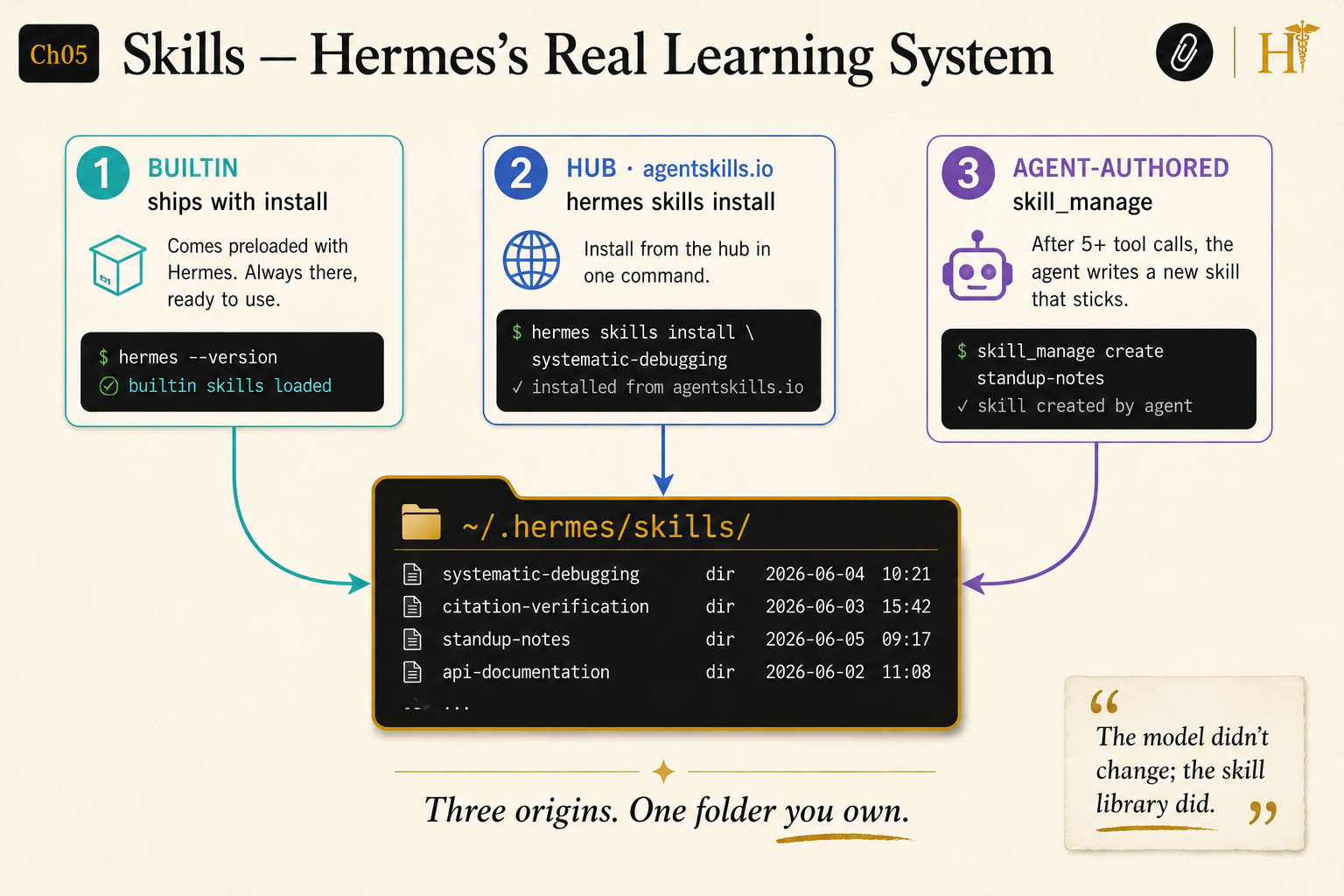
Here is how to write a Hermes skill the agent will actually load and follow, instead of a file that just sits on disk. A skill is a SKILL.md file: YAML frontmatter the matcher reads, plus a markdown body the agent follows. Skills are how a Hermes agent gets better over time without changing the model. As the book puts it: the model did not change, the skill library did. Get one skill right and you understand the whole system.
Where do Hermes skills come from?
Three origins, and all three write to the same ~/.hermes/skills/ folder. Three origins, one folder you own:
- Builtin ships with the install. Dozens of skills across categories, shown by
hermes skills listwith Sourcebuiltin. - Hub, installed from
agentskills.io(the canonical Skills Hub) withhermes skills install <name>. - Agent-authored, written by the agent itself via the
skill_managetool after a complex, successful task. The documented threshold is five or more tool calls; the book’s own diagram fires after seven.
After a while of installing and authoring, your folder looks like this:
~/.hermes/skills/
├── software-development/systematic-debugging/
├── research/citation-verification/
├── personal/standup-notes/
└── github/api-documentation/
The agent does not care which origin a skill came from. It loads whatever matches the task.
What does a real SKILL.md look like?
Lean. Here is a real published skill, the upstream systematic-debugging, verbatim from its repo:
---
name: systematic-debugging
description: Use when encountering any bug, test failure, or unexpected behavior, before proposing fixes
---

# Systematic Debugging

## Overview

Random fixes waste time and create new bugs. Quick patches mask underlying issues.

**Core principle:** ALWAYS find root cause before attempting fixes. Symptom fixes are failure.
Source: obra/superpowers, skills/systematic-debugging/SKILL.md. Note how little is required: the real frontmatter is just name and description. Everything else is optional. The description is the most important line in the file, because it is what the matcher reads to decide whether to load the skill for a given task.
How do you write your own skill?
Make the folder, then write the file. The name in the frontmatter must match the folder name, or the loader skips it silently.
mkdir -p ~/.hermes/skills/personal/standup-notesThen paste this complete, valid SKILL.md into ~/.hermes/skills/personal/standup-notes/SKILL.md. It is the smallest file that loads cleanly and that hermes -s will pick up: full frontmatter plus the three body sections the matcher reads.
---
name: standup-notes
description: When asked to summarize work into a standup update, produce a
  three-line "Yesterday / Today / Blockers" note in plain text.
version: 1.0.0
author: Your Name
license: MIT
metadata:
  hermes:
    tags: [standup, summary, status, notes]
---

# Standup Notes

## Overview

Turns a description of recent work into a tight standup update. No filler,
exactly three lines.

## When to Use

Use when the task mentions:
- "standup"
- "status update"
- "what I did yesterday"

## Procedure

1. Read the work the user describes.
2. Write exactly three lines, each starting with a label:
   `Yesterday:`, `Today:`, `Blockers:`.
3. Keep each line under 20 words. If there are no blockers, write
   `Blockers: none`.
The description and the When to Use triggers are what get this skill matched against a task. The Procedure is what the agent follows once it is loaded. Write the procedure like instructions for a competent stranger, because that is effectively what the model is on any given run.
How do you test that it loaded?
Force-load it past the automatic matcher with -s:
hermes -s standup-notes chat -q "Summarize: shipped the auth fix, reviewing the API PR, waiting on design."What you should see is a three-line Yesterday / Today / Blockers note instead of a paragraph. If the agent ignores the format, the skill did not load.
What broke: the skill that silently won’t load
The single most common failure is a name that does not match its folder. If the folder is standup-notes but the frontmatter says name: standup, the loader skips the file with no error. The second most common is mis-indented YAML under metadata: it must be two spaces to hermes:, two more to tags:. When hermes -s standup-notes does nothing, check those two things first, in that order.
The fix is mechanical: make name exactly match the folder, fix the indentation, re-run the -s command. No restart needed; the agent reads skills fresh at the start of every task, so your edits apply on the next session.
How does this become self-improving?
Once you have a few skills, the agent starts authoring its own. After a complex task that took real reasoning and some error recovery, Hermes evaluates whether the workflow is worth saving and, if so, calls skill_manage to write a new SKILL.md. Curate these: read what the agent saved, delete the overly specific ones, sharpen the good ones. That curation loop is how the library compounds. Week one you run on builtins. Week three the agent is authoring skills from your tasks and your prompts get shorter because the procedure is encoded in the files, not retyped every session.
What should you actually do?
- If you are starting out → write one hand-authored skill for a workflow you repeat, and test it with
hermes -s. - If a skill will not load → check that
namematches the folder, then check themetadataindentation. - If the agent loads too many skills per task → your
descriptionand tags are too broad. Narrow them so the matcher is precise. - If you write a skill worth sharing → publish it to
agentskills.iowithhermes skills publishso other people’s agents get it too.
The bottom line
- A skill is a text file.
name,description, and a procedure are enough. Thedescriptiondoes the matching, so write it like a trigger. - The library is the compounding asset, not the model. Back up
~/.hermes/skills/, put the good ones in git, and curate the agent-authored ones weekly. - Test every new skill with
hermes -s <name>before you trust it in a real run. A skill that does not load is a file, not a capability.
Frequently Asked Questions
How do I write a Hermes skill?+
Create a folder under ~/.hermes/skills/<category>/<skill-name>/ and put a SKILL.md inside it with YAML frontmatter (at minimum name and description) and a markdown body with Overview, When to Use, and Procedure sections. The name field must match the folder name.
Where do Hermes skills come from?+
Three places, all writing to the same ~/.hermes/skills/ folder: builtin skills that ship with Hermes, hub skills installed from agentskills.io, and agent-authored skills the agent writes itself via skill_manage after a complex task.
Why won't my Hermes skill load?+
Almost always the name field does not match the folder name, so the loader skips it, or the YAML under metadata is mis-indented. Force-load it with hermes -s <skill-name> to test, and fix the frontmatter until it picks up.