How Claude Code Actually Works: The Tool System
Claude Code architecture and tools, explained: every prompt fires a named tool call. Map Read, Edit, Grep, Bash, Agent, and MCP, then prompt to hit first try.
>This maps the tool system. Master Claude Code goes deeper on the planning pipeline, the permission layers, the context machine, and building your own tool reference sheet.
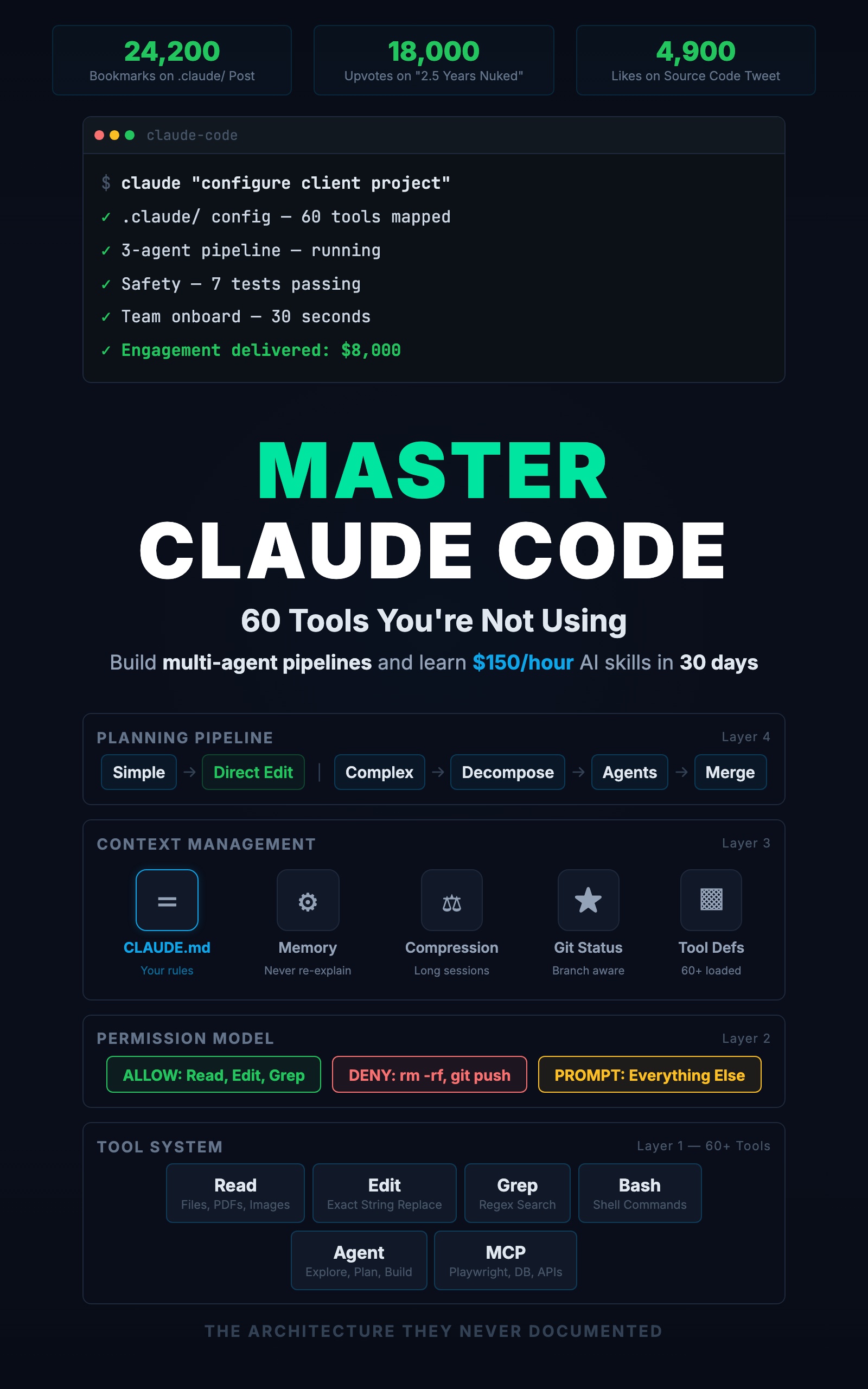
Master Claude Code: 60 Tools You're Not Using
Build Multi-Agent Pipelines and Learn $150/Hour AI Skills in 30 Days
Summary:
- Claude Code is a tool-calling agent, not a chatbot. Every prompt fires a named tool.
- The public docs list ~40 tools; the community counted ~60; most developers use six.
- Map each prompt shape to its tool, then prompt to skip the steps you can skip.
- Three facts (exact-string edits, resetting shell state, three subagent modes) change how you work.
Claude Code architecture tools are what the source leak actually exposed. Someone reverse-engineered what ships inside the package, posted it, and it went viral. People expected a chatbot with extra steps. What they found was an agent framework: a tool system, a permission model, a context manager, and a planning pipeline. Once you can see which tool fires for each prompt, you stop fighting the tool and start steering it. This is the map.
What is Claude Code’s architecture?
Claude Code is a tool-calling agent. It does not “generate an answer” the way a chat model does. It decomposes your request into a sequence of named tool calls, each passing through a permission check and operating inside a managed context. The community catalogued around 60 internal tool names; the public docs name about 40; most developers use six (read a file, edit a file, run a command, search, write, explain).
Tool names are the exact strings used in permission rules and hook matchers. Here are the core ones, from the tools reference:
| Tool | What it does | Permission required |
|---|---|---|
| Read | Reads files (code, PDFs, images) | No |
| Edit | Exact string replacement | Yes |
| Write | Creates or overwrites files | Yes |
| Glob | Finds files by name pattern | No |
| Grep | Searches file contents | No |
| Bash | Runs shell commands | Yes |
| Agent | Spawns subagents | No |
| WebFetch | Pulls content from a URL | Yes |
Every prompt maps to a tool call
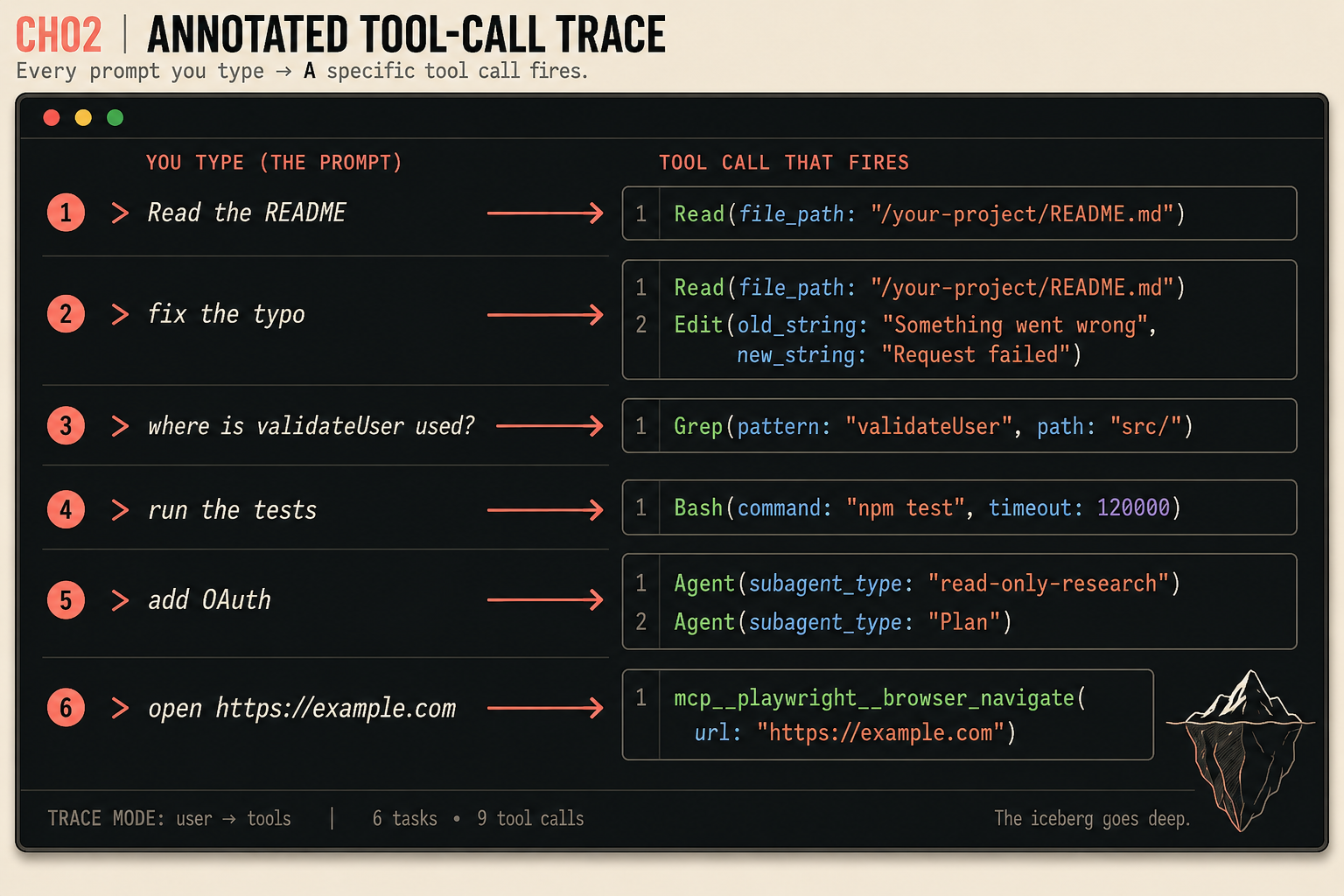
The fastest way to read the architecture is to watch what fires for each request. Six prompts, the exact tool calls behind them, and how knowing changes your prompt:
| You type | Tool call that fires | Prompt differently by |
|---|---|---|
| ”Read the README” | Read(file_path: "/your-project/README.md") | Pointing at a line range on big files |
| ”fix the typo” | Read + Edit(old_string: "Something went wrong", new_string: "Request failed") | Naming the function when the string repeats |
| ”where is validateUser used?” | Grep(pattern: "validateUser", path: "src/") | Narrowing the path to skip a full scan |
| ”run the tests” | Bash(command: "npm test", timeout: 120000) | Telling it the expected runtime |
| ”add OAuth” | Agent(subagent_type: "read-only-research") + Agent(subagent_type: "Plan") | Asking for research-then-plan explicitly |
| ”open https://example.com” | mcp__playwright__browser_navigate(url: "https://example.com") | Configuring the MCP server first |
Those six tasks fan out to nine tool calls (the typo fix is a Read then an Edit; OAuth spawns two agents). Every action is one named call. Nothing is magic. The search task, for example, fires exactly this:
Claude Code calls: Grep
  pattern: "validateUser"
  path: "src/"
Three files come back with line numbers. Help it narrow and that call gets cheaper.
The three facts that change how you prompt
Edit is an exact string replacement, not a rewrite. When you ask for a change, Claude Code finds a specific string and swaps it. The rest of the file is untouched:
Claude Code calls: Edit
  file_path: src/lib/errors.ts
  old_string: "Something went wrong"
  new_string: "Request failed"
If that string is not unique, the edit fails and Claude Code grabs more surrounding context to make the match unambiguous. That is why you sometimes see it target a 10-line block for a 1-line change. So when an edit could be ambiguous, name the location: “change the error message in the createUser function” beats “change the error message” when there are five of them.
Shell state does not persist between Bash calls. If Claude Code runs export MY_VAR=hello and then echo $MY_VAR in a separate call, the variable is empty. The working directory persists; environment variables and aliases reset. That is why a setup-then-build has to chain in one call:
npm install express-rate-limit && npm run buildThe Agent tool has three modes. A read-only research subagent scans the codebase fast and can’t edit. A Plan agent designs an approach, read-only. A general-purpose agent has full access and does the work. For a complex task, spell it out: “use a read-only research subagent to map the current auth system, then plan the OAuth addition, then build it.” You are telling Claude Code to use its deepest feature instead of guessing at it.
What should you actually do?
- Run the six prompts above on a real project and watch the tool call in each output. Confirm you can predict the tool before it fires.
- When you ask for an edit in a file with repeated strings, name the function or the line. You save the failed-match retry.
- When you search, narrow the path.
Grep(pattern, path: "src/routes/")is cheaper than scanning the whole repo. - For anything multi-step, name the subagent modes (research, then Plan, then build). Vague prompts make the planner guess; specific ones eliminate the guesses.
- If a long session feels slow or Claude Code keeps re-reading files, start a fresh one. Compression dropped the details, and a clean context reads precisely.
The bottom line
- Claude Code is not a chatbot. Read reads, Edit replaces strings, Grep searches, Bash runs, Agent spawns subagents. Every action is a named tool call through a permission gate.
- The diff between using Claude Code and mastering it starts with knowing which tool fires, because that is what lets you write the prompt that hits on the first attempt.
- The specific tool names will shift as the tool evolves. The understanding of how a tool-calling agent works is the part that lasts, and it is the part the source leak could not hand anyone who had not already watched it run.
Frequently Asked Questions
Is Claude Code a chatbot?+
No. Claude Code is a tool-calling agent. Every prompt you type fires named tool calls: Read reads files, Edit replaces strings, Grep searches contents, Bash runs commands, Agent spawns subagents. Understanding which tool fires lets you write prompts that hit on the first try.
How many tools does Claude Code have?+
The public docs list about 40 built-in tools. The community catalogued around 60 internal tool names by reverse-engineering the shipped package. Most developers use about six: read, edit, run, search, write, and explain.
Why does Claude Code re-read a file it already looked at?+
Because earlier reads get compressed out of context in long sessions. When it needs the details again, it re-reads. For multi-step work, start a fresh session so every read stays precise.