Build an AI Coding Agent From Scratch in Python
Build an AI coding agent from scratch in Python: the ~150-line agent loop that reads files, writes code, runs tests, and stops on its own. No framework.
>This builds the loop. Agentic Coding: Build the Harness adds the six layers around it: context, guardrails, tools, verification, recovery, and orchestration.
Agentic Coding: Build the Harness
The Loop, Guardrails, and Verification That Make Your AI Coding Agent Reliable on Real Code, Not Just Demos
Summary:
- Build an AI coding agent from scratch in Python in about 150 lines.
- The whole thing is one loop: call the model, run the tool it asks for, feed the result back, repeat.
- It reads a file, writes a function, writes a test, runs the test, and stops on its own.
- You get a runnable
rig.pyyou understand top to bottom, not a framework you rent.
You can build an AI coding agent from scratch in about 150 lines of Python. Not a framework wrapper. The actual loop that reads a file, writes code, runs the test, sees the result, and decides it is done, all on its own, in your terminal. Every explainer defines the loop and then shows you a diagram. We are going to write it.
What is the agent loop, exactly?
An agent is a model in a loop with tools. The loop has four beats, and the cleanest statement of them comes from the team that builds Claude Code:
In Claude Code, Claude often operates in a specific feedback loop: gather context → take action → verify work → repeat. With the agent loop in mind, you can build reliable agents that are easy to deploy and iterate on. — Anthropic, Building agents with the Claude Agent SDK
Gather context: put the right information in front of the model. Take action: let it call a tool, and actually run it. Verify work: check what happened. Repeat: feed the result back and go around again, until the model stops asking for tools. That last part is the whole control flow. A chatbot takes the first reply and stops. An agent keeps going.
The piece that trips people up: the model never touches your machine. It only emits text that says “I would like to run read_file with this path.” Your code reads the file and hands the contents back as more text. The model is the brain in a jar. Your loop is the body.
How do you build the agent loop in Python?
You build it in four pieces in one file. Call the project rig. Install the one dependency with pip install openai.
Step 1: the model seam. One client, pointed by an environment variable, so you can swap providers without touching the loop. Every major provider and local server speaks the OpenAI-compatible shape, so this same code runs against OpenAI or a local model through Ollama.
import json, os, subprocess, sys
from openai import OpenAI

client = OpenAI(
    base_url=os.environ.get("RIG_BASE_URL", "https://api.openai.com/v1"),
    api_key=(os.environ.get("RIG_API_KEY") or "not-needed-for-local"),
)
MODEL = os.environ["RIG_MODEL"]   # a model id your endpoint serves
Step 2: the tools. Three plain functions. This is the entire set of things the agent can do: read a file, write a file, run a shell command. Enough to do real work, and enough to do real damage, which is a problem for later.
def read_file(path):
    with open(path) as f:
        return f.read()

def write_file(path, content):
    with open(path, "w") as f:
        f.write(content)
    return f"wrote {len(content)} chars to {path}"

def run(command):
    p = subprocess.run(command, shell=True, capture_output=True, text=True, timeout=120)
    return f"exit_code={p.returncode}\n{p.stdout}\n{p.stderr}"

TOOLS = {"read_file": read_file, "write_file": write_file, "run": run}
Step 3: the schemas. The model cannot guess what your tools are. You describe each one in the OpenAI function-calling shape so the model knows what it can call and what arguments to pass. (One detail to bank: the field is parameters. Anthropic’s API calls the same thing input_schema, and confusing the two is the most common cross-provider bug.)
TOOL_SCHEMAS = [{"type": "function", "function": {
    "name": "read_file",
    "description": "Read a UTF-8 text file and return its full contents.",
    "parameters": {"type": "object",
                   "properties": {"path": {"type": "string"}},
                   "required": ["path"]}}}]
# ...write_file and run follow the same shape.
Step 4: the loop. This is the heart, about twenty lines. Read it slowly.
def run_loop(task, max_turns=25):
    messages = [{"role": "system", "content": "You are a coding agent. Read a file before editing it. Run the tests. Stop when they pass."},
                {"role": "user", "content": task}]
    for turn in range(1, max_turns + 1):
        msg = client.chat.completions.create(
            model=MODEL, messages=messages, tools=TOOL_SCHEMAS).choices[0].message
        messages.append(msg)                 # put the assistant turn back first
        if not msg.tool_calls:               # no tool call means it is done
            print(f"[rig] done: {msg.content}")
            return msg.content
        for c in msg.tool_calls:
            args = json.loads(c.function.arguments)   # arguments is a JSON STRING
            print(f"[rig] turn {turn}: {c.function.name}({args})")
            result = TOOLS[c.function.name](**args)
            messages.append({"role": "tool", "tool_call_id": c.id, "content": str(result)})
    return "stopped: hit max turns"
That for turn in range(...) instead of while True is deliberate. It is the most primitive safety mechanism in the whole agent: a hard cap so a model that never decides it is done cannot burn your API budget overnight.
How do you run it on a real task?
Set your endpoint and model, then hand it the smoke-test task that follows you through the whole build: add an apply_discount(price, pct) function to a file, with a test.
export RIG_API_KEY=sk-...
export RIG_MODEL=<a model your provider serves>
python rig.py "Add apply_discount(price, pct) to pricing.py and a test. pct is a percent, so 20 means 20% off. Run the test."
Watch the four beats fire in order:
[rig] turn 1: read_file({'path': 'pricing.py'})
[rig] turn 2: write_file({'path': 'pricing.py', ...})
[rig] turn 3: write_file({'path': 'test_pricing.py', ...})
[rig] turn 4: run({'command': 'pytest -q'})
[rig] done: Added apply_discount and a passing test. 1 passed.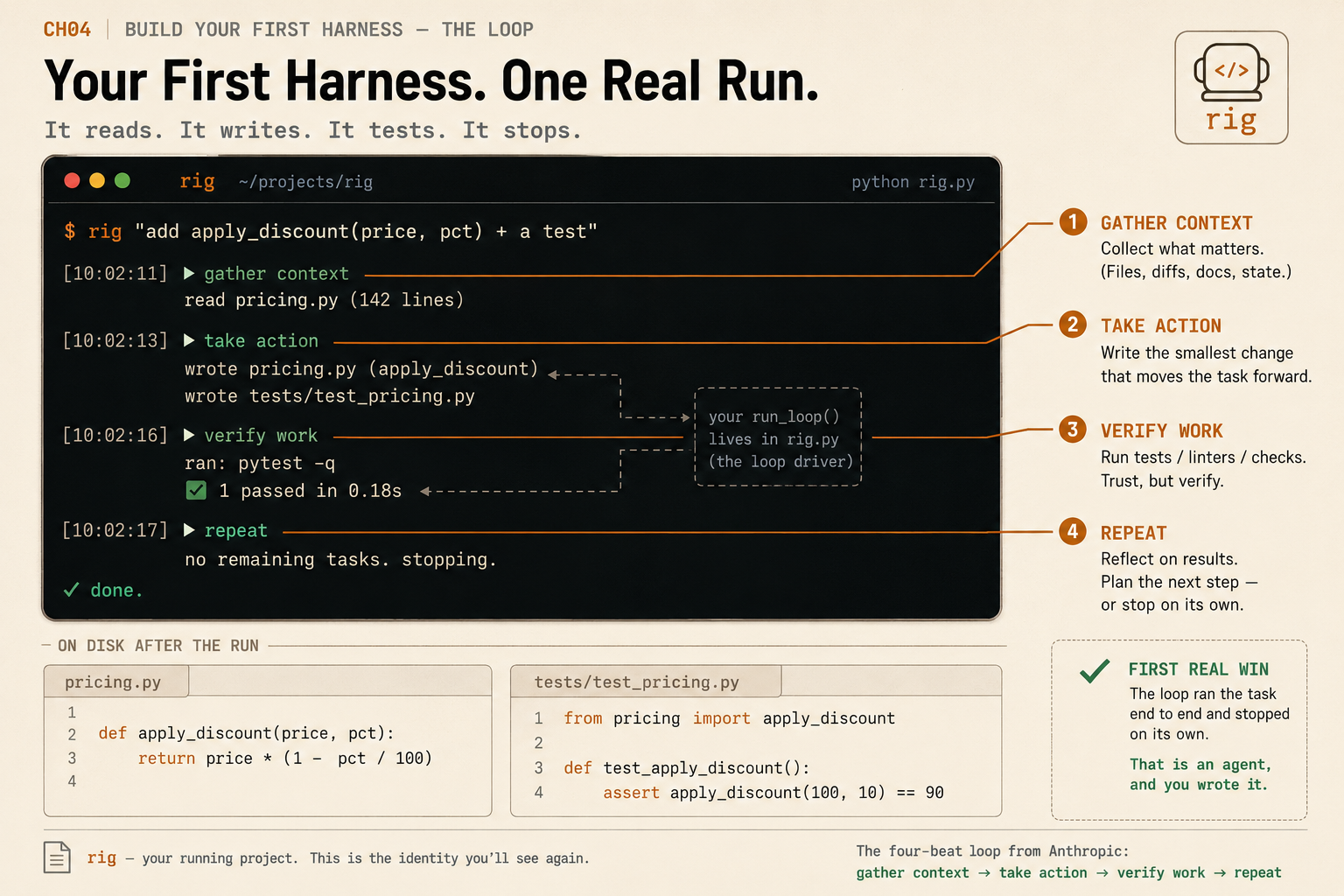
This is not a recording. Open the file and the work is on disk. The agent read the existing file before touching it, wrote the function with the correct math, wrote a test for it, ran the test, saw it pass, and stopped because the work was done.
# pricing.py
def apply_discount(price, pct):
    return price * (1 - pct / 100)   # apply_discount(100, 20) == 80
What broke the first time
Hand the same loop a bigger task, one that touches three files, and you will watch three failures, often all three.
It loses the plot. The conversation grows every turn, and the model re-reads the same file it already read, because nothing in the loop remembers what it has seen.
[rig] turn 7:  read_file({'path': 'pricing.py'})
[rig] turn 12: read_file({'path': 'pricing.py'})   # already read it on turn 7
It does something reckless. The run tool will execute any string the model emits, including rm -rf build && git checkout ., and run it without a pause.
It lies about being done. The model says “tests pass” and stops when pytest printed 1 failed, because nothing forces it to be honest about what the tool returned.
None of these are model problems. A smarter model loses the plot more slowly and lies a little less, but it still does all three, because all three are jobs the loop does not do yet. You did not build a bad agent. You built the loop correctly. What it cannot do yet, remember, restrain itself, and tell the truth about its own work, is the rest of the harness around it.
The one variable that trips everyone
When the model calls a tool, c.function.arguments is a JSON-encoded string, not a dictionary:
# what the model hands back
arguments = '{"path": "pricing.py"}'   # a STRING
args = json.loads(arguments)           # {'path': 'pricing.py'}  <- now a dict
Skip the json.loads and you crash on the first real tool call with a confusing TypeError. The other classic trap: you must append the assistant’s message (the one carrying the tool calls) to messages before you append the tool results, or the API rejects the request. Both are five-second fixes once you have seen them, and neither is a flaw in the loop.
What should you actually do?
- If you have never built an agent → type all four pieces into one file and run the smoke-test task. Watch the loop fire. That single run teaches more than ten explainer videos.
- If your agent keeps re-reading files or losing the goal → that is the missing context layer, not a weak model. Add a progress note and trim the window before you reach for a bigger model.
- If you gave your agent a shell tool → put a gate in front of it before you point it at a repo you care about. An unguarded
runis a loaded gun. - If a small local model produces broken tool calls → test your loop against a strong model first to prove the code is fine, then expect weaker tool-calling from smaller models.
The bottom line
- An agent is not magic. It is a model, a loop, and three tools, and you can hold all of it in your head.
- The loop is the cheap part. Reliability lives in the layers you wrap around it, not in the model you call.
- Build the loop once, understand every line, and you will never be fooled by an agent demo again, because you know exactly what is under the hood.
Frequently Asked Questions
How many lines of code is a basic AI coding agent?+
About 150 lines of Python. The agent loop itself is roughly 20 lines; the rest is the model client, three tools (read, write, run), and the JSON schemas that describe those tools to the model.
Do I need a framework like LangChain to build an agent?+
No. An agent is a model in a loop with tools. You call the model, run the tool it asks for, feed the result back, and repeat until it stops asking. That is plain Python against the OpenAI-compatible API.
What is the difference between a chatbot and an AI agent?+
A chatbot answers once and stops. An agent runs a loop: it calls a tool, sees the result, and decides the next action, repeating until the task is actually done. The loop is the line where a chatbot becomes an agent.