The Batch System: 14 Faceless Videos in One Sunday
A 6-station production factory that cuts per-video time from 45 minutes to 11 minutes. Printable checklist and real efficiency data.
>This covers the batch production system. Faceless Content Profits includes niche selection, the AI toolkit, 3 slideshow formats, cross-platform distribution, 7 monetization paths, and the honest guide to surviving the $0 months.
Summary:
- A 6-station production factory that turns 14 topics into 14 posted videos in one afternoon.
- Per-station time budgets so you know exactly how long each step takes.
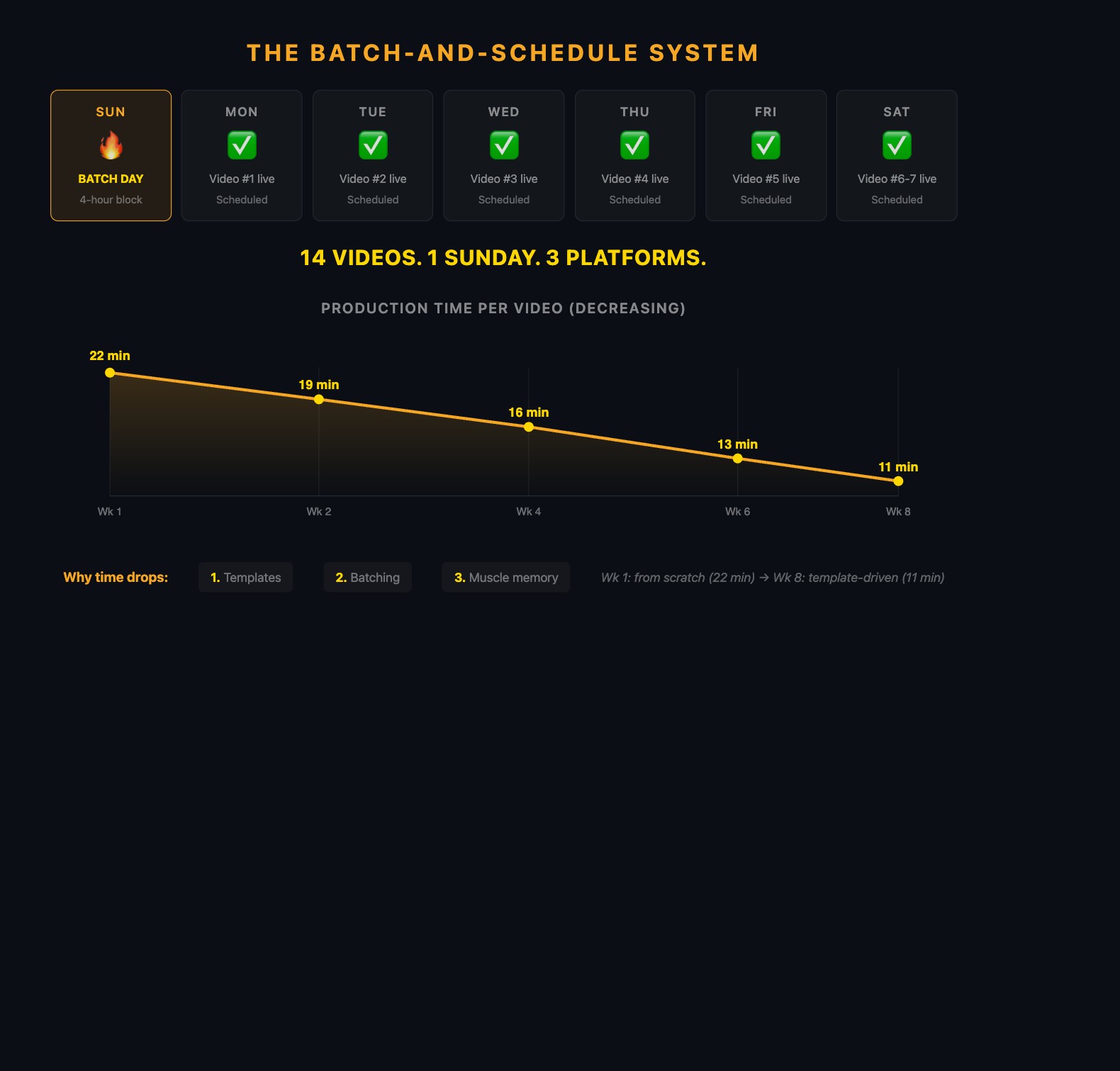
- Real per-video time data from week 1 (22 min) to week 8 (11 min).
- Printable Sunday checklist and optimization triggers for when things break down.
Sunday afternoon. You sit down at 2 PM with coffee. Open Canva, ChatGPT, ElevenLabs, and CapCut. By 5 PM, 14 videos are finished, captioned, and scheduled across three platforms for the next two weeks. You close your laptop. The machine runs itself until next Sunday.
That’s the system by month 2. The #1 reason faceless creators quit isn’t views or money. It’s burnout. “Each video takes me 45 minutes, how do I get under 15?” is the most common question in creator communities. Those creators aren’t lazy. They’re working without a system.
How does the 6-station factory work?
Stop thinking about “making a video.” Start thinking about running a factory.
| Station | Time (14 videos) | Per Video | What you do |
|---|---|---|---|
| 1. Ideation | 30 min | ~2 min | Pull topics from master list, assign formats |
| 2. Scriptwriting | 65 min | ~5 min | Generate all scripts in one ChatGPT session, edit each |
| 3. Voiceover | 35 min | ~2.5 min | Batch all voiceovers in ElevenLabs, download MP3s |
| 4. Visual Design | 75 min | ~5 min | Duplicate Canva template, fill content, export |
| 5. Editing | 50 min | ~3.5 min | CapCut: captions, music, trim, export all |
| 6. Upload/Schedule | 25 min | ~2 min | Post 1 now, schedule rest across 3 platforms |
| Total | 4.7 hours | ~20 min |
Station 1: Ideation (30 min for 14 videos)
Pull 14 topics from your master idea list. Sort into format types: 7 numbered lists, 4 comparisons, 3 stories (adjust based on what your analytics show works best). If running low on ideas, spend 10 minutes scrolling competitor content on TikTok. Each question on Reddit is a potential video.
Station 2: Scriptwriting (60-75 min for 14 scripts)
Open ChatGPT. Generate all 14 in one session. Use a master prompt that includes your voice guidelines, then swap only the topic:
Master prompt (copy this, swap the brackets): “You are a confident, direct content creator in the [niche] space. Write a 150-word TikTok script about [TOPIC]. Use specific numbers. Include one opinion. End with a question.”
Edit each script: cut filler, add opinions, add specifics. The editing goes faster in batch because you stay in “editing mode” instead of switching between creative and editorial mindsets.
Two more prompts that speed up ideation and repurposing:
Ideation prompt: “I make faceless [NICHE] content on TikTok. Give me 14 video ideas: 7 numbered lists, 4 comparisons, 3 stories. Each idea should have a hook under 10 words. Make them specific, not generic.”
Repurposing prompt: “I made a TikTok slideshow called ‘[YOUR TOP VIDEO TITLE].’ Give me 5 spin-off video ideas that go deeper on individual points from that video. Each spin-off should work as a standalone slideshow.”
Station 3: Voiceover (30-40 min for 14 voiceovers)
Paste each script into ElevenLabs, generate, download. About 2-3 minutes per script. Don’t re-record unless there’s a genuine pronunciation error. A slightly imperfect voiceover posted on schedule beats a perfect one that delays your batch.
If on ElevenLabs’ free tier (10K chars/mo), 14 scripts of 150 words use ~10,500 characters. Slightly over. Either upgrade to $5/month or use TikTok’s built-in voice for 4 of the 14.
Station 4: Visual Design (60-90 min for 14 slideshows)
Duplicate your saved Canva template 14 times. Swap text and images but keep fonts, colors, and layout identical.
The efficiency trick: batch image sourcing separately. Before designing, spend 15 minutes downloading 40-50 images from Pexels into a “this week” folder. During design, drag from the folder instead of searching each time. This kills the 2-3 minute “search for an image” bottleneck per slide.
First slideshow: 8-10 minutes (setting up). Slideshows 2-14: 4-6 minutes each (just swapping content).
Station 5: Editing (45-60 min for 14 videos)
Import all 14 exports and voiceovers into CapCut. Edit sequentially.
The preset trick that saves 15-25 minutes: Style captions on video 1 (font, size, color, position, outline). Save as a preset. Apply to videos 2-14 with a single tap. Use the same 2-3 background music tracks across all videos.
First video: 5-6 minutes. By video 5: under 3 minutes. Muscle memory takes over.
Station 6: Upload and Schedule (20-30 min)
Upload video 1 to TikTok, YouTube Shorts, and Instagram Reels immediately. Schedule the remaining 13 using native schedulers (TikTok: up to 10 days ahead; YouTube Studio: indefinite; Instagram: professional dashboard).
Batch by platform, not by video: write all 14 TikTok descriptions, then all 14 YouTube descriptions, then all 14 Instagram captions.
What does the total time investment look like?
| Station | Time | Per Video |
|---|---|---|
| Ideation | 30 min | 2 min |
| Scriptwriting | 65 min | 5 min |
| Voiceover | 35 min | 2.5 min |
| Visual Design | 75 min | 5 min |
| Editing | 50 min | 3.5 min |
| Upload/Schedule | 25 min | 2 min |
| Total | 4-5 hours | ~20 min |
Compare to the non-batch approach: 45 min per video, produced one at a time throughout the week. 7 videos = 5+ hours of scattered work. The batch approach produces twice the content in less total time.
What broke (and efficiency data from 8 weeks)
I tracked per-video time across my first 8 batches:
| Week | Per-video time | What changed |
|---|---|---|
| 1 | 22 min | First batch, still learning the workflow |
| 2 | 19 min | Template reuse kicking in |
| 4 | 16 min | Muscle memory on CapCut editing |
| 6 | 13 min | Image library pre-built, no searching |
| 8 | 11 min | Full autopilot, 2.5 hours for 14 videos |
Why the drop? Batching eliminates context switching (you stay in one mode per station), compounds template reuse (setting up the Canva template costs 5 minutes once, then 30 seconds per video), and amortizes tool loading (open 4 apps once instead of daily).
Note: These times reflect slideshow-format content in the motivation niche. Your numbers will differ by niche, format complexity, and tool familiarity. Voiceover-heavy content takes longer than text slideshows. Complex niches (finance with charts) take longer than simple niches (quotes with stock photos). Track your own times from week 1 and measure improvement against yourself.
Here’s what one batch of 7 videos looks like in practice:
| # | Topic | Format | Script | Design | Edit | Total |
|---|---|---|---|---|---|---|
| 1 | 5 Stoic morning habits | List | 5 min | 8 min | 5 min | 18 min |
| 2 | Broke vs rich mindset | Comparison | 4 min | 6 min | 4 min | 14 min |
| 3 | I tried journaling 30 days | Story | 6 min | 7 min | 4 min | 17 min |
| 4 | 3 books that changed everything | List | 4 min | 5 min | 3 min | 12 min |
| 5 | Modern therapy vs Stoic method | Comparison | 5 min | 6 min | 3 min | 14 min |
| 6 | Marcus Aurelius morning routine | Story | 5 min | 6 min | 4 min | 15 min |
| 7 | 7 quotes for your 30s | List | 3 min | 5 min | 3 min | 11 min |
Lists are fastest. Stories take longest because the narrative arc needs more thought. Your first batch will be slower than this. That’s normal.
What’s the printable Sunday checklist?
Copy this. Check off every Sunday.
Batch Sunday Checklist (print this)
- Pull 14 topics (assign format: list/comparison/story)
- Generate 14 scripts in ChatGPT (one session, no breaks)
- Edit each: cut filler, add 1 opinion, add 1 specific number
- Generate 14 voiceovers in ElevenLabs (download all MP3s)
- Pre-download 40-50 images into a “this week” folder
- Duplicate Canva template x14, fill content, export as MP4
- Edit all 14 in CapCut: captions, music, trim, export
- Upload video 1 to TikTok NOW
- Schedule videos 2-7 on TikTok (one per day)
- Upload all 7 to YouTube Shorts with keyword descriptions
- Upload all 7 to Instagram Reels with niche hashtags
- Update tracking spreadsheet
- 15-min analytics review: best/worst, 1 adjustment
- Add 5+ new ideas to master list
How do you turn 8 ideas into 14 videos?
Content repurposing within a batch means your 14 videos don’t need 14 new ideas.
A “Top 7 Stoic habits” slideshow can split into 7 individual posts, each exploring one habit in depth. That’s 8 videos from one topic: the original list plus 7 deep dives.
A comparison slideshow (“broke vs. rich mindset, 5 differences”) contains material for 5 follow-ups, each exploring one difference: “Most people handle money like this. Rich people do this instead. Here’s why.”
A story slideshow (“I tried Stoic journaling for 30 days”) generates spin-offs: “Day 1 vs. Day 30,” “The one journal prompt that changed everything,” “3 things I stopped doing after 30 days.”
Build this into your ideation station. When picking 14 topics, identify which can expand into sub-topics. You might need 8 new ideas, with the other 6 as spin-offs. Your master list lasts longer, your audience gets depth on topics they’ve already engaged with, and the algorithm sees your channel as authoritative because you cover topics from multiple angles.
What do you do when a batch isn’t working?
| Trigger | Fix | Why It Works |
|---|---|---|
| Per-video time above 20 min | Slideshow-only for 2 weeks | Slideshows are the fastest format (10-15 min). Removes video editing bottleneck. |
| Burning out on batch Sundays | Split: Saturday scripts + voice, Sunday design + edit | The overnight break resets creative energy. Two 2-hour sessions feel lighter than one 4-hour grind. |
| Quality dropping (completion rate falling) | Reduce batch from 14 to 10 | The algorithm rewards engagement, not volume. Ten strong videos build more momentum than 14 weak ones. |
| Running out of ideas mid-batch | 15 min scrolling competitor content first | Fresh input produces fresh output. Your best video ideas will come from seeing what’s working for others right now. |
| Same hook on every video | Force: 3 numbers, 3 claims, 1 question | The algorithm tests each video independently. Varied hooks reach different audience segments. |
| ElevenLabs credits gone | TikTok TTS for 4, save ElevenLabs for best 10 | Consistent posting matters more than perfect audio. TikTok’s audience is used to TTS voices. |
What does the full weekly schedule look like?
Sunday (3-5 hours): Batch production. All six stations. Review last week’s analytics.
Monday-Saturday (10 min/day): Reply to 3-5 comments per platform. Verify scheduled posts went live. Add new ideas to master list.
Don’t skip the daily comments. When you reply, the commenter gets notified (another view), and the platform sees active engagement (more distribution). Total weekly time: 4-6 hours.
What should you actually do?
If 14 videos feels like too much: Start with 7. That’s one week of daily content in a single session. Half the time commitment, same system. Many creators start at 7 and scale to 14 once the workflow is automatic. There’s no shame in a half-batch. Seven good videos posted consistently beats 14 forced videos where the last 4 are garbage.
If one 4-hour block feels heavy: Split it. Saturday afternoon: scripts + voiceovers (stations 1-3, about 2 hours). Sunday morning: design + edit + upload (stations 4-6, about 2 hours). The overnight break between sessions often fixes creative blocks.
If your per-video time is stuck above 20 minutes: The bottleneck is almost always visual design. Pre-build an image library of 50+ stock photos for your niche in Pexels. Download them into a “this month” folder. During batch day, drag from the folder instead of searching. That one change typically saves 2-3 minutes per video.
bottom_line
- Batch production cuts per-video time from 45 minutes to under 15 minutes by eliminating context switching and compounding template reuse.
- The 6-station factory (ideation, scripts, voice, visuals, edit, upload) processes 14 videos in one Sunday afternoon.
- Track your per-video time weekly. If it’s not dropping, identify which station is the bottleneck and fix that station specifically.
Frequently Asked Questions
How long does it take to batch produce 14 TikTok videos?+
4-5 hours in week 1 (about 20 minutes per video). By week 8, the same batch takes 2.5 hours (11 minutes per video). The efficiency comes from template reuse, muscle memory, and eliminating context switching.
How many videos should I batch produce at once?+
14 videos covers 2 weeks of daily posting. If quality drops at 14, reduce to 10. Better to post 10 strong than 14 where 4 are garbage. Split the session across two days (Saturday scripts + Sunday design) if one sitting feels too long.
Do I really need to post every day on TikTok?+
For the first 90 days, daily posting helps the algorithm learn your audience faster and builds your content library quickly. After 90 days, many creators reduce to 5 per week without noticing a drop. After 6 months, 3-4 per week typically maintains momentum because the library of 200+ videos generates ongoing views.