The $0 AI Toolkit for Faceless Videos (Every Tool Tested)
Head-to-head comparison of AI tools at each production stage. Two complete stacks: $0/month and $30-50/month. Tested on real content.
>This covers the toolkit. Faceless Content Profits includes the 60-minute first video walkthrough, TikTok slideshow templates, cross-platform distribution, and the batch system that gets per-video time under 15 minutes.
Faceless Content Profits
$1,000/Month, AI Videos, No Camera
Summary:
- The exact 6-stage production pipeline for faceless videos, with specific tools at each stage.
- Head-to-head comparison of 5 voiceover tools, tested on the same script.
- Two complete stacks: $0/month (free tools only) and $30-53/month (premium).
- Copy-paste AI prompts for scriptwriting that produce usable first drafts in 10 seconds.
I wasted $127 in my first month on tools I didn’t need. Paid for a premium video editor when CapCut’s free version does everything. Subscribed to an AI voice tool that charged per character when another had a free tier with enough credits for 30+ videos. This article exists so you skip those mistakes.
What does the faceless content production pipeline look like?
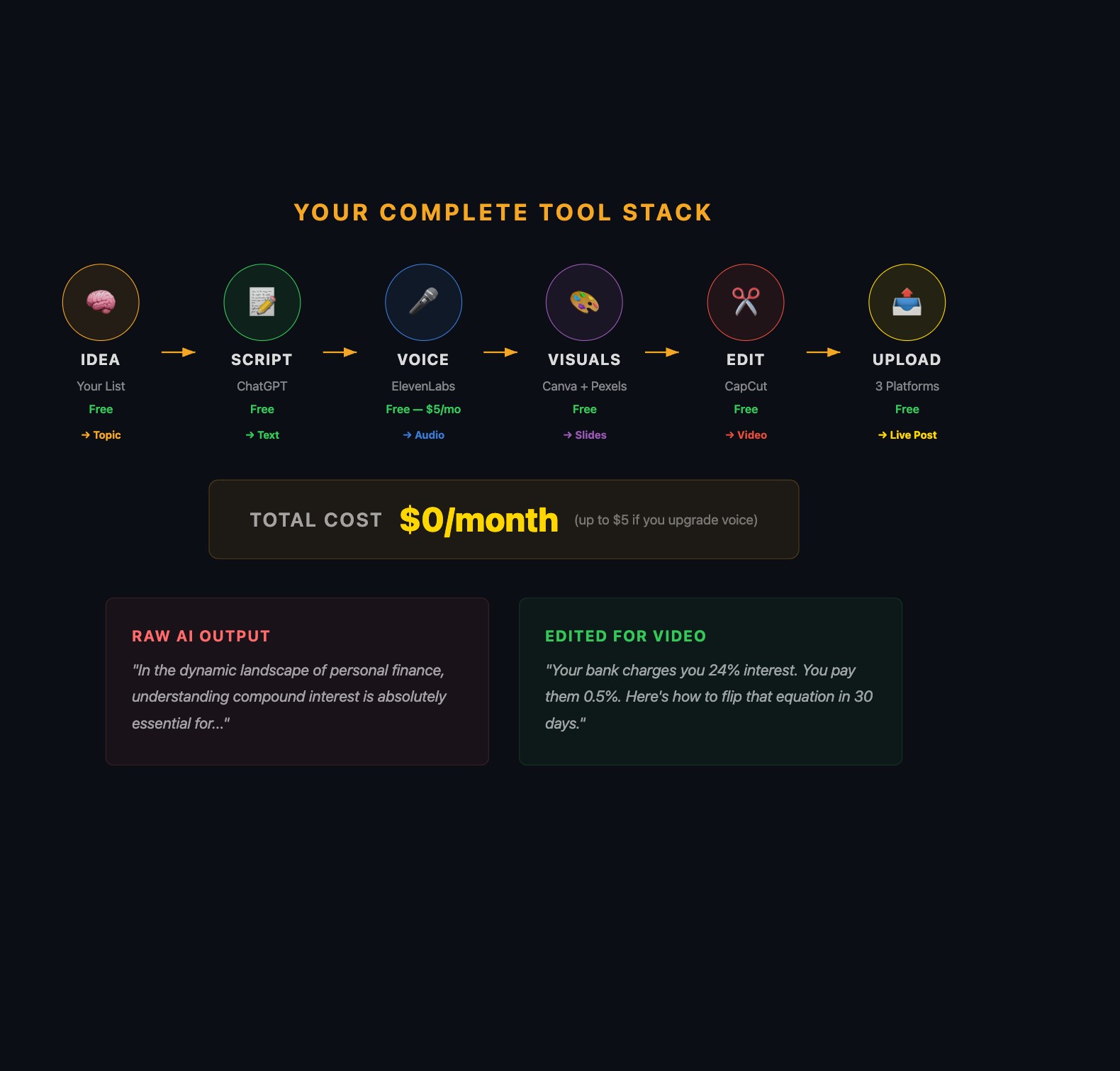
Every faceless video follows the same six stages: Idea (your content list) > Script (ChatGPT or Claude) > Voice (ElevenLabs) > Visuals (Canva + Pexels) > Edit (CapCut) > Upload (platform apps). You need tools for stages 2-5. Here’s what to use at each one.
Which AI scriptwriting tool should you use?
ChatGPT (free tier) handles 90% of scriptwriting. Paste this prompt:
SCRIPT prompt (copy this): “Write a 150-word TikTok script about [TOPIC]. Audience: [WHO]. Tone: confident and direct, like a smart friend. Include one surprising stat. End with a question that invites debate.”
Save these three additional prompts. Swap the brackets for each video.
HOOK prompt: “Give me 10 scroll-stopping hooks about [TOPIC]. Each under 10 words. Use numbers, contrasts, or direct challenges.”
REWRITE prompt: “Make this script more controversial and specific. Cut every hedge word. Replace vague claims with numbers. Cut 20% of the words: [PASTE SCRIPT]”
BATCH prompt: “Write 7 TikTok scripts about [NICHE], 150 words each. Mix: 3 numbered lists, 2 comparisons, 2 stories. Each must open with a different hook style.”
Claude (free tier) is better at following voice instructions. If you tell it “write like a sarcastic friend giving money advice at a bar,” the output is closer to that voice than ChatGPT produces.
The editing pass is non-negotiable. Here’s a real before/after:
Raw ChatGPT output:
“The 50/30/20 rule is a popular budgeting method that can help you manage your finances more effectively. It’s important to note that this approach divides your after-tax income into three categories…”
After a 3-minute editing pass:
“68% of Americans can’t cover a $400 emergency. Here’s the fix that takes 2 minutes. Take your paycheck. Split it: 50% to bills, 30% to fun, 20% to savings. That’s it. No spreadsheet. No app. Just three numbers.”
What changed: killed the filler phrase. Replaced a vague opener with a specific stat ($400). Added an opinion. Cut 30% of the words. Doubled the impact. Three minutes of editing.
Which AI voiceover tool is best?
I tested five tools with the same 150-word script.
| Tool | Voice Quality | Free Tier | Paid Price | Best For | Verdict |
|---|---|---|---|---|---|
| ElevenLabs | 10/10 | 10K chars/mo (~15 videos) | $5/mo | Everything | Winner |
| PlayHT | 8/10 | Limited | $24/mo | British/accent variety | Runner-up |
| TikTok TTS | 5/10 | Unlimited | Free | Quick backup videos | Backup only |
| Speechify | 7/10 | Very limited | $139/yr | Nothing | Skip |
| Amazon Polly | 6/10 | Pay-per-use | ~$0.004/100 chars | High-volume (100+/mo) | Advanced |
In testing, ElevenLabs produced the most natural-sounding output. Their voices have noticeable inflection and pausing that the others lack. “Adam” and “Rachel” are popular choices among faceless creators. That said, AI voice quality is subjective and improving across all tools. Listen to samples on each platform’s site before committing.
Pricing note (check current rates at each site): Free tiers and pricing change frequently. The table above reflects testing conditions. Always verify current limits before planning your production budget.
The gotcha: ElevenLabs’ free tier resets monthly. If you run out mid-month, you’re stuck until reset. Batch voiceover generation at the start of the month when credits are full.
Settings that matter: Stability at 50% for motivational content, 65-70% for factual content. Similarity at 75%. If the tone feels wrong, add “Voice style: serious, contemplative” above your script text.
What should you use for visuals?
Canva (free) is the single most important tool. Set dimensions to 1080x1920 (vertical). Design one template with your specific fonts (one headline, one body) and 2-3 colors. Save it. Duplicate for every video.
The mistake that creates AI slop: using Canva’s defaults. Everyone uses the same defaults. Your content looks identical to everyone else’s. Pick a specific font pair, a specific color palette, and stick with them across every video.
Pexels (free) for stock photos. Leonardo AI (free tier, 150 images/day) for custom AI-generated images.
Prompting trick for Leonardo: “Dramatic low-angle photo of Roman marble columns at sunset, cinematic lighting, 16:9 aspect ratio” beats “Roman columns.” Be specific about lighting, composition, mood.
What’s the best video editor for faceless content?
CapCut (free) is the strongest free option for short-form editing. Built by TikTok’s parent company, it’s purpose-built for vertical video. The standout feature: auto-captions with accuracy that rivals paid alternatives in most testing.
The CapCut editing workflow in order: import visuals + voiceover, tap Captions > Auto captions (95%+ accuracy), fix misheard words (check proper nouns), style captions to match your Canva font (white text, black outline, lower third), add background music at 15-20% of voice volume, check timing so visuals change at narration breakpoints, watch on your phone before posting, export at 1080x1920. Total: 12-15 minutes as a beginner, 5-8 minutes after 20 videos.
The music volume rule: 15-20% of voiceover volume. Quieter than you think. If someone without headphones can hear lyrics over narration, turn it down.
How do you edit an AI script so it doesn’t sound like AI?
This is the skill that separates faceless creators who get followers from those who get scrolled past. Run this checklist on every script before recording:
The 3-Minute Script Editing Checklist
Run these 6 checks on every AI-generated script. Not optional.
| Check | What to do | Example |
|---|---|---|
| 1. Kill filler openers | Delete sentences starting with “Did you know,” “In today’s world,” “Have you ever wondered” | Just start with the point |
| 2. Add one specific number | Replace “many people struggle” with a stat | ”68% of Americans can’t cover a $400 emergency” |
| 3. Add one opinion | AI hedges. You don’t. | ”this could be beneficial” becomes “this changed everything” |
| 4. Cut 20% of the words | 180-word script? Get it to 145. | Every cut makes it punchier |
| 5. Add a hook for next video | Give viewers a reason to follow | ”Tomorrow: the one tool that automates all of this” |
| 6. Read it out loud | If it sounds like a press release, rewrite it | Trust your cringe reflex |
The before/after earlier in this article shows the transformation. Raw AI output sounds like a Wikipedia summary. Three minutes of editing turns it into something a person would actually say.
What are the two complete stacks?
Free Stack ($0/month):
| Stage | Tool | Notes |
|---|---|---|
| Scripts | ChatGPT free | 90% of scripting needs |
| Voice | ElevenLabs free | 10K chars/mo, ~15 videos |
| Visuals | Canva free + Pexels + Leonardo AI free | Covers everything |
| Editing | CapCut free | Best option at any price |
| Scheduling | TikTok native + YouTube Studio | Built-in, free |
| Total | $0/month |
Premium Stack ($30-53/month):
| Stage | Tool | Cost | Why upgrade |
|---|---|---|---|
| Scripts | Claude Pro | $20/mo | Better voice control |
| Voice | ElevenLabs Starter | $5/mo | 30K chars, daily posting |
| Visuals | Canva Pro + Pexels | $13/mo | Brand kit, larger library |
| Editing | CapCut free | $0 | Still the best |
| Scheduling | Later | $15/mo | If managing 3+ platforms |
| Total | $33-53/month |
Start with the free stack. Many creators report building their first months of content entirely on free tools. The one exception: if ElevenLabs’ free tier runs out mid-month and you’re posting daily, the paid upgrade is worth it to maintain consistency.
For YouTube Shorts specifically: Use the same CapCut export (no TikTok watermark). Upload through YouTube Studio with keyword-rich descriptions instead of hashtag-heavy ones. YouTube’s algorithm weights search terms in descriptions more than TikTok does. Same content, different metadata.
For selling digital products: Gumroad charges 10% + $0.50 per transaction with no monthly fee (verified March 2026). You only pay when you sell.
Two more prompts that make your content less generic
Visual prompt for Leonardo AI or Midjourney: “Dramatic low-angle photo of [SUBJECT] at sunset, cinematic lighting, dark moody tones, 9:16 aspect ratio for TikTok.” Replace [SUBJECT] with your niche imagery: Roman columns for Stoic content, city skyline for finance, mountain trail for self-improvement. The specificity matters. “Roman columns” gets generic output. The full prompt gets something usable.
De-AI prompt for script cleanup: “Rewrite this script to sound like a confident friend, not a textbook. Cut every sentence that starts with ‘Did you know’ or ‘In today’s world.’ Replace vague claims with specific numbers. Add one strong opinion. Make it 20% shorter: [PASTE SCRIPT]“
What should you actually do?
If you have $0 and 90 minutes tonight:
- Create ChatGPT + ElevenLabs + Canva + CapCut accounts (free, 20 min)
- Generate a test script with the prompt above (2 min)
- Edit the script: cut filler, add one number, add one opinion (3 min)
- Generate voiceover in ElevenLabs, pick one voice for your channel (5 min)
- Build a 7-slide test slideshow in Canva with your 2-color brand (20 min)
- Edit in CapCut: add captions, music at 15%, export (15 min)
- Watch on your phone. If readable and audible, your toolkit is ready.
If you have $30/month and want 1 video/day: Same free stack, but upgrade ElevenLabs to the paid tier ($5/month) for enough characters to post daily. Add Canva Pro ($13/month) for the brand kit feature and larger stock library. That’s $18/month and covers daily production across 3 platforms.
bottom_line
- The free stack ($0/month) produces professional-quality faceless content. Every dollar you spend before posting 30 videos is a dollar wasted.
- ElevenLabs for voice, Canva for visuals, CapCut for editing. That’s the stack. Everything else is optional.
- The editing pass on your AI script is what separates your content from the thousands of creators who copy-paste and wonder why nobody watches.
Frequently Asked Questions
What is the best free AI voice generator for faceless content?+
ElevenLabs is the strongest option tested. The free tier gives you 10,000 characters per month, enough for roughly 15-20 short videos. Voice quality has improved dramatically across all tools, but ElevenLabs consistently produces the most natural inflection in testing.
How much does it cost to start a faceless YouTube channel?+
Zero dollars. ChatGPT free tier for scripts, ElevenLabs free tier for voiceovers, Canva free for visuals, CapCut free for editing, and native platform schedulers. The free stack produces professional content. Premium tools ($30-53/month) add convenience, not quality.
How do I make AI-generated content that doesn't look like AI slop?+
Three things: pick one ElevenLabs voice and use it for every video (builds recognition), create one Canva template with specific fonts and colors and reuse it (visual identity), and edit every AI script by cutting filler, adding opinions, and replacing vague claims with specific numbers.