The 30-Second Supabase Check That Proves Your Client's Data Is Closed
A 30-second check from outside your app proves the client's data is closed before you hand the work over. Supabase rls not enabled by default is true of every table an agent writes in raw SQL, and the exposure is full CRUD: anyone with the project URL can read, edit and delete.
>This locks one table. Claude Design Sync wires the whole designed app to a real backend and puts it on a live URL without losing the design on the way.
Claude Design Sync: Ship the Real App
The Two-Way Claude Code System for Shipping Production Apps Without Drift
Hello builders,
A single curl from outside your app, 30 seconds of work, tells you whether the client’s data is closed before you hand the project over. Right now it probably is not, and the reason is a default nobody chose. Supabase rls not enabled by default is true of every table an agent creates for you and false of the ones you click into existence, and that gap is where the damage lives. Here is the rule, from Supabase’s own guide:
“RLS is enabled by default on tables created with the Table Editor in the dashboard. If you create one in raw SQL or with the SQL editor, remember to enable RLS yourself and grant only the permissions each Postgres role needs.”
Read the second sentence twice. Row Level Security is on for you only when you make the table by clicking around in the dashboard. Make it any other way and it lands with RLS off, which is plain Postgres behaviour, because Postgres doesn’t lock the door for anybody.
Now connect that to how we actually work. We are asking Claude Code to set up the booking schema behind a form we designed, and it doesn’t click around a dashboard. It writes SQL, or it runs a migration, which is exactly the path that inherits the open default. An agent scaffolding your schema is the precise case where RLS is off and nobody chose for it to be off.
So the habit is simple. Assume RLS is off unless you personally created the table in the Table Editor, then go and verify. Never assume it is on.
Not read-only
A designer’s instinct on hearing “the table is not secured” is that somebody might read the data. That’s not the worst case. It is barely the start of it. Supabase’s Security Advisor carries a check for exactly this, numbered 0013, and it’s worth reading in full because it’s blunter than anything I would write:
Level: ERROR
Summary: Table publicly accessible
Ramification: Anyone with your project URL can read, edit, and delete all data in this table because Row-Level Security is not enabled.
Rationale: Tables in the
publicschema are accessible over Supabase APIs. If row level security (RLS) is not enabled on a public table, anyone with the project’s URL can CREATE/READ/UPDATE/DELETE (CRUD) rows in the impacted table. Publicly exposing full CRUD to the internet is a critically unsafe configuration.
Create, read, update, delete. Anyone on the internet can drop every booking in a client’s table, insert ten thousand fake ones, or quietly change the prices. (Performance and Security Advisors, check 0013)
Thirty seconds, from the outside
We run the advisor and glance at the “Unrestricted” badge in the dashboard, and both are useful. Neither is the check I actually trust. Both tell us RLS is on, not that our policy is right, and those aren’t the same fact.
The check I trust takes thirty seconds and behaves like an attacker. Open a plain terminal with no session and hit the table with nothing but the publishable key and the URL:
curl "https://YOUR_PROJECT.supabase.co/rest/v1/bookings?select=*" \
  -H "apikey: YOUR_PUBLISHABLE_KEY"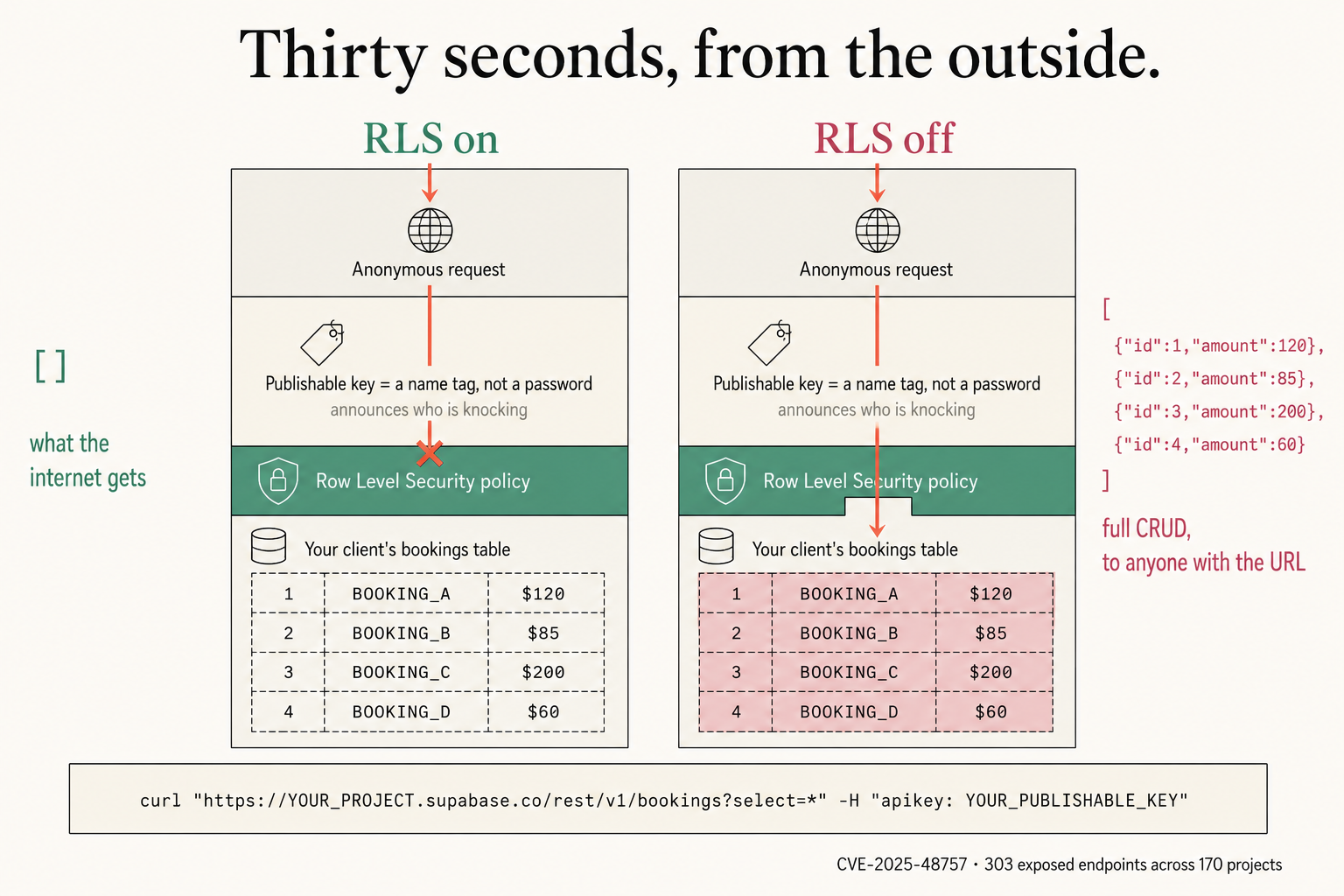
With the lock doing its job we get back an empty array, and that is what the internet gets:
[]With it off, the identical request returns everything:
[{"id":1,"amount":120},{"id":2,"amount":85},{"id":3,"amount":200},{"id":4,"amount":60}]Every row visible from that call is a row the entire internet can see, because that’s exactly the request the entire internet can make. And the publishable key sitting in the header is not the problem. It confers no permissions of its own. It’s a name tag, and all it does is announce who is knocking. Your policies decide what that role is allowed to touch. That is why it is safe to publish, and it is also why RLS is the only thing standing between it and the data.
Enabling it is not enough
Two statements, in this order, and the second one is the part people skip:
alter table public.bookings enable row level security;

create policy "Diners see only their own bookings."
on public.bookings
for select
using ( (select auth.uid()) = user_id );
Enabling RLS with no policy denies everything. That surprises people who switch it on, test nothing, and ship a table returning zero rows to everyone including the owner. Supabase says the same thing in its own words: after enabling RLS you cannot use the anon role to read or write until you create policies. Deny-by-default is a Postgres engine guarantee, so the policy is not decoration, it is the thing that lets anyone in at all.
Keep the (select auth.uid()) wrapper. It isn’t a redundant subquery to simplify away: dropping it makes Postgres re-evaluate the function once per row, which is the real performance trap.
Then we run the same thirty-second curl against the deployed URL, not just localhost, because the live site goes through the deployed key. This is not an edge case: there is a catalogued vulnerability, CVE-2025-48757, covering RLS misconfiguration in apps built on AI app-builders, with 303 exposed endpoints reported across 170 projects. The difference between us and those projects is one command.
Now go build something this weekend!
John Cook