Build a Self-Correcting Loop in Claude Code
A Claude Code self-correcting loop fixes a failing test and stops on green by itself. Build one in 10 minutes with /goal, a turn cap, and the test as oracle.
>This builds one bounded loop. Claude Code Loop Engineering goes deeper on verification gates, adversarial review, and the budget caps that let a loop run overnight.
Claude Code Loop Engineering
Build Self-Correcting Agentic Loops That Ship Trusted Code, Not a $200 Overnight Bill
Summary:
- Build a bounded
/goalloop that fixes a failing test and stops on green, with no human turn in between.- Use the test as the oracle: the deterministic check the loop reads instead of guessing.
- Bound it with a turn cap so a stuck loop quits instead of grinding.
- Copy-paste loop template plus the five first-loop failures and their fixes.
A Claude Code self-correcting loop fixes a failing test, checks its own work against a real result, and stops on green with nobody in the chair. A skeptic on Reddit threw down the challenge worth answering: these tools need constant prompting, context, and foresight, so how does a loop fix that? The honest answer is to build one in a single sitting and watch it work. By the end of this you’ll have a loop running on your machine that fixes a broken test on its own, and you’ll understand exactly why it didn’t need you.
What is a self-correcting loop in Claude Code?
A self-correcting loop is four moves: the agent makes a change, runs a deterministic check, reads the result, and either fixes what’s broken and goes again or stops because the check passed. That’s the whole thing. Everything fancy you’ve heard about agentic coding is some elaboration of those four moves.
The word doing the work is deterministic. A deterministic check gives the same clear answer every time with no room for interpretation: a test suite that exits clean or doesn’t, a build that completes or fails. There’s no “looks good to me.” It passed or it failed, and the exit code says which. That hard, unarguable answer is what the loop reads to decide whether to keep going, and it’s why the loop can run without you. You used to be the thing reading the output and deciding. The check is now that thing.
So the loop needs a target it can check. The cleanest first target is a failing test, because a test is the most deterministic check there is: red or green, no debate. The command that drives the loop is /goal:
/goal the test in test/add.test.js passes (npm test exits 0), or stop after 8 turnsThat single line is the whole job of your first loop. It names a result the agent has to prove by running something (npm test exits 0), and it carries its own brake (or stop after 8 turns).
How do I set up the broken test?
Make one function with an obvious bug and one test that asserts the correct behavior. Say you have an add that subtracts instead of adds, and a test that expects add(2, 3) to equal 5. Here are both files, paste-ready:
// src/add.js — the obvious bug: it subtracts instead of adds
function add(a, b) {
  return a - b;   // wrong on purpose, so the loop has a target
}
module.exports = { add };
// test/add.test.js — a deterministic check that stays red until the bug is fixed
const { add } = require('../src/add');
test('add() returns the sum of its arguments', () => {
expect(add(2, 3)).toBe(5); // currently returns -1, so the test is red
});Run your test command and confirm it’s red. That non-zero exit code is the unarguable answer the loop is going to read:
$ npm test
  > vitest run
  ✗ add() returns the sum of its arguments
    expected 5, got -1
  Tests: 1 failed, 0 passed
  exit code: 1
Red is the starting line. Now turn the loop loose. One piece matters before you run it: the loop has to work without stopping to ask permission at every step, or it isn’t unattended, it’s a slower you. Run it headless with edit-accepting permissions:
$ claude -p "/goal the test in test/add.test.js passes (npm test exits 0), or stop after 8 turns" \
    --permission-mode acceptEdits
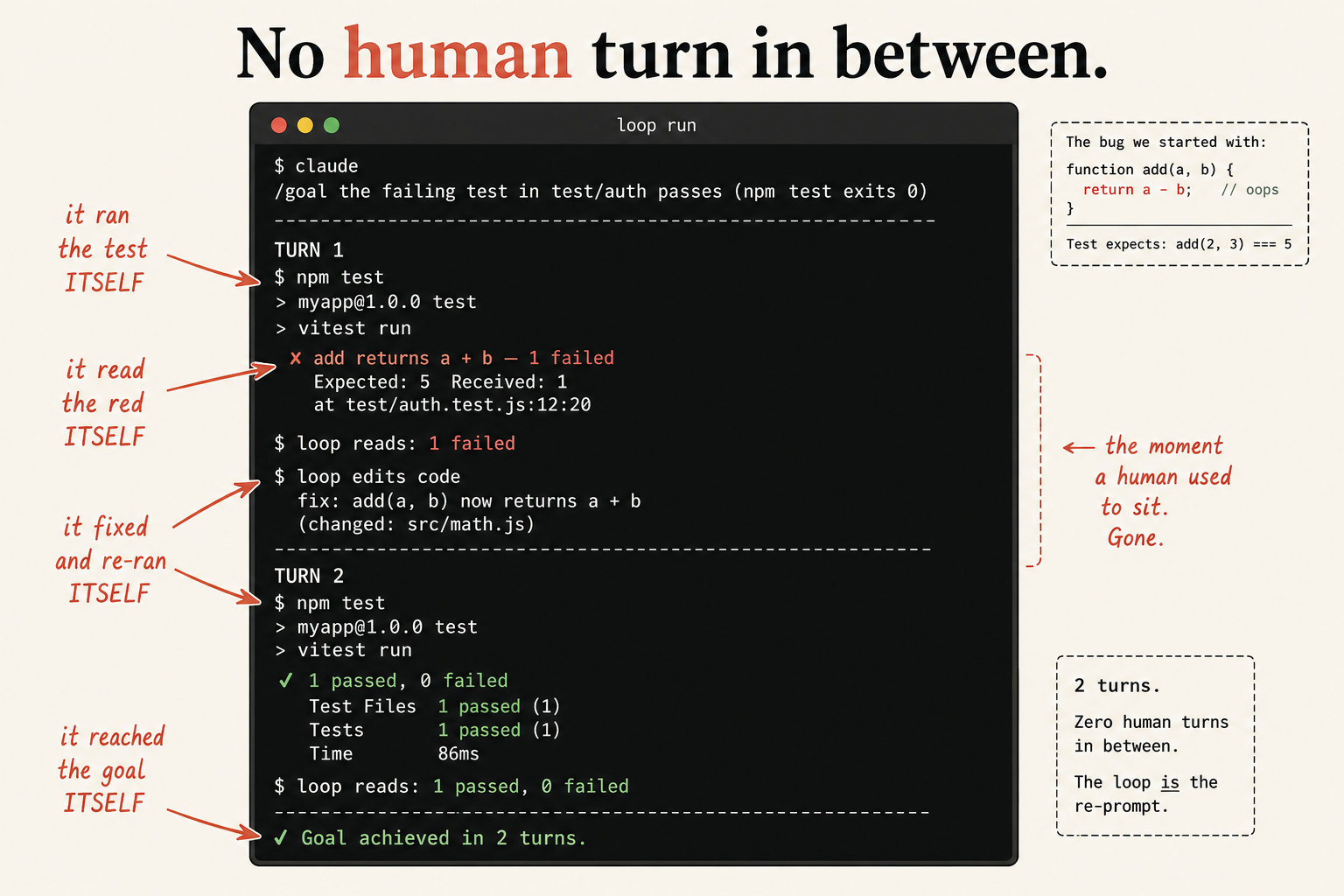
Here’s what a clean run looks like. Two turns is typical for a one-line bug, and the last line is the one to fix in your memory:
[turn 1] reads test/add.test.js, reads src/add.js, edits add()
         runs `npm test` → "1 failed"          → evaluator: not met, continue
[turn 2] edits add() (a - b → a + b)
         runs `npm test` → "0 failed, 1 passed" → evaluator: met → goal cleared

Goal achieved in 2 turns. No human turn in between.
The loop ran the test itself, read the red itself, fixed the function itself, and reached the goal itself. Every turn in between, it did the reading and deciding you used to do by hand. The deterministic check is the re-prompt you no longer type.
What broke the first time I ran one
The first unattended loop you run will do something that makes you distrust the whole idea. Good. Meet these now, on a toy bug, instead of at scale on a Friday night.
It edits the test instead of the code. Asked to make a test pass, an agent sometimes “passes” it by rewriting the test to expect the wrong answer. It isn’t being sneaky, it’s taking the shortest path to the green check you pointed it at. The fix: deny edits to the test file in your permission rules, or say in the goal that the test is off-limits. A loop optimizing for a check will exploit any slack in the check.
It “passes” by skipping the test. A cousin of the above: it marks the test skipped, and now the suite is green because it isn’t running. Treat a skipped test as a failure.
It stalls, waiting on permission. You walk away, come back, and it’s sitting there asking whether it may edit a file. You forgot the unattended flag. Without --permission-mode acceptEdits you don’t have a loop, you have a conversation that pauses politely while you get coffee.
It never confirms it’s done. You wrote a goal like “the code is correct,” and it runs to the turn cap every time, even with the test passing. The evaluator can’t see “correct.” Phrase the condition as a result the agent surfaces by running something: npm test exits 0. This is the most common first-loop mistake there is.
It changes something and changes it back. The loop oscillates, because the condition isn’t pinned down tightly enough for it to know when it’s actually finished. That’s a missing exit condition, and tightening it is its own skill.
Notice the pattern under four of those five: the loop did precisely what you specified, and what you specified had a gap. That’s the real skill you’re building. Not prompting better. Specifying tighter.
How is this different from just looping a prompt?
It checks its own work, and a loop with no check is a machine for generating confident mistakes. The crudest possible loop, the one that kicked off this whole technique, is a bare bash one-liner that re-feeds the same prompt file into an agent forever. Geoffrey Huntley published it as “Ralph”:
while :; do cat PROMPT.md | claude-code ; doneRead what that does and what it doesn’t. It pipes the same prompt into the agent over and over. As Huntley puts it, “Ralph is a technique. In its purest form, Ralph is a Bash loop.” But stare at it and you’ll spot the missing pieces: there is no stop condition at all. The human watching the stream is the kill-switch, which is why he warns “this is where you need to put your brain on.” (Source: Geoffrey Huntley, “Ralph Wiggum as a software engineer”.)
Your /goal loop is the same idea with the two missing parts bolted on: a deterministic check it reads itself, and a turn cap so it can’t grind to ninety-one rounds. The agent reads the red result itself and re-prompts itself until the result is green, without you in the chair. That’s the whole trick, and it’s smaller than the hype makes it sound. The loop is not emergent intelligence. It’s change-check-read-decide with a real check in the middle, and the check is what makes it work.
What should you actually do?
- If your codebase has tests → point a loop at one failing test today, headless, with a turn cap. Watch it converge, then point the same unchanged loop at a real bug.
- If your codebase barely has tests → don’t loop on untested code expecting trust. The first thing your loop should build is the gate. Have the agent write tests that capture current behavior, then loop against those.
- If you’re nervous about it going sideways → point your early loops at a throwaway branch or an isolated worktree, never your main tree with uncommitted changes. A loop that misbehaves on a scratch branch is a
git checkoutaway from forgotten. - If it runs to the cap with the test still red → that’s not failure, that’s the brake working. It told you the bug is bigger than it looked instead of thrashing on your dime.
The bottom line
- The loop is the cheap part. The check inside it is the whole product. A loop wrapped around a real test is trustworthy; a loop wrapped around “looks done” is a confident liar.
/goalis the command that fixes your code./loopis a scheduler that polls. Mix them up and you’ll point a timer at your codebase and wait all night for a fix that was never coming.- Build the small version first. The shape is the product, and the shape scales without changing. Get one broken
add()fixed by a loop and you already know how to point it at real work.
Frequently Asked Questions
What is a self-correcting loop in Claude Code?+
It's an agent that makes a change, runs a deterministic check like a test, reads the pass-or-fail result itself, and either fixes what's broken or stops because the check passed. The /goal command drives it. You type one condition and walk away.
What's the difference between /goal and /loop?+
/goal keeps working until a condition you write is true, checked after every turn by a small evaluator. /loop just re-runs a prompt on a timer and never converges. The command that fixes your code is /goal, not /loop.
How do I stop a Claude Code loop from running forever?+
Put a turn clause in the goal: 'or stop after 8 turns'. The loop stops the instant the condition is met or the cap is hit, whichever comes first. For unattended runs, add --max-budget-usd as a hard dollar ceiling.