How to Stop AI Slop in Claude Code for Good
Get Claude Code replies that open with the answer and stay clear from the first reply to the last, in every session you start. In my test of one 20-prompt session, a Plain English output style plus a small hook gave the shortest replies of any setup, 387 words on average.
>This covers the output style and the hook. Stop AI Slop goes further with 100 before-and-after examples, a strictness dial and a check that sends a foggy reply back before you read it.
Stop AI Slop
Get Clear, Useful Writing from Claude and ChatGPT with 100 Before-and-After Examples
Hello builders,
Claude Code can open every reply with the answer and keep doing it 20 replies into a session. It can do that in every session you start, with no reminder from you. That clears out the AI slop that builds up as a session runs: the recap, the hedge, and the answer buried in paragraph three. One Reddit user described the usual experience: the writing rule “holds for a single turn and then Claude reverts back to its bullshit.” The setup I kept is a Claude Code output style plus one small hook, because it gave the shortest replies and the only answer-first openings in my runs. I tested it against three other places the rule can live.
The 20-reply test
To find where the rule should live, we held one 20-prompt work session four times on Opus 5.5. The session planned a move from a nightly cron job to a job queue. We changed only where the rule lived. Then a script counted every sentence over 25 words across all 80 replies. We also averaged the length of each session’s replies.
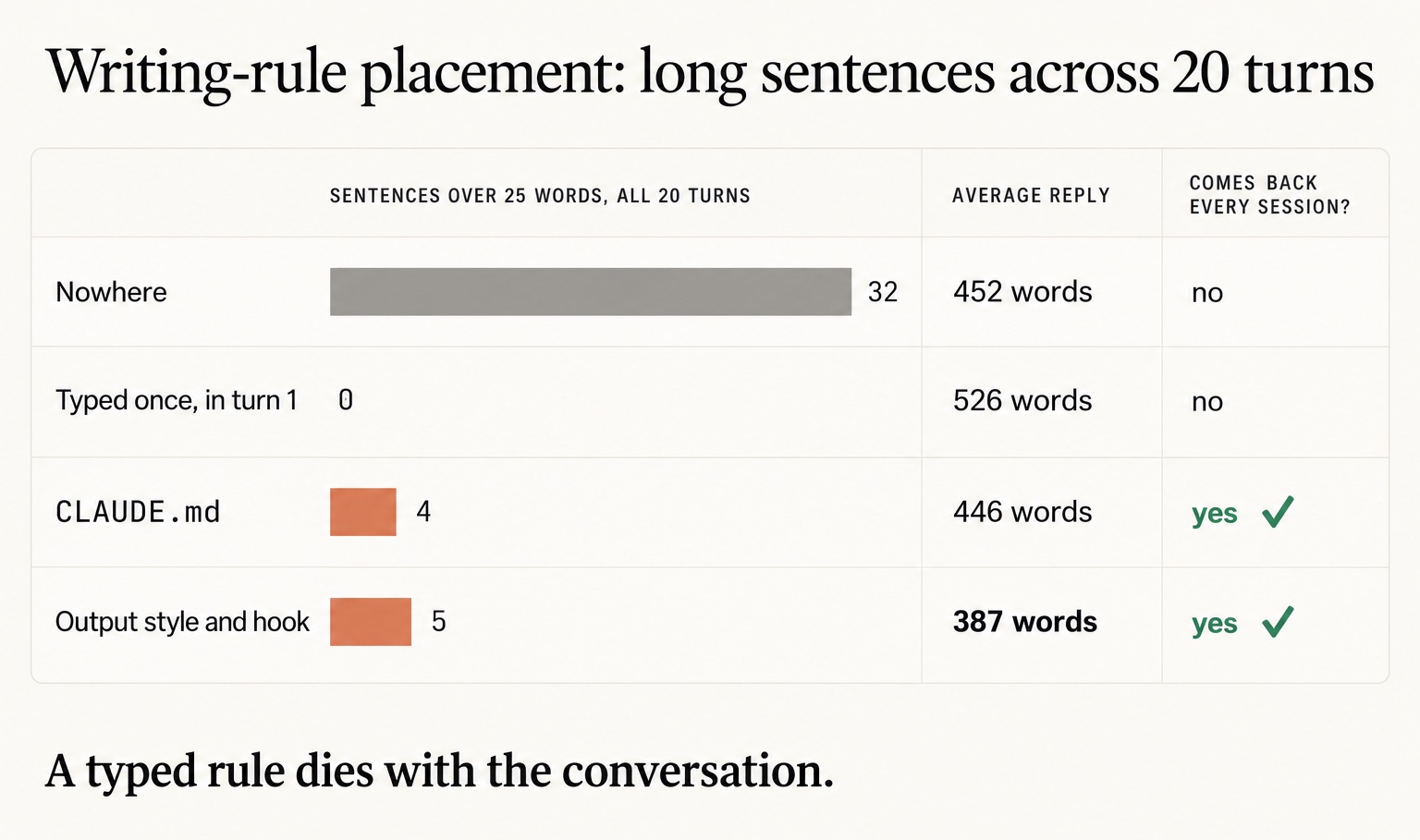
Start with the second row, since it’s the one I didn’t expect. A rule typed into the first message held for all 20 replies with zero long sentences, and its replies averaged 526 words. That is 74 words more per reply than with no rule, because the model made every sentence short and then wrote more of them. The typed rule also lives only inside that conversation. A new terminal tomorrow puts you back on the first row, with 32 long sentences and 452-word replies, until you type it again.
In the last row, the style and hook let 5 long sentences through in 20 replies, one more than CLAUDE.md did. Its replies averaged 387 words, 65 fewer than the session with no rule. In my runs it was also the only setup that opened its replies with the answer. In the first prompt we asked what could make a nightly job run twice. The first sentence in the style session named the cause to check first: “The most common cause is two schedulers that run the same job.”
How does a style reach every reply when a rules file loads once, at the start? Claude Code’s docs answer that in two lines.
In their words:
An output style changes the instructions Claude Code gives Claude. Claude Code sends the active style’s instructions with every request.
(Claude Code docs, Output styles)
Build the style
An output style is a Markdown file, and we keep ours in the user folder so every project gets it. Make the folder with mkdir -p ~/.claude/output-styles and save this file in it as plain-english.md.
Here’s the whole file:
---
name: Plain English
description: Replies in the aircraft-manual style, answer first
keep-coding-instructions: true
---

Write every reply in ASD-STE100 Simplified Technical English, about 80% of the way.

- Put the answer in the first two sentences. Put the details after it.
- Keep sentences to 25 words or fewer. Keep instructions to 20 words or fewer.
- Use one name for one thing. Do not switch to a synonym.
- Use the active voice. Say who does the action.
- Put a condition before the action: "If the build fails, read the log."
- Keep paragraphs to six sentences or fewer.
- Keep the domain terms. Keep the words that say how sure you are.
- Code, commands, file paths, names, prices and numbers stay exactly as they are.
ASD-STE100 is the plain English of aircraft repair manuals, and the model already knows it by name. “About 80% of the way” is Andrej Karpathy’s softer setting, and it’s why the last two bullets keep words like “probably” in your replies. Don’t drop keep-coding-instructions: true. Without it, a custom style replaces the part of Claude Code’s instructions that covers coding work.
Switch it on, and add the hook
The hook prints the rule into the context before each of your prompts. We save it as ~/.claude/plain-rule.txt, written as facts about the replies:
Replies in this project are written in ASD-STE100 Simplified Technical English, about 80% of the way. The answer is in the first two sentences. Sentences have 25 words or fewer, and each thing has one name. Code, commands, paths and numbers stay exact.Claude Code’s docs ask for text a hook adds to read “as factual statements rather than imperative system instructions,” because text that looks like a system command can trip its prompt-injection defenses. So there is no “YOU MUST” in that file. Then both pieces go in ~/.claude/settings.json, and if that file already exists, we add these two keys to it and keep everything else. If it already has a UserPromptSubmit hook, add this one to that list.
The two keys:
{
  "outputStyle": "Plain English",
  "hooks": {
    "UserPromptSubmit": [
      { "hooks": [ { "type": "command", "command": "cat \"$HOME/.claude/plain-rule.txt\"" } ] }
    ]
  }
}
Copy the capitals in "Plain English" exactly. I tested "plain english" and got the default style back, with no error and no warning. Typing /output-style Plain English ignores case, so the trap only bites when you edit the file by hand. One stray comma does the same kind of damage, because a settings file that doesn’t parse runs no hooks. Check it after every edit:
python3 -m json.tool ~/.claude/settings.json > /dev/null && echo "settings OK"We restart Claude Code next, since it reads style files when it starts. Then we work a normal session for 20 replies and never type the rule or a reminder. We score replies 1, 10 and 20 to see whether it held, counting the longest sentence and noting which sentence holds the answer. Reply 20 should land within a few words of reply 1, and reply 1 should answer in sentence 1 or 2.
Now go build something this weekend!
John Cook