How to Stop AI Slop in Every Claude and ChatGPT Reply
Stop AI slop in every Claude and ChatGPT reply and get answers you understand on the first read, with the two-line ASD-STE100 rule Andrej Karpathy posted and an engineer on Anthropic's Claude Code team ships in a plugin. Here is where the rule goes in six tools, and the one setup slip that switches it off with no error.
>This covers installing the rule. Stop AI Slop goes further with 100 before-and-after examples, formats for plans, emails and proposals, and a check that scores a draft before you send it.
Stop AI Slop
Get Clear, Useful Writing from Claude and ChatGPT with 100 Before-and-After Examples
Hello builders,
You can stop AI slop in every reply Claude writes for you: the fluff, the jargon and the walls of text you read twice. The same goes for ChatGPT, Codex and the Copilot app. Andrej Karpathy, now at Anthropic, posted the trick to 7.8 million views. Ask the model to write in ASD-STE100, the controlled English of aircraft maintenance manuals, a style Karpathy calls “a lot more readable.” Here’s my ASD-STE100 Claude setup: two lines, about ten minutes, and the exact place each tool reads them.
The two lines
Write every reply in ASD-STE100 Simplified Technical English.
Code, commands, file paths, names, prices and numbers stay exactly as they are.
Line 1 names the standard in full, so the model has nothing to guess. We don’t paste the rules themselves, because the model already knows them by name. Line 2 came from Claude itself. When @levelsio asked Claude Code to save the rule, it answered with its own scope: “I keep technical items exact.” We keep that line because a rule about plain words could otherwise rename a function, round a price or tidy up a shell command.
I gave Claude Code the same planning prompt twice, once with these two lines in CLAUDE.md and once without. The plan without the rule ran 959 words, and its longest sentence was 30 words. With the rule, it ran 663 words, and the longest sentence was 18. Here’s one line from each version, about the same option:
Avoid the plain fixed window, which lets a client send double the limit across a window boundary.
Do not use a fixed window only. It permits two times the limit at the window edge.
I’ve stopped typing “be concise” for this, and our DNS test shows why. It cut a reply about DNS caching from 436 words to 219, and a 27-word sentence still sat in the middle of it. “Be concise” is a wish, and a wish has no test. The standard comes with rules you can count. Of the six instructions we ran on that question, it was the only one with no sentence over 25 words.
Thariq Shihipar, an engineer on Anthropic’s Claude Code team, wrote the same rule into html-plan, a planning plugin in Anthropic’s community marketplace. Line 93 of its skill file reads:
**Write all prose in ASD-STE100 Simplified Technical English (STE). Use no other style.** This rule applies to claims, captions, pins, questions, options and notes.(html-plan SKILL.md, anthropics/claude-plugins-community)
Where the rule goes
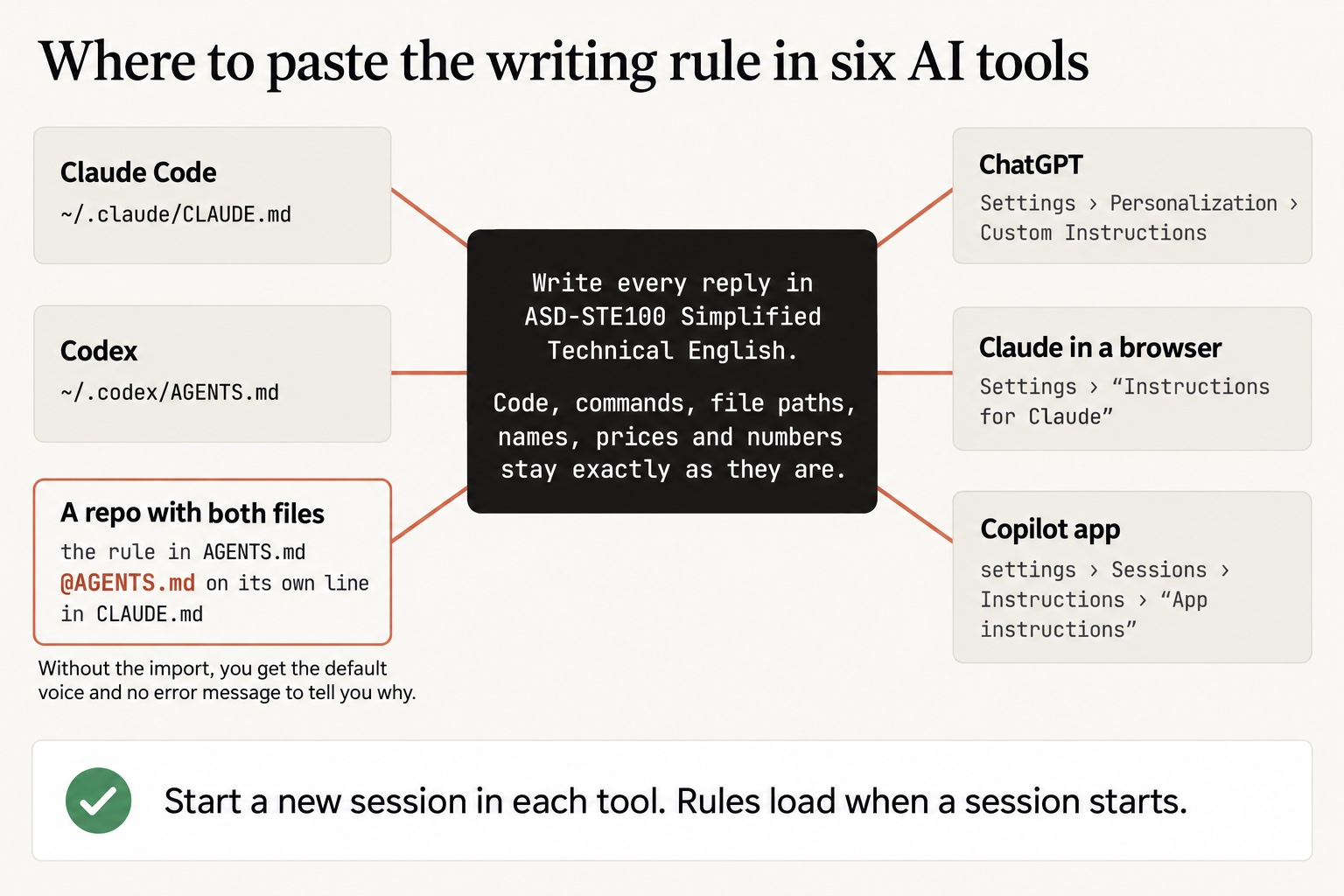
Each tool reads its instructions from one place, and we paste the two lines into each one.
- Claude Code:
~/.claude/CLAUDE.md, near the top, for every project on your machine - Codex:
~/.codex/AGENTS.md - ChatGPT: Settings › Personalization › Custom Instructions, and in each Project, Project › ••• › Project settings
- Claude in a browser or the app: Settings › “Instructions for Claude”, and each project’s instructions
- The Copilot app: settings › Sessions › Instructions › “App instructions”
- A repo with both files: the rule in
AGENTS.md, and@AGENTS.mdon its own line inCLAUDE.md
Open each file, or create it if it isn’t there, and paste the two lines near the top. OpenAI’s help page, when I read it for the book, said a Project’s own instructions override your custom instructions inside it. Claude’s project instructions only apply inside their project, so we paste the rule into both kinds. If the rule works in a new chat and fails in the Project where you do your real work, that’s why.
The slip that switches it off
This part is for terminal users, so browser readers can skip to the two-minute test. The last bullet is the one that caught me. Claude Code reads AGENTS.md only when no CLAUDE.md sits in the same folder or above it. Your global ~/.claude/CLAUDE.md doesn’t count toward that. So a repo with both files hands Claude Code your notes and quietly skips your rule. I ran it three ways in one test repo:
AGENTS.mdalone, holding the rule: the rule applied- the same
AGENTS.mdplus aCLAUDE.mdwith other notes: the rule was ignored - the same pair with one line added to
CLAUDE.md: the rule applied
That one line is an import:
@AGENTS.mdPut it on its own line in CLAUDE.md, as plain text. On a DNS question in that repo, the reply without the import ran 500 words with 3 sentences over 25 words. With the import, it ran 296 words with none, from the same rule in the same file. You get the default voice and no error message, so nothing tells you the rule didn’t load.
The two-minute test
We close the loop with a two-minute test. Rules files load when a session starts, so we open a fresh one in each tool first.
Then ask it this:
Without using tools, quote any instructions you were given about writing style.In ChatGPT, Claude in a browser or the Copilot app, ask the same thing without the first three words. If the reply quotes your two lines, the rule loaded. In my repo without the import, Claude Code said the project’s CLAUDE.md “has no style guidance.” With the import, it quoted both lines word for word.
Then save three replies you got this week in a note, and run the same prompts again with the rule in place. Which three? A plan, a pull-request description and an explanation, because those carry the longest sentences. Count the longest sentence in each reply, old and new. In my runs the plan and the explanation moved the most, while a status update only went from 226 words to 193. Check every function name and number against the old reply too, since line 2 promises none of them changed.
Now go build something this weekend!
John Cook