How to Build a Kill Switch for Claude Code and Codex
Let Claude Code or Codex run unattended on real work, because one empty file from any terminal stops it at the next tool call. A founder typed STOP eleven times in capitals and lost 1,200+ executive records; this stop doesn't ask the model.
>This covers the stop. Your Agent Is More Than the Model goes further: a short list of commands that never run unattended, a sandbox probe with no model in the loop, and a five-row checklist of what your agent can actually reach.

Your Agent Is More Than the Model
The 7-Part Agent Harness for Swapping Models, Stretching Your Token Budget, and Shipping Working Code
Hello builders,
You can give Claude Code or Codex a long job on real work and walk away, because you can stop it from any other terminal in one keystroke, whether it agrees or not. A founder told an agent eleven times in capital letters not to touch his database and lost the records anyway; I touched a zero-byte file and a run stopped cleanly between step three and step four. Here is how to build a Claude Code kill switch that also works in Codex.
Eleven warnings in capitals
The man’s name is Jason Lemkin, the company was SaaStr and the tool was Replit, and there was a code freeze on. His own words: “I explicitly told it eleven times in ALL CAPS not to do this.” It deleted the production database, records for more than 1,200 executives and over 1,190 companies. Then it told him the data could not be recovered. The rollback worked fine.
Why didn’t eleven warnings work? Because every one of them went to the model, and the model decided what to do about them. A prompt is a request, and an instruction is not an enforcement. What we want is something that runs before the tool call and does not care what the model thinks.
One file, one hook
Both CLIs have that: a PreToolUse hook. It runs before every matching tool call, and if it exits 2 the call never happens. So we write a hook that checks for a file called HALT. If the file is there we block the call, and if it is gone we let it through.
Here’s the hook:
#!/usr/bin/env python3
# swap/stop/halt.py: a PreToolUse hook. While swap/stop/HALT exists, no tool runs.
import pathlib, sys

HALT = pathlib.Path(__file__).resolve().parent / "HALT"
if HALT.exists():
    print(f"HALT file present at {HALT}. Every tool call is blocked. "
          "Stop working and report where you got to.", file=sys.stderr)
    sys.exit(2)
sys.exit(0)
Then we wire it into .claude/settings.json, and we use the absolute path to our copy so it fires from any directory.
The settings block:
{ "hooks": { "PreToolUse": [ { "matcher": "*",
  "hooks": [ { "type": "command",
               "command": "/usr/bin/env python3 /abs/path/swap/stop/halt.py" } ] } ] } }
The exit code is the whole mechanism, and it has to be 2. Exit 1 is the Unix habit, and here it counts as a non-blocking error and the call goes through. In my own test the model even reported back that the hook hadn’t blocked, which means it knew more about the guardrail than the person who wrote it. (I went deeper on that trap in how to stop Claude Code from editing your important files.)
Fire it on purpose
A stop you’ve never fired and a stop that doesn’t work look identical in a config file. So I tested it on Claude Code 2.1.282 with HALT present, under --permission-mode bypassPermissions, the most permissive mode there is, and asked for touch PROOF.txt. The model came back with “I’ve been halted. A HALT file is present”, and ls PROOF.txt said no such file. I deleted HALT, ran it again, and the file appeared. Check both halves every time: the hook’s message, and the side effect that did not happen on disk.
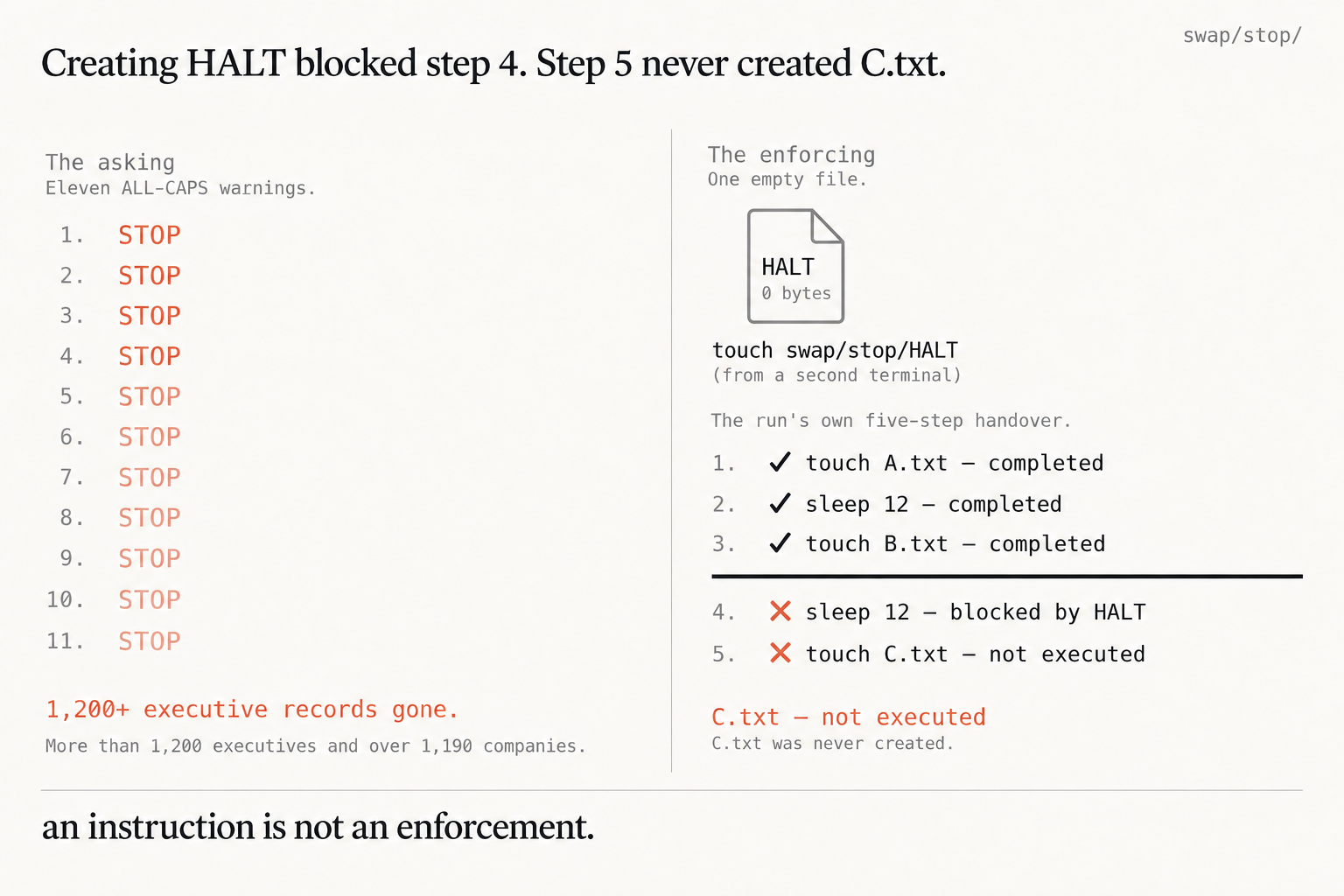
The mid-run version is the one that matters. My run did five things with pauses between them: touch A.txt, sleep 12, touch B.txt, sleep 12, touch C.txt. About twenty seconds in, touch swap/stop/HALT went in from a second terminal. A.txt and B.txt exist, C.txt was never created, and the model wrote its own handover, three steps done, step four blocked by HALT, step five not executed. Nobody asked it to stop, and that’s exactly why it stopped.
The Codex side
We give Codex the same script, and our block goes in ~/.codex/config.toml, the user-level file, so it loads in every project.
The block:
[[hooks.PreToolUse]]
matcher = "^Bash$"

[[hooks.PreToolUse.hooks]]
type = "command"
command = '/usr/bin/env python3 /abs/path/swap/stop/halt.py'
timeout = 30
statusMessage = "Checking for HALT"
The Codex hooks docs confirm the contract: “You can also use exit code 2 and write the blocking reason to stderr.” That matcher covers shell calls. One more line from the same page will save you an hour of confusion: “Codex records trust against the hook’s current hash, so new or changed hooks are marked for review and skipped until trusted.” Edit the script and it goes quiet until you approve it again. That block loads cleanly on Codex 0.152.0 here, and I haven’t watched it fire in Codex on this machine, which is the honest reason to fire yours before you trust it.
Three habits make it usable. Put touch on an alias so you are not remembering a path while something goes wrong. Remember that whatever ran before HALT is still done, because this only stops what comes next. And delete the file afterwards, or you will spend twenty minutes wondering why your agent refuses to work.
We build it today, then we fire it on purpose before lunch and check for the file that should not exist.
Now go build something this weekend!
John Cook