MCP Works on My Machine, Breaks on Teammate's: 5 Fixes
MCP works on my machine breaks on teammate clones for 5 reasons. The portability gotchas, the .mcp.json project-scope rule, and the tool-naming convention fix.
>Portability is one Domain 2 muscle. Claude Certified Architect Foundations Playbook ships the portable MCP build with the CI fresh-clone check and the prompt-injection defense layered on.

Claude Certified Architect Foundations Playbook
Pass the CCA-F Exam in 30 Days with 60 Scenario Drills and 8 Build Projects
Summary:
- When MCP works on my machine breaks on teammate clones, it is a scoping bug, not a version bug, almost every time.
- There are 5 portability gotchas: hardcoded path, missing env var, missing npm/node, empty/wrong env block, broken tool naming.
.mcp.jsonbelongs at the project root in the repo. Tool names must followmcp__<server>__<tool>or discovery fails.- Bonus deliverable: a portable
.mcp.jsonand a fresh-clone checklist a teammate can run cold.
When MCP works on my machine breaks on teammate clones, the cause is not a Claude Code version mismatch. It is one of five scoping gotchas, and the Claude Certified Architect exam grades whether you can name which one from the symptom in three sentences without touching agent code. Same repo. Same .mcp.json. One config in the wrong place. That is the canonical Domain 2 stem, and Domain 2 is 18% of the exam.
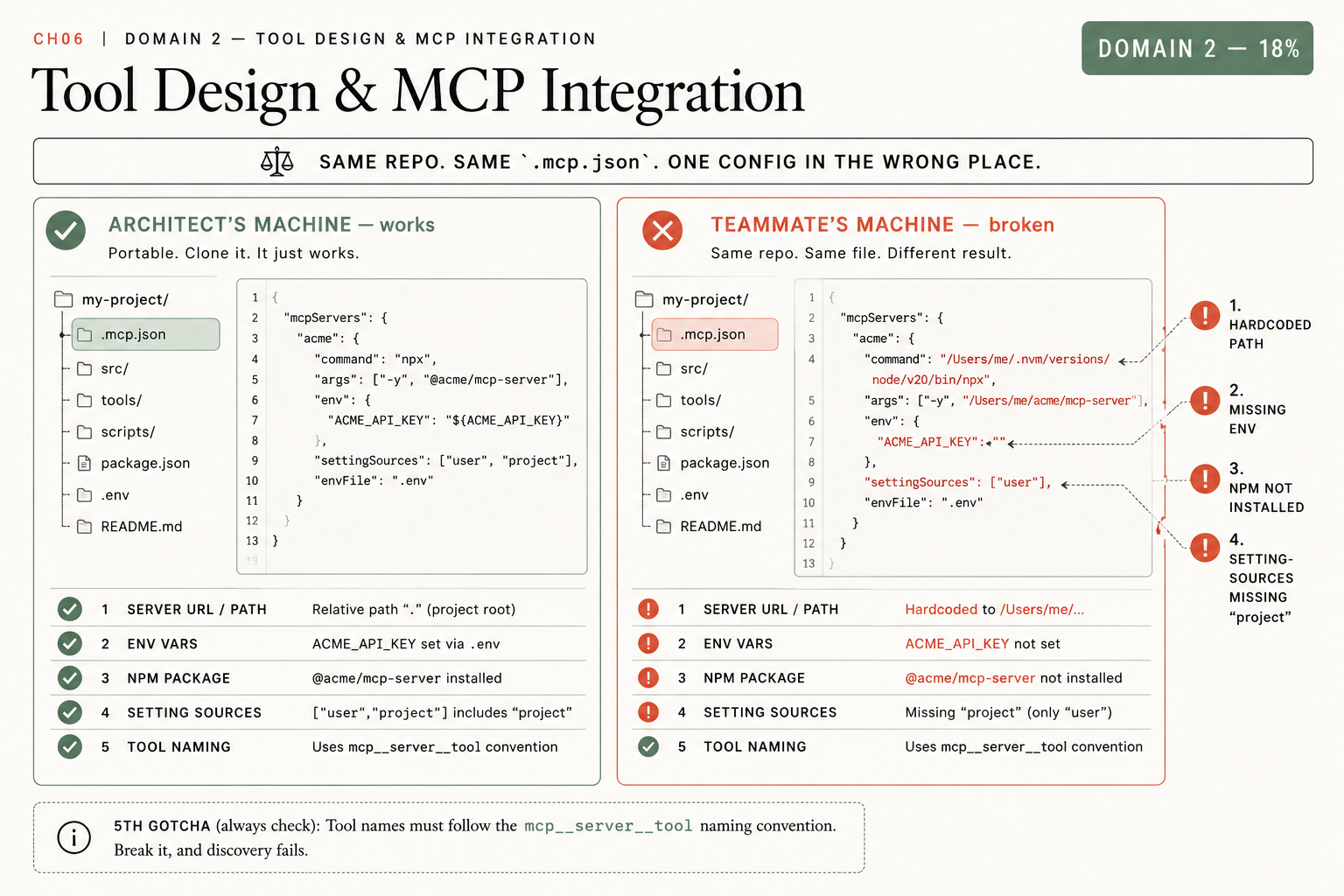
Why does the same repo behave differently on two machines?
Because portability is a scoping problem and the config encodes assumptions about your machine. The agent runs on the teammate’s clone, the MCP server appears registered, the tool calls return nothing, and no error explains why. The architect’s job is to trace the symptom to one of five canonical causes. Version skew is the wrong answer the exam plants because it sounds plausible; it is rarely the root cause.
Start from a portable baseline. The canonical .mcp.json shape, from docs.claude.com/en/docs/claude-code/mcp:
{
  "mcpServers": {
    "github": { "type": "http", "url": "https://api.githubcopilot.com/mcp/" },
    "company-internal": {
      "type": "stdio",
      "command": "/usr/local/bin/company-mcp-server",
      "args": ["--config", "/etc/company/mcp-config.json"],
      "env": { "COMPANY_API_URL": "https://internal.company.com" }
    }
  }
}
Documented install scopes are Local, Project (the .mcp.json checked into the repo), and User. Documented transports are HTTP (recommended), SSE (deprecated), and stdio. Stdio is where almost every portability bug lives, because the local-process invocation depends on the teammate’s filesystem and environment.
What broke: the teammate clone returned nothing
The teammate cloned the repo, ran claude, and the agent ran but did nothing. No tools fired. The senior engineers who set the project up still had working agents. That pattern (works for the people who configured it, breaks for new clones) is the tell. It is always one of these five.
The 5 MCP portability gotchas
Each gotcha has a symptom and a one-line fix. This is the diagnostic checklist.
Gotcha 1: Hardcoded absolute path in args. Your args baked in /Users/jane/projects/widgets. On the teammate’s machine that path is /Users/teammate/... and /Users/jane does not exist. Fix: use a relative path from the project root, or a template variable, never an absolute home-directory path.
Gotcha 2: Missing or unexported env var. Your config references ${ACME_API_KEY}. Your shell exports it; the teammate’s does not. The server starts and cannot authenticate. Fix: commit a .env.example documenting every required variable, and reference variables consistently.
Gotcha 3: Missing npm package or node binary. Your args runs npx -y @modelcontextprotocol/server-filesystem. You have Node; the teammate does not, or theirs is too old for npx. Fix: document the runtime in the README and pin the package version in args so version skew does not surprise you.
Gotcha 4: Empty or wrong env block (and the scope it loads from). The env block is {} or settingSources excludes "project", so the project .mcp.json is never loaded. Fix: put .mcp.json at the project root, populate env, and ensure project settings are loaded. The file being technically present is not the same as the loader reading it.
Gotcha 5: Tool naming breaks the convention. Tool names must follow mcp__<server>__<tool> with double underscores. mcp.github.list_issues with dots is invalid. Break the convention and tool discovery fails, often with no clear error. Always check this one.
The exam maps symptoms to gotchas directly. “One config file in the wrong place” is Gotcha 4. “The agent runs but does nothing” is Gotcha 1, 2, or 4. “The agent cannot start” is usually Gotcha 3. Pattern-match the phrase, name the gotcha, state the fix.
How do you make the clone reproducible?
You validate portability in CI, not in the teammate’s first failed clone. Every push runs a job that scaffolds a fresh checkout, sets only the documented env vars, and asserts every expected mcp__<server>__<tool> registers and responds:
name: mcp-portability
on: [push, pull_request]
jobs:
  portability:
    runs-on: ubuntu-latest
    steps:
      - uses: actions/checkout@v4
      - uses: actions/setup-node@v4
        with:
          node-version: '20'
      - name: Install SDK
        run: pip install claude-agent-sdk
      - name: Set documented env vars only
        run: echo "ACME_API_KEY=${{ secrets.ACME_API_KEY }}" >> $GITHUB_ENV
      - name: Verify MCP servers register
        run: python tests/verify_mcp_servers.py
The verify script is short and asserts each expected mcp__<server>__<tool> is registered:
# tests/verify_mcp_servers.py
import subprocess, sys

EXPECTED = ["mcp__github__list_issues", "mcp__company-internal__query"]

out = subprocess.check_output(["claude", "mcp", "list"], text=True)
missing = [t for t in EXPECTED if t not in out]
if missing:
    print("MISSING TOOLS:", missing)
    sys.exit(1)
print("all MCP tools registered")
A test set that runs only on your laptop is not portability validation. The line the exam grades: can someone other than the original author run the validation without manual setup?
Then run the manual fresh-clone check before you ship:
git worktree add ../mcp_clone        # simulate a teammate's fresh checkout
cd ../mcp_clone
cp .env.example .env                 # they fill in their own values
# set only the documented env vars, then:
claude                               # confirm all mcp__<server>__<tool> are reachable
What should you actually do?
- If the agent runs but no tools fire → check Gotcha 1, 2, and 4 first. Hardcoded path, unexported env var, or
.mcp.jsonnot loaded from project scope. - If the agent cannot start at all → Gotcha 3. Missing npm package or a node binary too old for
npx. - If tool discovery silently returns nothing → Gotcha 5. Verify every tool name is
mcp__<server>__<tool>with double underscores. - If you only do one thing → move
.mcp.jsonto the project root, commit.env.example, and add the CI fresh-clone check. That converts a teammate’s broken clone into a failed build you catch first.
bottom_line
- “Works on my machine” is a scoping bug. Trace the symptom to one of five gotchas; do not blame the version.
.mcp.jsonlives at the project root in the repo. Tool names aremcp__<server>__<tool>or discovery dies quietly.- Put the fresh-clone check in CI. Portability you cannot reproduce without the original author is not portability.
Frequently Asked Questions
Why does my MCP server work on my machine but break on my teammate's?+
Almost always one of five scoping gotchas: a hardcoded absolute path in args, an env var set only on your machine, a missing npm package or node binary, an empty or wrong env block, or a tool name that breaks the mcp__server__tool convention.
Where does .mcp.json belong?+
At the project root, checked into the repo (project scope). Not under .claude/. If it sits in the wrong directory the loader never reads it and the agent runs with no MCP tools and no obvious error.
What is the MCP tool naming convention?+
mcp__<server>__<tool>, with double underscores. Break the convention and tool discovery fails silently. mcp.server.tool with dots is invalid.