MCP Tool Errors: The Two Channels Architects Miss
MCP tool design best practices start with error handling: recoverable failures return isError true, and malformed calls throw a JSON-RPC protocol error.
>This locks the error contract. Claude Certified Architect Foundations: 500+ Practice Questions drills 26 tool-design scenarios where the wrong error channel is the trap.
Claude Certified Architect Foundations: 500+ Practice Questions
6 Full Mock Exams, Every Answer Explained, Weighted to All 5 CCA-F Domains. Know You're Ready Before Exam Day.
Summary:
- MCP tools report failures through two different channels, and picking the wrong one is the trap.
- Recoverable failures return a result with
isError: true; malformed calls throw a JSON-RPC protocol error.- Share servers at project scope with
${VAR}expansion, never committed secrets.- You get the exact JSON for both channels and the design rules that fail candidates.
MCP tool design best practices start with one decision most builders get backwards: which channel an error goes down. A tool that hits a rate limit and a tool called with a bad argument look similar, but they route to two different contracts, and using the wrong one either shuts down the conversation or hides a real bug. This is Domain 4, Tool Design and MCP Integration, 18% of the exam, and locking these two channels down settles most of it.
The two error channels
Here is the split, and it hinges entirely on whether the call itself was valid:
| Failure | Channel | What the caller does |
|---|---|---|
| Rate limit (429), 403, 404, timeout, quota, partial data | Tool execution error: isError: true in the result | The agent reads the message and adapts |
| Unknown tool, invalid arguments, server error | JSON-RPC protocol error (-32601 / -32602 / -32603) | The client fixes the malformed call; the tool never ran |
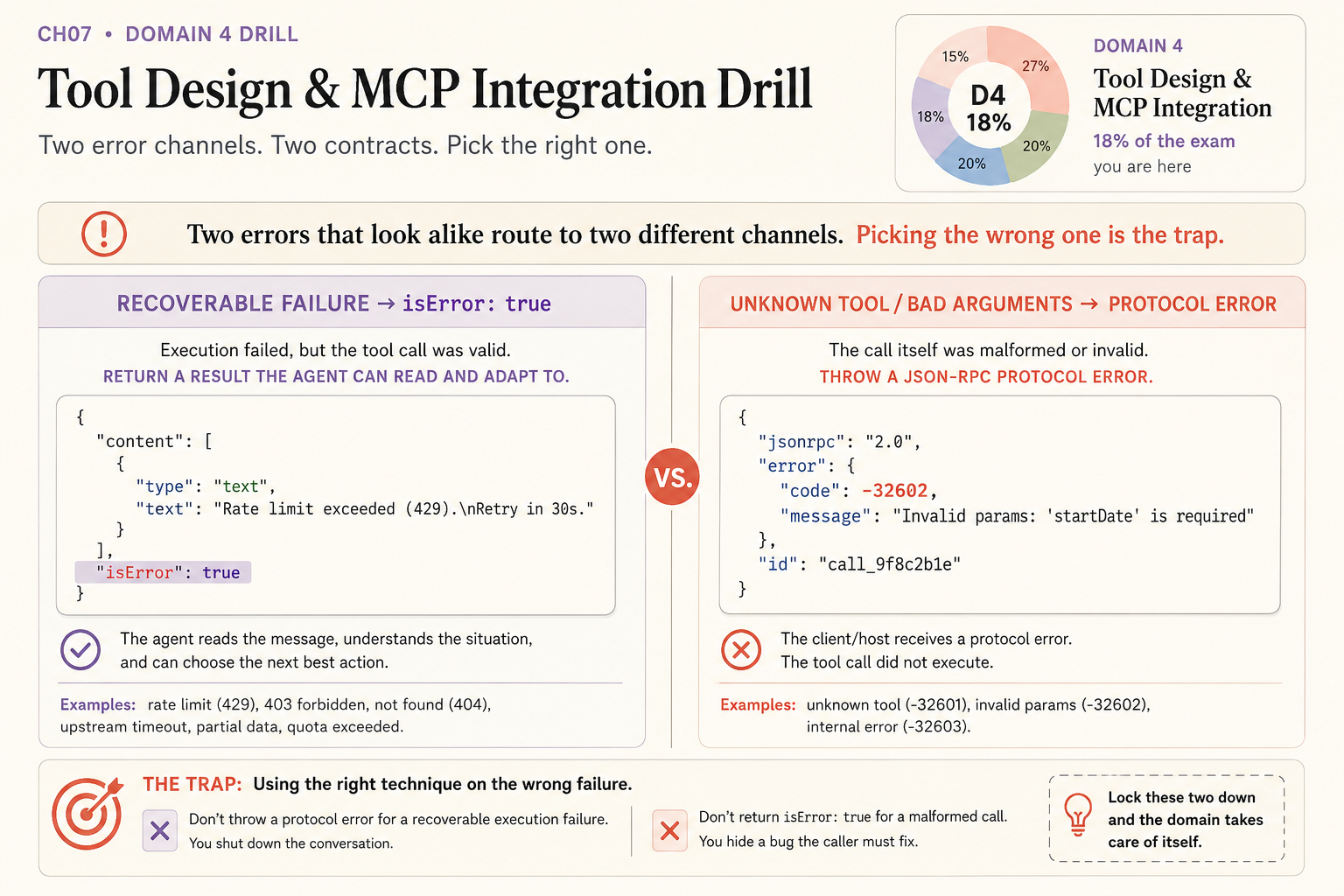
The test is simple: ask whether the call itself was valid. If the tool ran and the work failed, the agent can still recover, so keep the conversation alive with a result it can read. If the call was invalid before any work started, there is nothing for the agent to adapt to, so the failure belongs to the client. Everything below follows from that one question.
Channel 1: a recoverable failure returns isError
A recoverable execution error is one where the tool call was valid but the work failed: a rate limit, a 403, a not-found, an upstream timeout. Return it inside the result with isError: true and a message the model can read:
{ "content": [{ "type": "text",
  "text": "Rate limit exceeded (429). Retry in 30s." }],
  "isError": true }
The agent reads that, understands the situation, and can choose the next best action. This is exactly how the spec defines it:
Tools use two error reporting mechanisms: Protocol Errors (standard JSON-RPC errors for unknown tools, invalid arguments, server errors) and Tool Execution Errors (reported in tool results with
isError: truefor API failures, invalid input data, business logic errors).
Source: Model Context Protocol specification. The spec’s own execution-error example is the same shape:
{ "jsonrpc": "2.0", "id": 4, "result": {
    "content": [{ "type": "text",
      "text": "Failed to fetch weather data: API rate limit exceeded" }],
    "isError": true } }
Channel 2: a malformed call throws a protocol error
A protocol error is for a call that was invalid before any work started: an unknown tool name or bad arguments. That’s a JSON-RPC error, and the tool never executes:
{ "jsonrpc": "2.0", "id": 4,
  "error": { "code": -32602, "message": "Invalid params: 'startDate' is required" } }
The codes: -32601 unknown tool, -32602 invalid params, -32603 internal error. The trap the exam plants is mixing the channels. Throw a protocol error for a recoverable failure and you shut down the conversation the agent could have recovered from. Return isError: true for a malformed call and you hide a bug the caller has to fix. Two errors that look alike, two contracts.
Two design rules that fail candidates
Past the error contract, two more facts carry Domain 4.
Portability is project scope plus env-var expansion. A server added at local scope is private to you, so a teammate who clones the repo won’t have it. Add it at project scope so it lands in a committed .mcp.json, and reference secrets with ${VAR} so the config travels without the secret:
{ "mcpServers": { "db": {
  "command": "npx", "args": ["-y", "@org/db-mcp"],
  "env": { "DATABASE_URL": "${DATABASE_URL}" } } } }
From the CLI, that’s a one-flag change:
# Local scope (private to you) is the default; add --scope project to share it.
claude mcp add --scope project db -- npx -y @org/db-mcp
Consolidate, don’t fragment. More tools do not lead to better outcomes. A server that wraps fifteen REST endpoints as fifteen thin tools returning raw UUIDs sends agents down wrong paths. Consolidate into a few task-shaped tools (find_and_update_contact, not three primitives), namespace them, and return human-readable fields. And treat any tool that returns external content as a trust boundary: defend prompt injection with a human gate on the dangerous action, showing inputs before sending, and least privilege, never with a prompt line asking the model to ignore malicious instructions.
What should you actually do?
- If a tool hits a rate limit, 403, or timeout → return
isError: truewith a readable message; do not throw a protocol error. - If a call has an unknown tool or bad arguments → throw the JSON-RPC protocol error; the caller, not the agent, fixes it.
- If a teammate is missing your MCP server → re-add it at project scope and use
${VAR}for any secret. - If a server exposes one thin tool per endpoint → consolidate into workflow tools that return readable fields.
The bottom line
- The channel is the whole trick. Recoverable failure returns
isError; a malformed call throws a protocol error. Mixing them is the single most-tested Domain 4 mistake. - Portability is not luck. Project scope plus
${VAR}expansion shares config without shipping secrets. - Fewer, task-shaped tools beat many thin wrappers, and a prompt is never a security boundary. Design the surface; don’t apologize for it in the system prompt.
Frequently Asked Questions
How should an MCP tool report an error?+
It depends on the failure. A recoverable execution failure (rate limit, not found, timeout) returns a result with isError set to true and a readable message. A malformed call (unknown tool, bad arguments) throws a JSON-RPC protocol error instead.
What is the difference between isError and a JSON-RPC protocol error in MCP?+
isError true reports a failure inside a valid tool result, so the agent can read it and adapt. A protocol error means the call itself was invalid and never executed, so the client, not the agent, has to fix it.
How do you share an MCP server with a team without leaking secrets?+
Add it at project scope so it writes to a committed .mcp.json, and reference secrets with env-var expansion like ${DATABASE_URL} that each developer sets locally instead of committing the value.